Digital Manufacturing – Part 1

Digital Manufacturing

Paolo Bosetti

Università di Trento, Dipartimento di Ingegneria Industriale

Updated: 19/10/2026

Manufacturing systems

Relevant for the mechatronics point of view

Manufacturing systems

To give shape to a block of raw material (workpiece) there are three possibilities:

  • Deform it: forming processes (motion axes: 1+)
  • Cut it: material removal (or subtractive) processes (motion axes: 2.5+)
  • Build on it: additive manufacturing processes (motion axes: 2.5+)

Manufacturing systems

  • We skip over forming processes, where motion planning and control is trivial (with exceptions!)
  • In subtractive and additive manufacturing there is a tool performing the process (a mill, a polarized wire, an extruding nozzle, …), whose motion is performed by synchronized action of two or more axes, typically in cartesian arrangement
  • The motion (trajectory and speed) must be planned according to geometry and process specifics

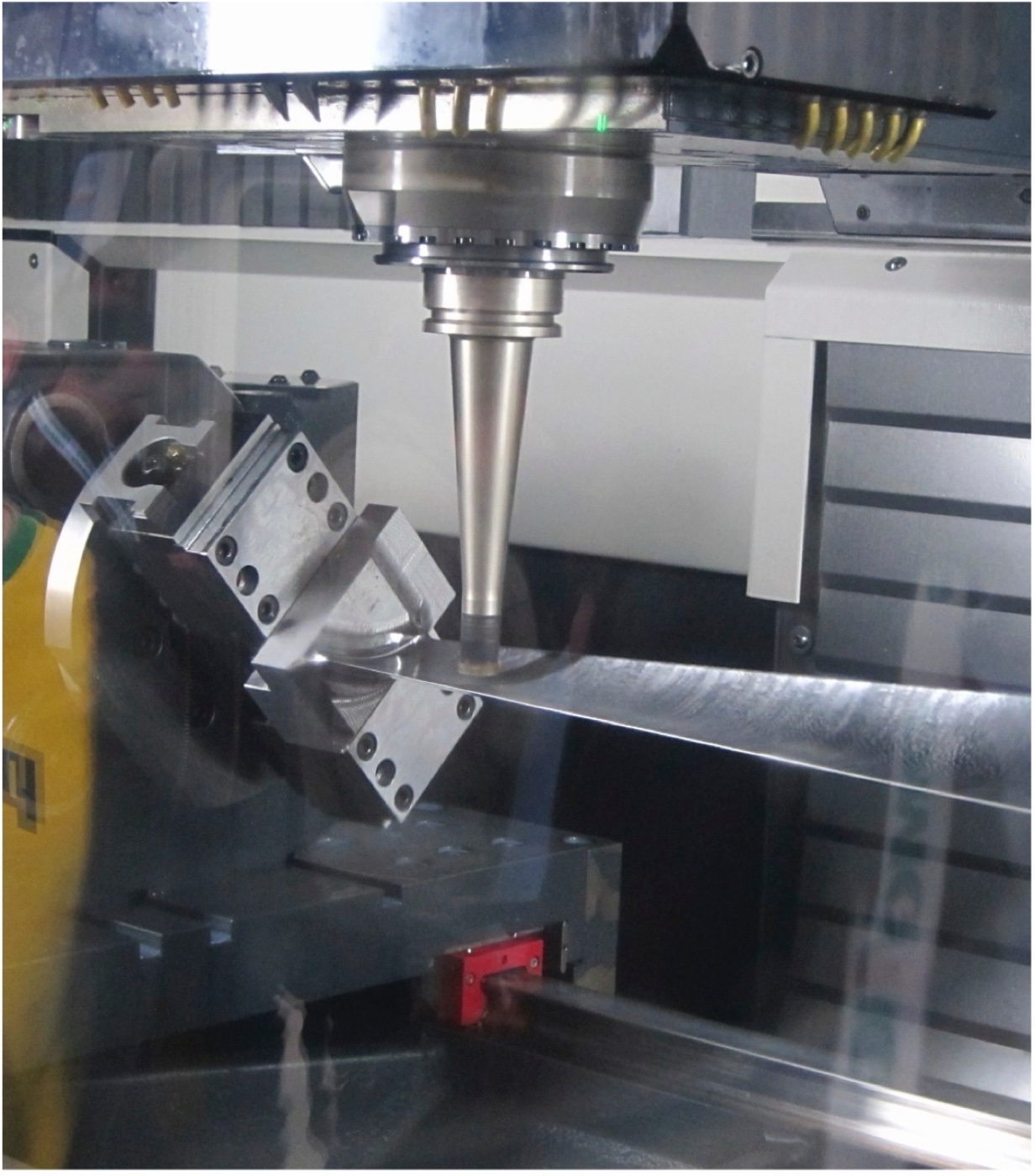
Subtractive Manufacturing: 5-axes milling

Additive Manufacturing: 5-axes Direct Laser Deposition

Reference case: Turning/Milling

  • The majority of products involve machining, either directly, or indirectly (dies are machined)
  • Machining involves a combination of linear and rotary motions:
    • In turning, the workpiece is rotating, the tool is displacing
    • In drilling and milling the tool is rotating and there is a combined relative displacement between tool and workpiece

Important

Regardless the process, understanding its physics and the governing parameters is essential to design the manufacturing system and its control algorithms

The subtractive manufacturing case

Material removal processes and their control parameters

Machining parameters

  • Mechanism of chip formation depends
    • on the relative speed of tool and workpiece (cutting speed)
    • on the cross section of removed material
  • Cutting speed and cross section (tool parameters) depend in turn on trajectory, rotary and translation speeds (machining parameters)

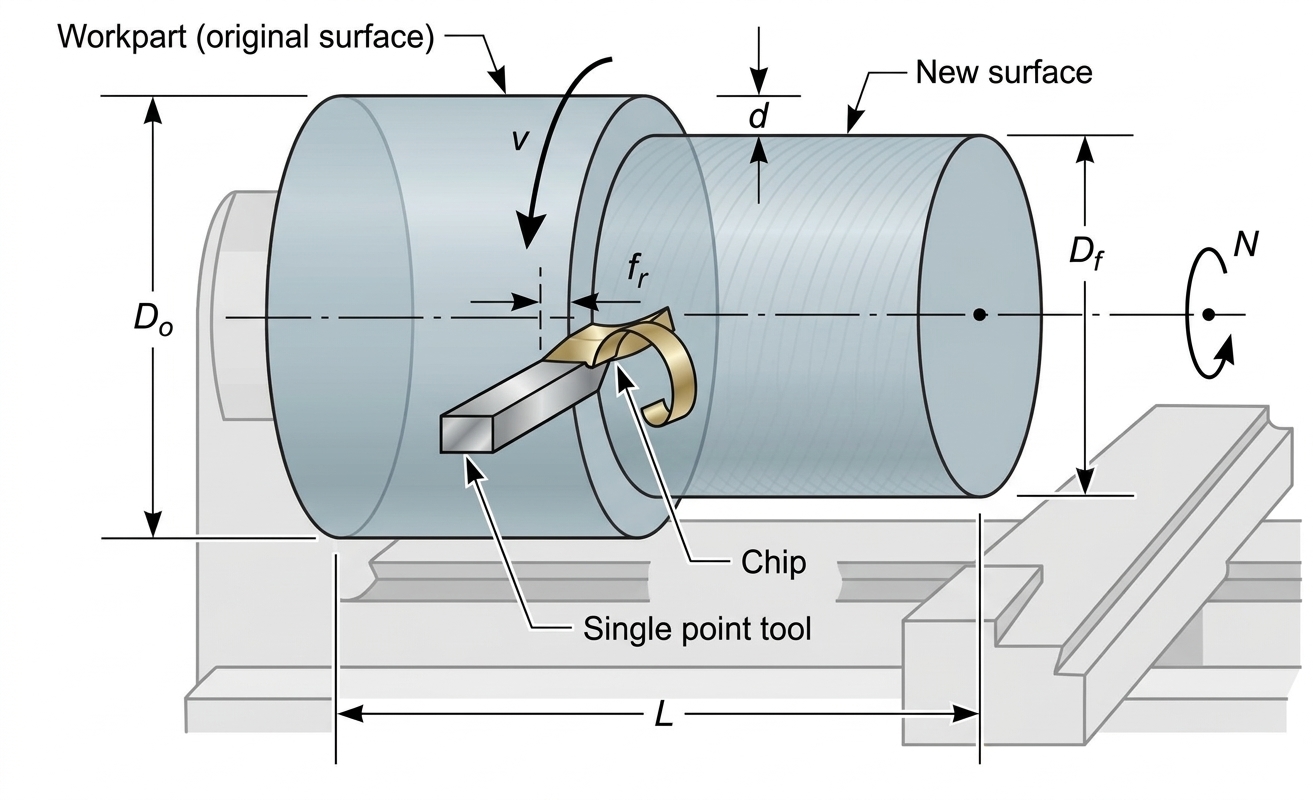
Turning

Machining parameters to be calculated are spindle speed, feed rate, and spindle power:

\[ \begin{aligned} \text{Rotational speed:}\quad & N = \frac{v}{\pi D_0} \\ \text{Diameter:}\quad & D_f = D_0 - 2d \\ \text{Feed rate:}\quad & f = N f_r \\ \text{Machining time:}\quad & T_m = \frac{L}{f} = \frac{\pi D_0 L}{f_r v} \\ \text{Material Removal Rate:}\quad & MRR = v f_r d \end{aligned} \]
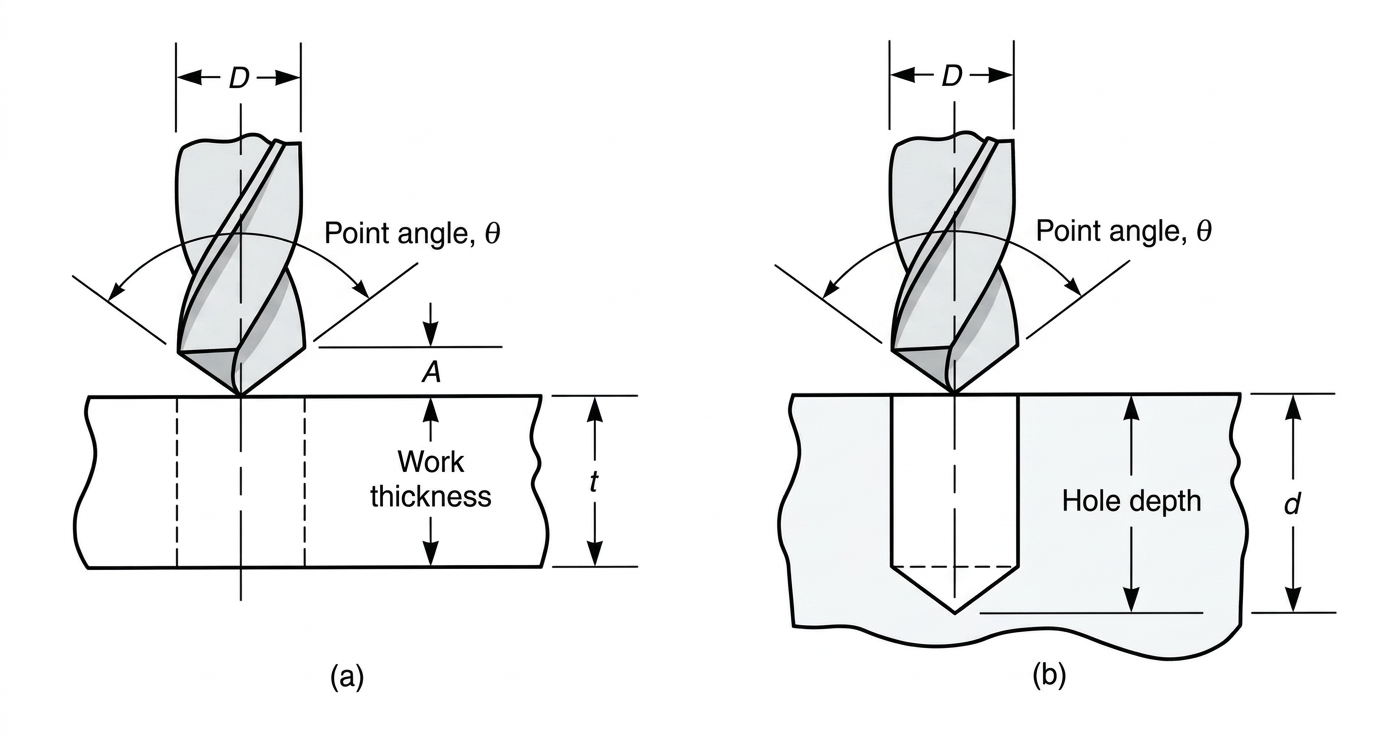
Drilling

Machining parameters to be calculated are spindle speed, feed rate, and spindle power:

\[ \begin{aligned} N &= \frac{v}{\pi D} \\ f &= N f_r \\ T_m &= \frac{t + A}{f} \\ A &= \frac{D}{2}\tan\left(\frac{\pi - \theta}{2}\right) \\ MRR &= \frac{\pi D^2 f}{4} \end{aligned} \]
Milling

Machining parameters to be calculated are spindle speed, feed rate, and spindle power. There are three types of milling:
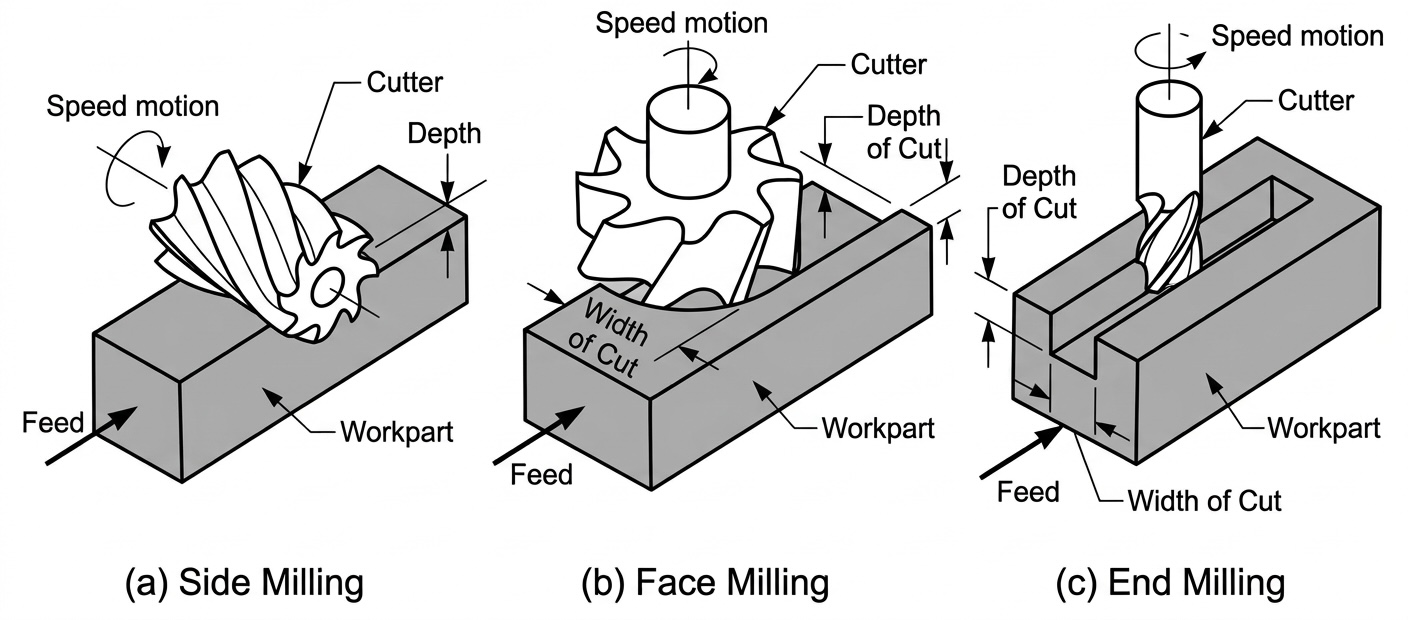
Milling

\[ \begin{aligned} N &= \frac{v}{\pi D} \\ f &= N f_z z \\ MRR &= w d f \\ A &= \begin{cases} \sqrt{d(D-d)} & \text{side milling} \\ \sqrt{w(D-w)} & \text{face/end milling} \end{cases} \\ T_m &= \begin{cases} (L + A)/f & \text{side milling} \\ (L + 2A)/f & \text{face/end milling} \end{cases} \end{aligned} \]

Shopfloor formulas

Parameter Turning Milling Drilling
\(v\) (m/min) \(v = \pi D_0 N\) \(v = \pi D N\) \(v = \pi D N\)
\(N\) (1/s) \(N = \dfrac{v}{\pi D_0}\) \(N = \dfrac{v}{\pi D}\) \(N = \dfrac{v}{\pi D}\)
\(f\) (mm/min) \(f = f_r N\) \(f = z f_z N\) \(f = f_r N\)
\(f_{z,r}\) (mm) Feed per tooth (zahn) or per revolution
\(T\) (s) \(T_m = L/f\) \(T_m = (L + kA)/f\) \(T_m = L/f\)
\(MRR\) (mm³/min) \(MRR = d f_r v\) \(MRR = w d f\) \(MRR = \dfrac{\pi D^2}{4} f\)
\(P\) (kW) \(P = MRR\, p_s\) \(P = MRR\, p_s\) \(P = MRR\, p_s\)
\(P_e\) (kW) \(P_e = \dfrac{MRR\, p_s}{\eta}\) \(P_e = \dfrac{MRR\, p_s}{\eta}\) \(P_e = \dfrac{MRR\, p_s}{\eta}\)

Example

We have to set up a milling process on Aluminum, which has \(p_s = 12.56\) W min/cm³

The tool manufacturer suggests \(v = 1000\) m/min and \(f_z = 0.1\) mm/tooth

The mill has a diameter of \(30\) mm and does face milling with full overlapping, has \(3\) teeth and removes a layer of \(2\) mm

\[ \begin{aligned} N &= \frac{v}{\pi D} = \frac{1000\ \text{m/min}}{\pi\, 30\ \text{mm}} = 10610\ \text{rpm} \\ f &= f_z z N = 0.1\ \text{mm} \cdot 3 \cdot 10610\ \text{rpm} = 3183\ \text{mm/min} \\ MRR &= w d f = 30\ \text{mm} \cdot 2\ \text{mm} \cdot 3183\ \text{mm/min} = 190980\ \text{mm}^3/\text{min} \\ P &= MRR\, p_s = 190.98\ \text{cm}^3/\text{min} \cdot 12.56\ \text{W min/cm}^3 \simeq 2.4\ \text{kW} \end{aligned} \]

Note

The machinist must always ensure that the required maximum power does not exceed that available at the spindle. If not, some of the machining parameters must be reduced (usually \(d\) and or \(w\))

Cutting Economics

The cost of machining depends on:

  • labor: hourly cost of trained personnel
  • machinery: purchase cost / machine life
  • raw material: cost of initial workpiece
  • consumables: tools, cutting fluids, disposable fixtures

Some costs depend on process parameters (mainly cutting speed)

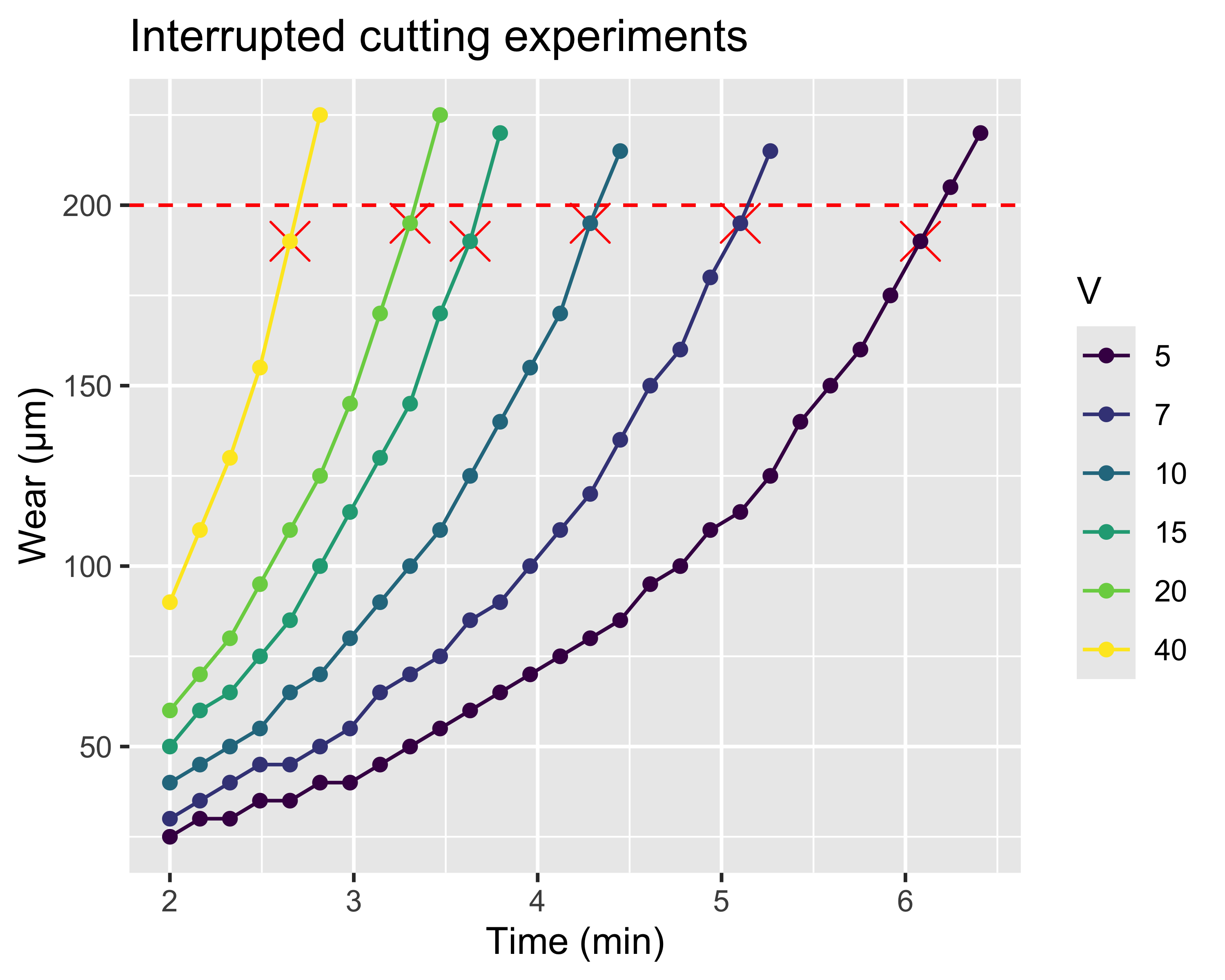
Tool wear

Tool wear

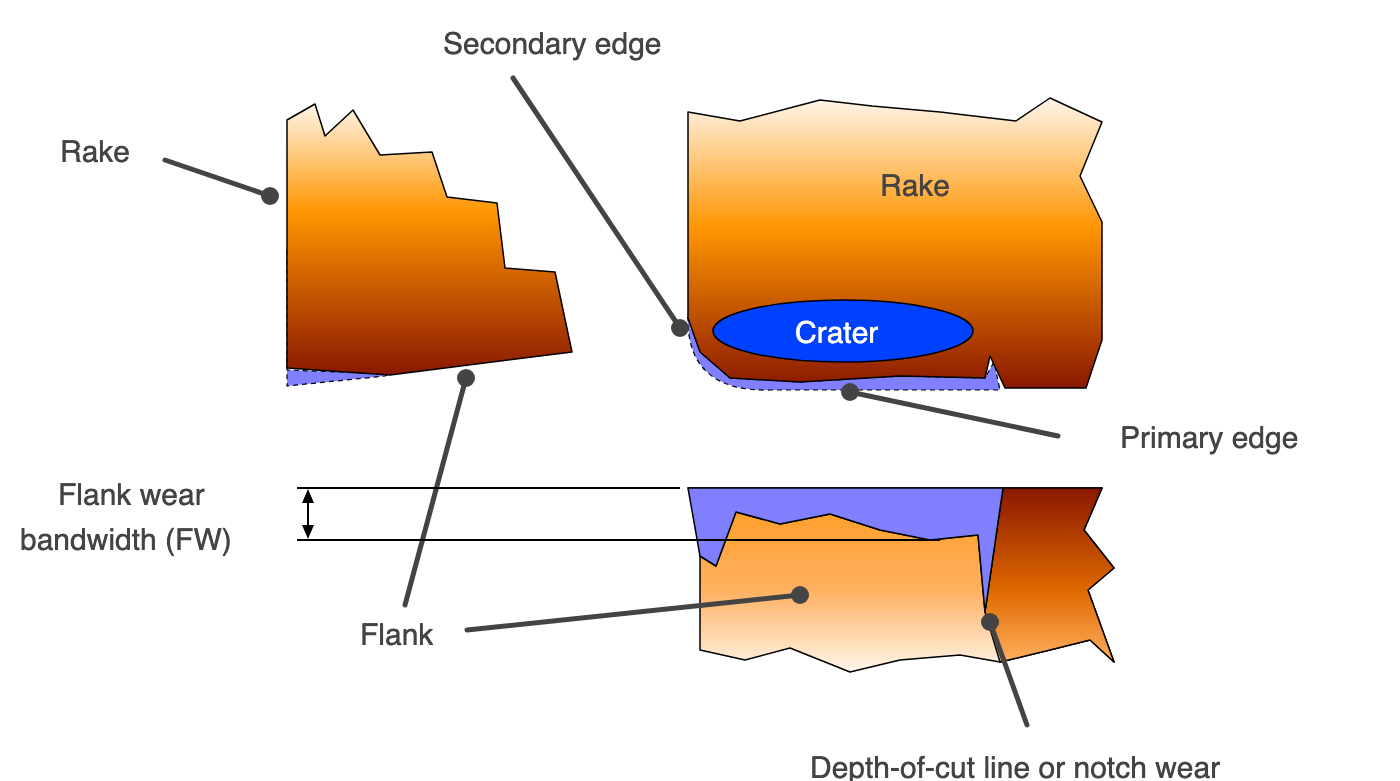
Tools are subject to wear. It can affect two parts of the tool:

  • the flank: it changes the geometry of the tool where it contacts the workpiece, so it progressively affects surface quality and dimensional accuracy
  • the rake face: it changes the geometry where the tool contacts the chip: it has no effect on the workpiece, but in the long run it weakens the tool and causes it to break

If the tool and the cutting parameters are chosen correctly, flank wear occurs before rake face wear

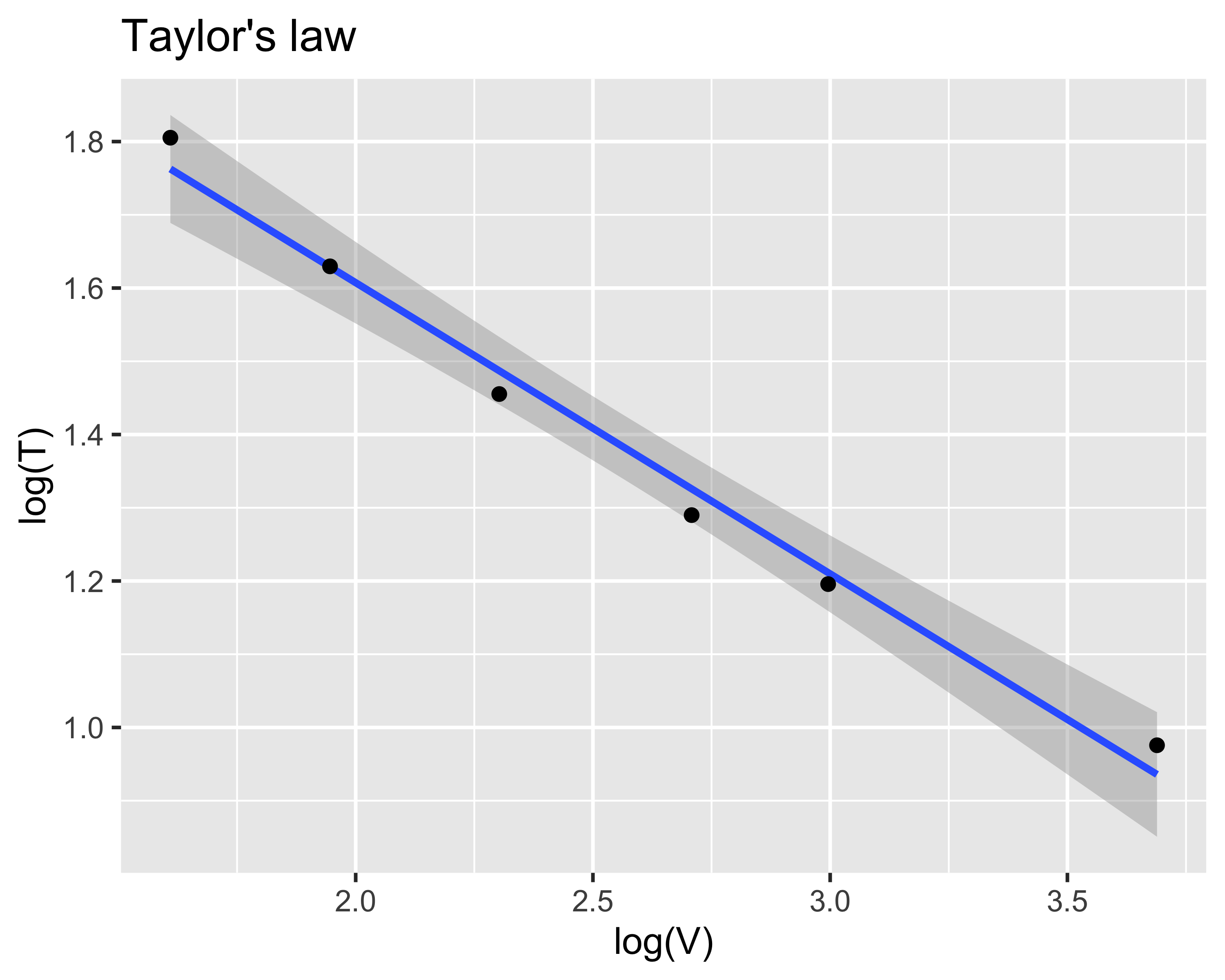
The wear law was formulated by Taylor: \(VT^n=K\), where:

  • \(V\) is the cutting speed
  • \(T\) is the tool life
  • \(n\) and \(K\) are material constants; \(K\) also depends on the end-of-life criterion (application specific)

Taylor’s law

\(VT^n=K \rightarrow \log(V) - n\log(T) = \log(K) \rightarrow \log(T) = \frac{1}{n}\log(V) - \frac{1}{n}\log(K)\)
Productivity optimization

The costs of machining production are related to:

  • investments and overhead (fixed)
  • labor and raw materials (variable)
  • cost per piece (variable)

Costs are dependent variables. The process parameters are independent parameters

Important

We can ask whether there are process conditions that maximize productivity and/or minimize costs

Productivity optimization — Turning

Symbol Meaning
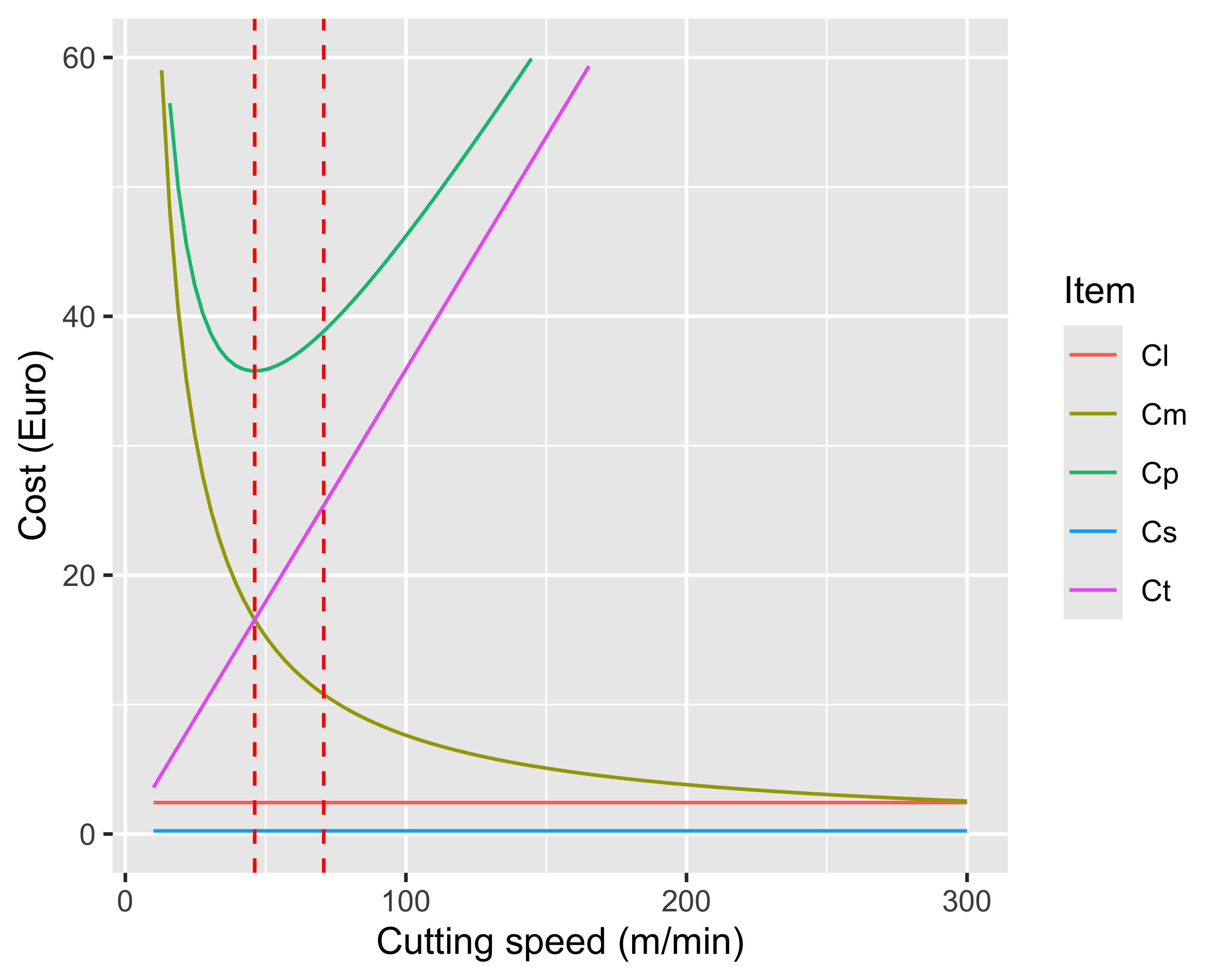
\(C_p\) Cost per piece
\(C_m\) Machining cost
\(C_s\) Setup cost
\(C_l\) Loading cost
\(C_t\) Tooling cost
\(L\) Labor cost
\(O\) Overhead

In turning: \[ T_m = \frac{L}{fN}=\frac{\pi LD}{fV} \\ N_p = \frac{T}{T_m} = \frac{fK^{1/n}}{\pi LDV^{1/n-1}} \]

\[\begin{align} C_p &= C_m + C_s + C_l + C_t \\ C_m &= T_m(L_m + O_m) \\ C_l &= T_l(L_m + O_m) \\ C_t &= \frac{1}{N_p}\left[T_c(L_m+O_m) + T_g(L_g+O_g) + D_c\right] = \frac{C_{t0}}{N_p} \\ T_p &= T_{s,l} + T_m + \frac{C_{t0}}{N_p} \end{align}\]

Note

We have \(C_p=C_p(V)\) and \(T_p = T_p(V)\), so we can differentiate both to identify an optimal condition

Productivity optimization — Turning

Costs: \[\begin{align} \frac{\partial C_p}{\partial V} &= 0 \\ V_{o,c} &= \frac{K(L_m+O_m)^n}{[(1/n-1)C_{t0}]^n} \\ T_{o,c} &= (1/n -1)\frac{C_{t0}}{L_m+O_m} \end{align}\]

Times: \[\begin{align} \frac{\partial T_p}{\partial V} &= 0 \\ V_{o,t} &= \frac{K}{[(1/n-1)T_c]^n} \\ T_{0,t} &= (1/n -1)T_c \end{align}\]

Note

What do we optimize? Costs or times?

Productivity optimization — Turning

  • The optimal cutting speed \(V_{o,c}\) corresponds to maximum economic efficiency
  • However, when there are penalties for delays it may be worth producing at \(V_{o,t}\), because it is the speed that maximizes productivity
  • So, \(V\) shall be normally set to \(V_{o,c}\), increasing it up to (but not above) \(V_{o,t}\) if there are penalties for delays
Limits of analytical process models

Orthogonal cutting

  • Orthogonal cutting rarely applies. In most real machining operations chip formation is inherently 3-D
  • The chip formation model is idealized. In reality:
    • the cutting edge is never perfectly sharp
    • the shear plane does not have zero thickness
    • deformation does not occur only on the shear plane, but also on the machined surface in contact with the cutting edge and between chip and tool
  • The stress and strain field cannot be computed analytically
  • There is no reliable thermal model that accounts for friction and plastic deformation as heat sources
  • The strain rates involved \(\dot\gamma\) are extreme: this makes it very difficult to identify the plastic properties of the material under similar conditions

Limits of analytical process models

Taylor’s law

  • It is an empirical model, i.e., it has no physical basis but rests on observation alone, so it cannot be calibrated from measurements of material properties
  • It is an approximate law: more complete empirical laws exist in the form \(VT^nd^xf^y=K\), which account for other process parameters that have a much smaller influence than \(V\) but still affect tool life
  • It is expensive to calibrate:
    • the experimental procedure is necessarily slow and costly
    • \(n\) depends on the workpiece material and on the tool material
    • \(K\) depends on the end-of-life criterion, so it is user-specific (i.e., it cannot be found in tables)
  • Even the more complete laws do not account for factors such as lubrication and cooling

Economic optimization

  • The analysis above depends on being able to express \(T_m(V)\) analytically
    • This is possible only for elementary operations (e.g., cylindrical turning). For more complex operations the relation can only be computed point by point by simulating the process (via CAM or CNC functions, which entails considerable time and cost)
    • It relies on the availability of a validated and reliable wear law
    • It is worthwhile only for large and very large batches (economy of scale)

Machine tools

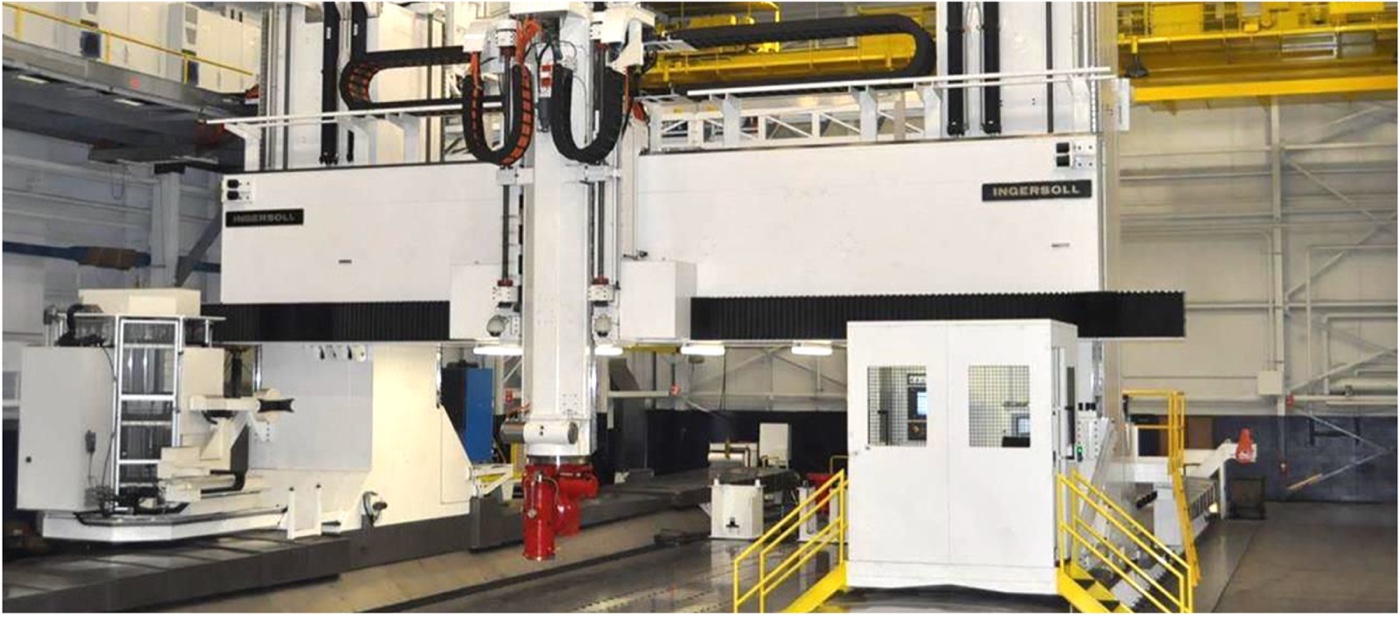
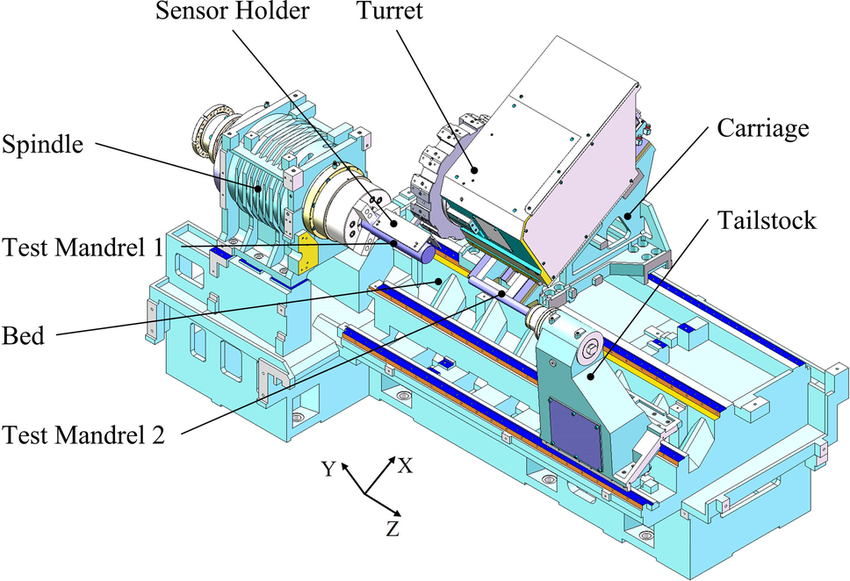
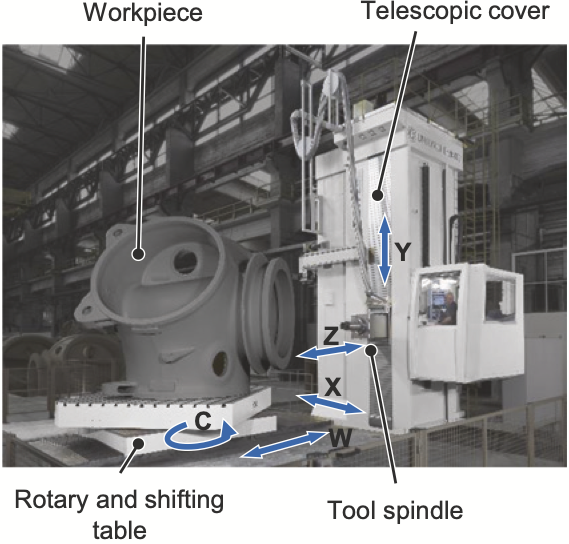
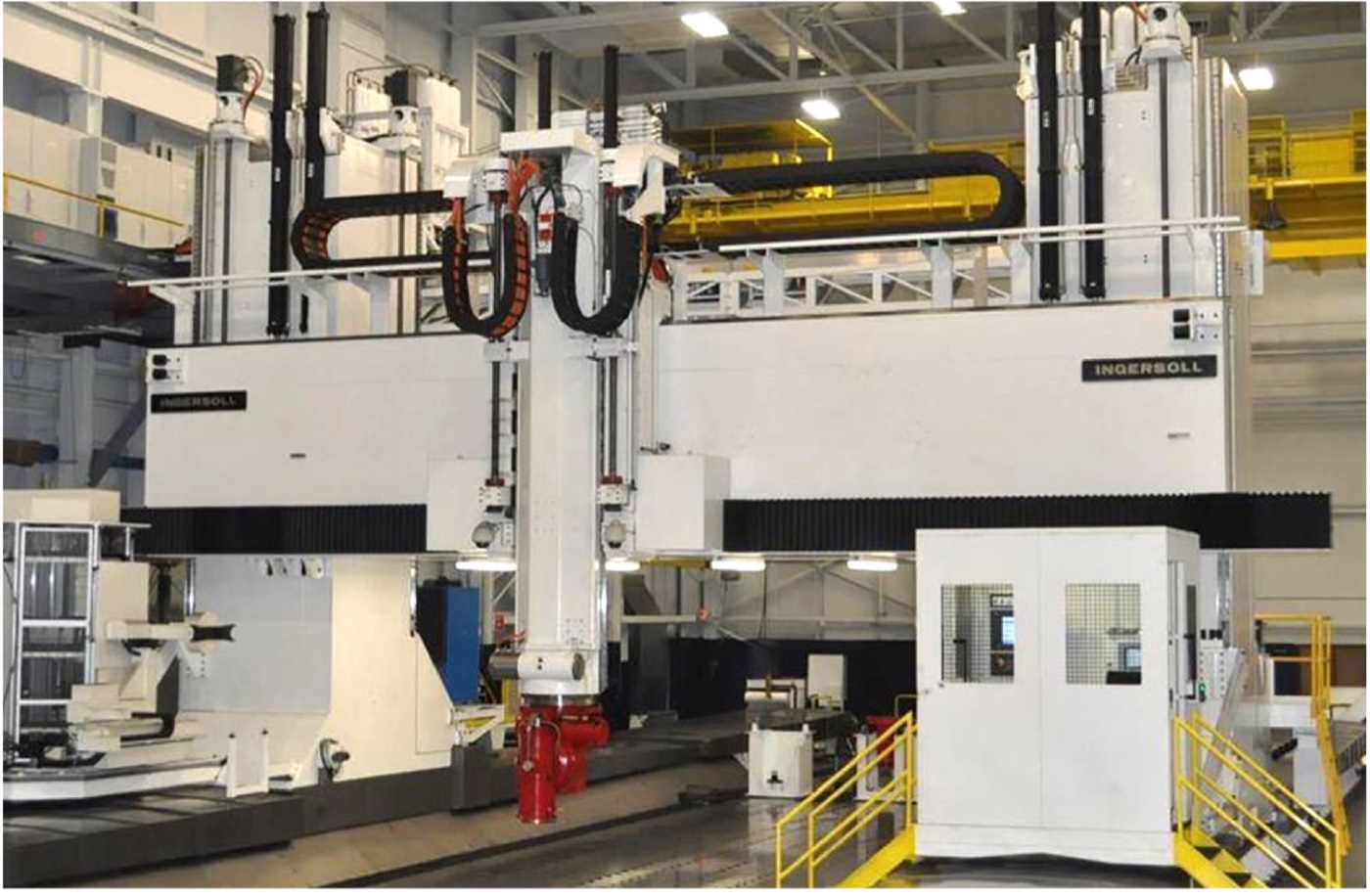
A gantry-type, large milling center

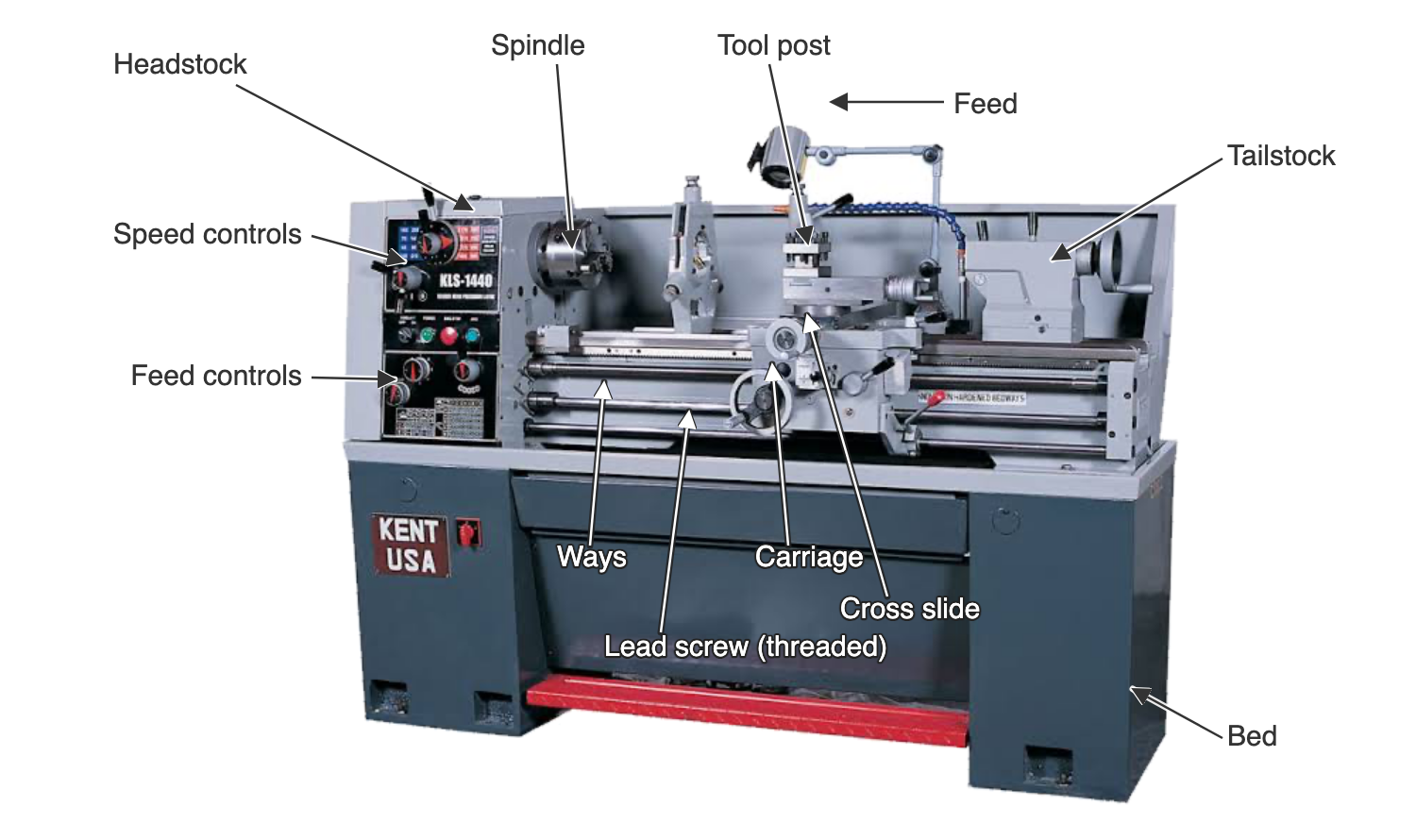
Types of Lathes

  • Parallel or engine lathe
  • CNC lathe
    • Horizontal spindle
      • single spindle
      • multiple spindle
    • Vertical spindle
    • Sliding headstock (fantina mobile)

Parallel (engine) lathe

Parallel (engine) lathe

  • Programmable engine lathe
  • Same architecture as an engine lathe
  • Simple controller for programming simple motions (cylinder, cone, sphere, plane)
CNC lathe

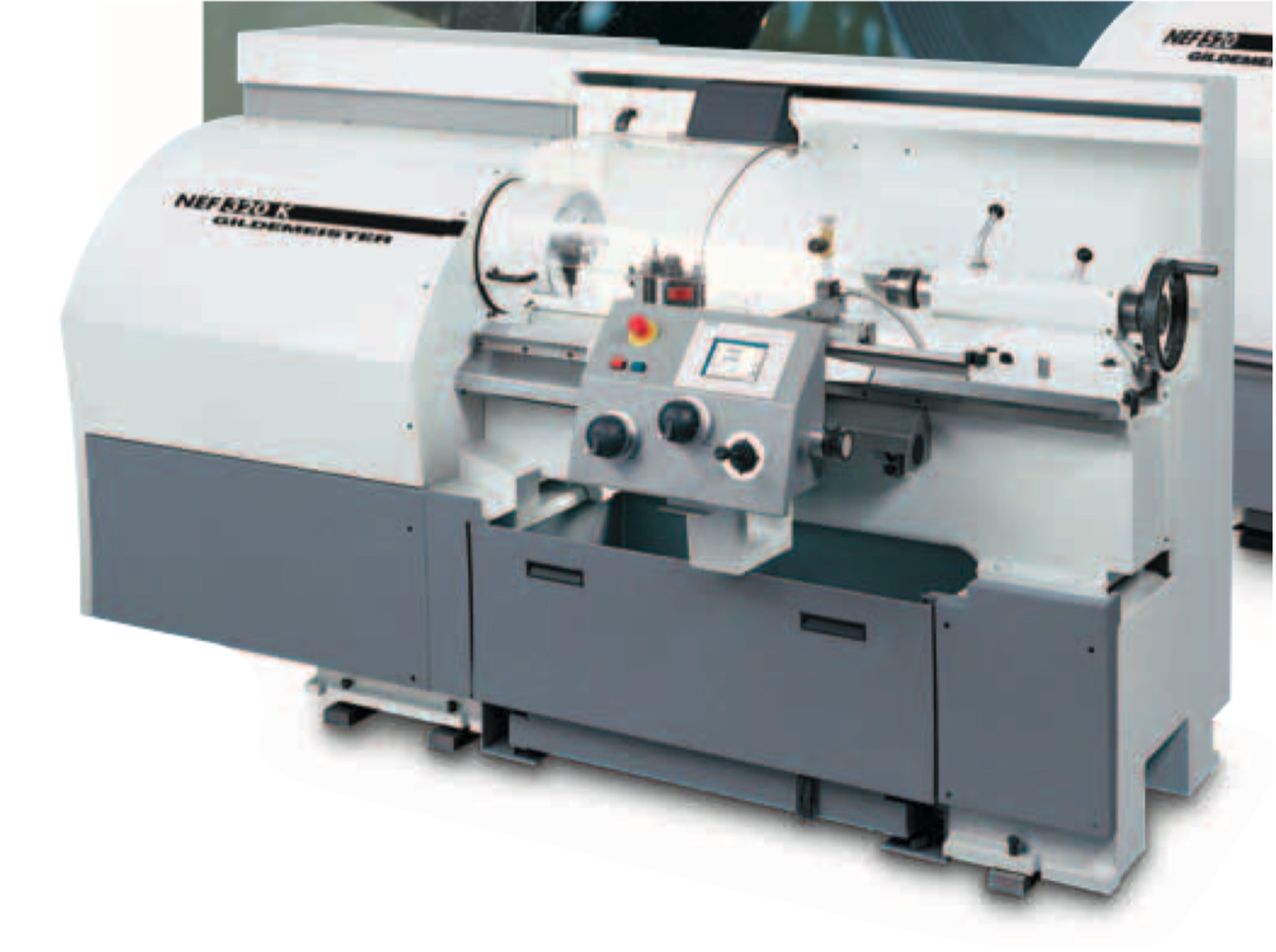
  • A lathe with enhanced motion controller (Computer-Numerical-Controller, CNC)
  • Mechanical layout is arranged in order to allow automated chip evacuation
  • 3 controlled axes + spindle, or more
  • The spindle can be a controlled axis itself
  • It can have rotary tools, too (hybrid turning-milling)

CNC lathe

  • Direct-drive spindle
  • Roller-turner (revolving) turret
  • Counterstock (hydraulics)
  • Inclined bed
  • Lead screw

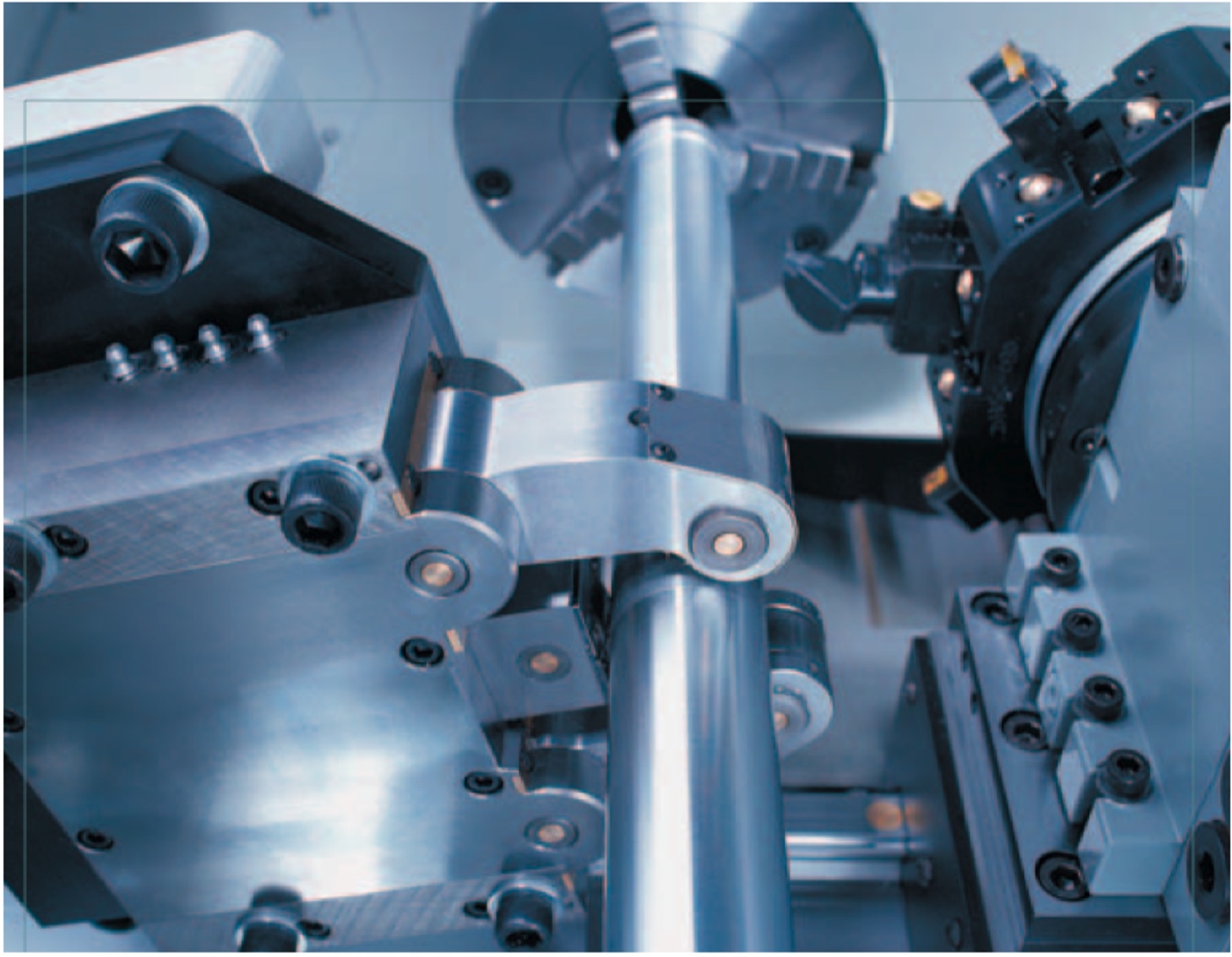
Moveable rest

Moveable rest

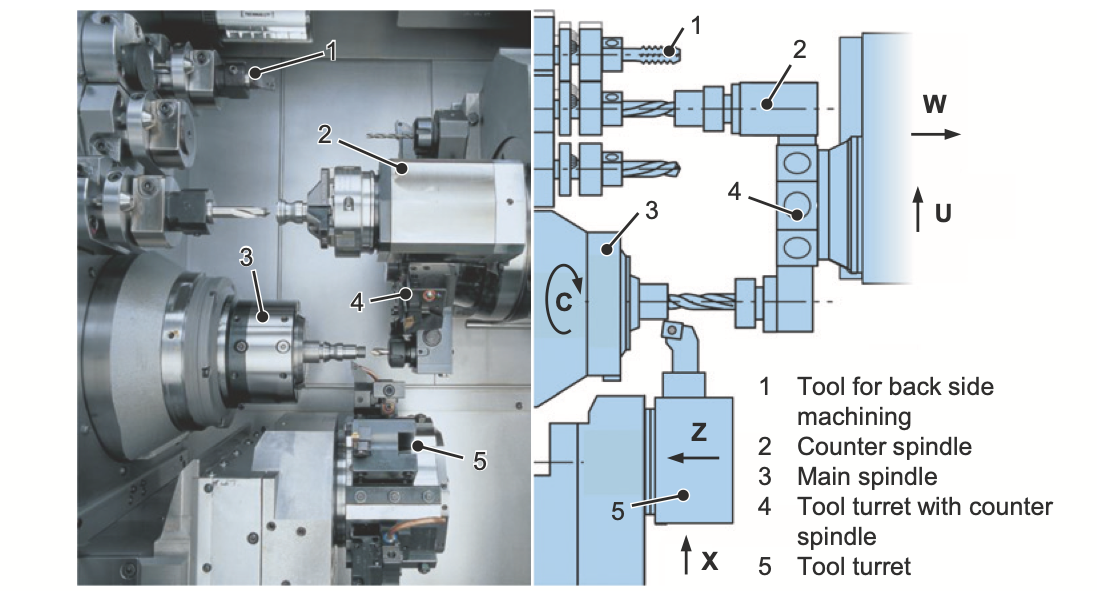
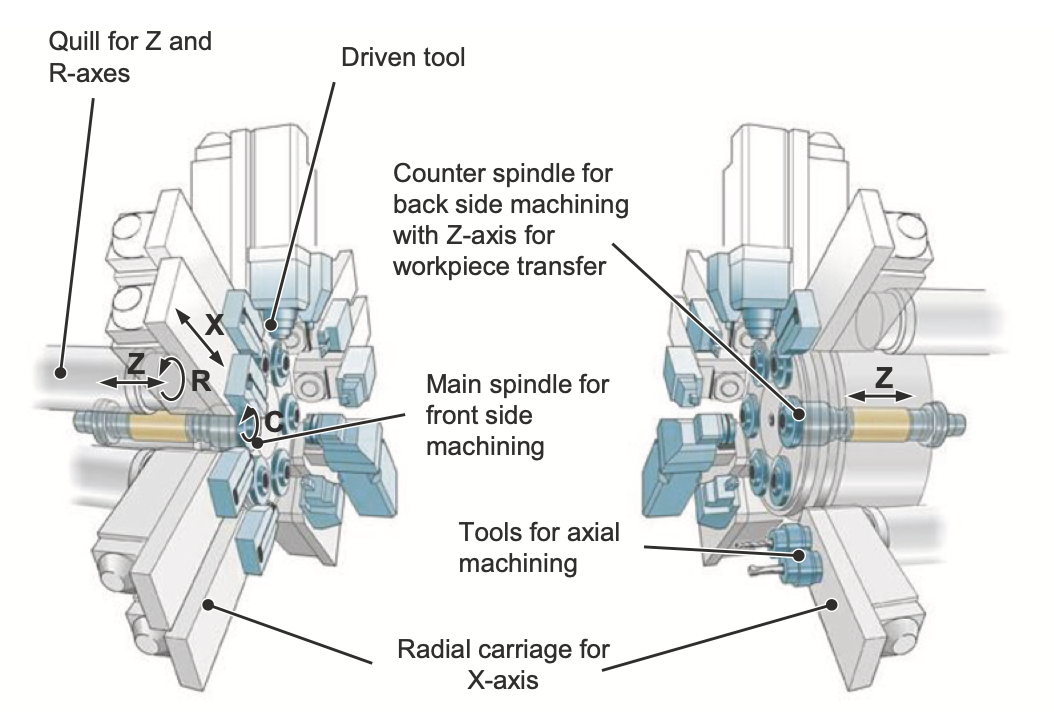
Two-spindle, two turrets lathe
Multiple spindle lathe
Multiple spindle lathe
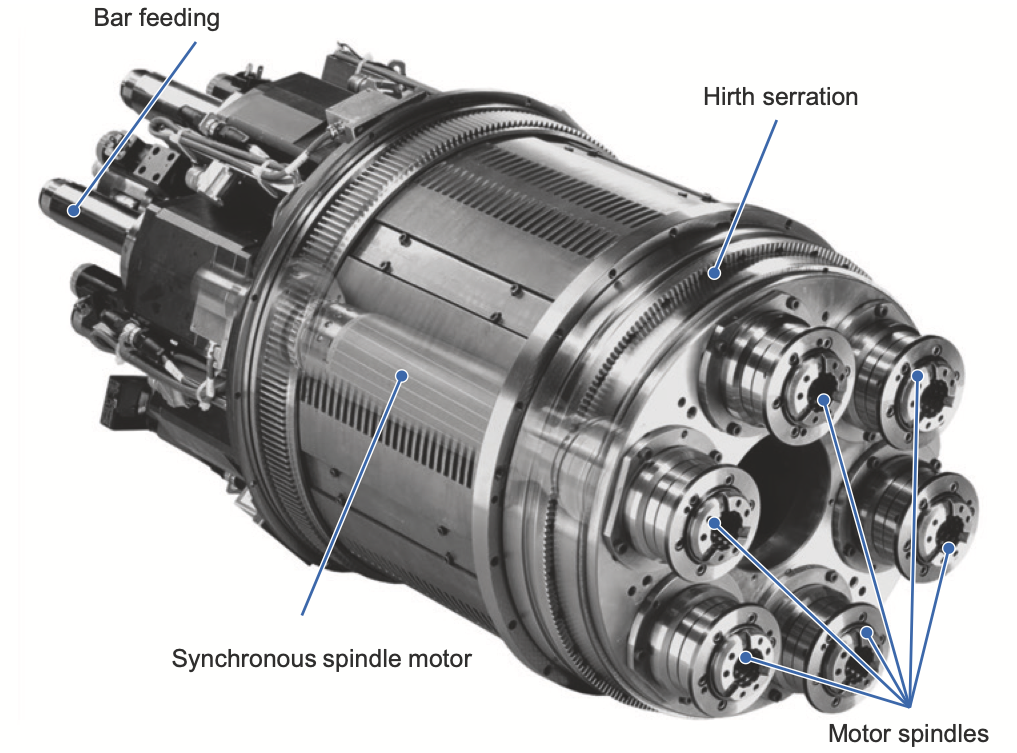
Multiple spindle lathe

Vertical spindle lathe
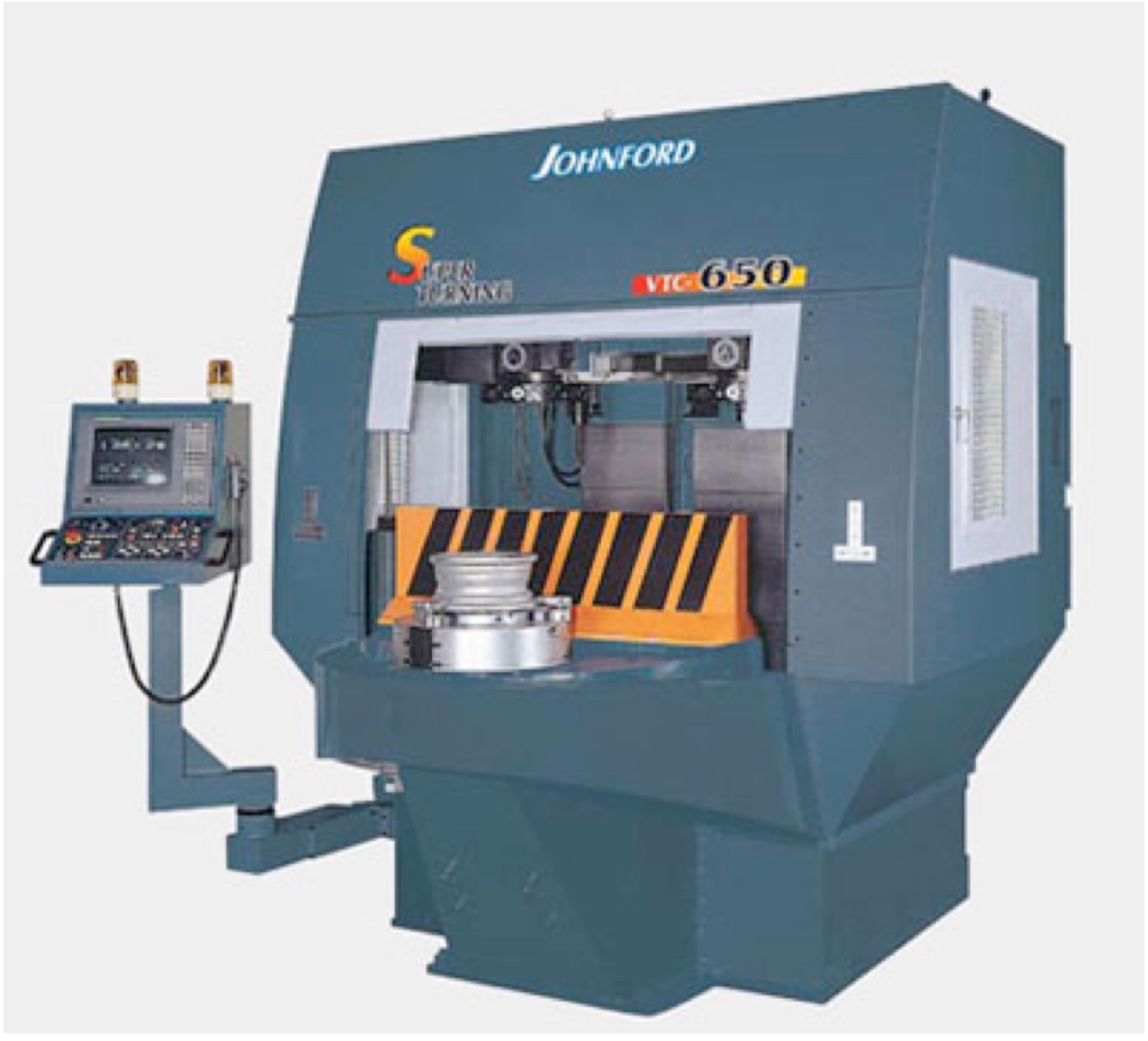
Normal

Inverted spindle

Vertical spindle lathe

Sliding headstock
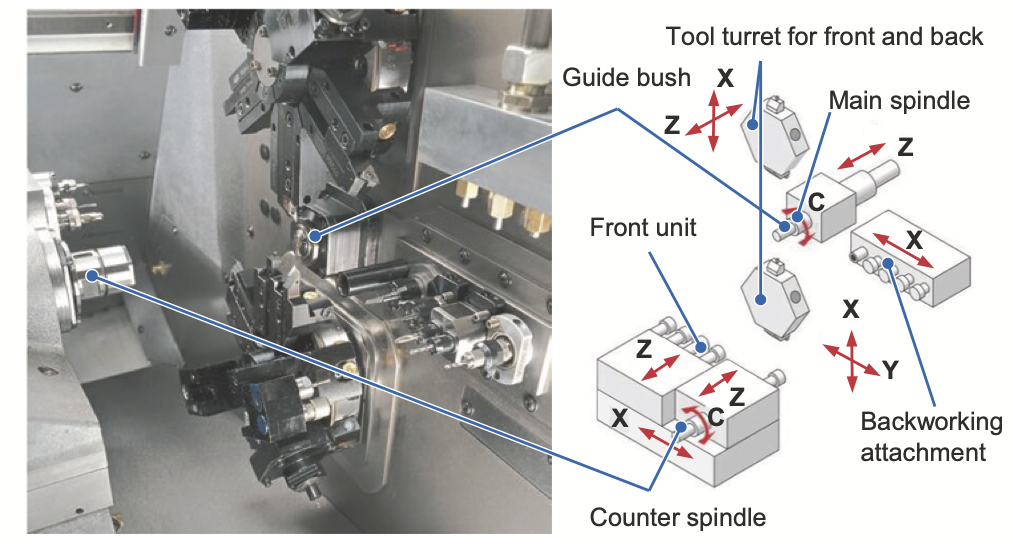
Sliding headstock

Parameters

  • Slewing (Brandeggio)
  • Turning diameter
  • Turning length
  • X and Z travels (and possibly other axes)
  • Spindle speed
  • Rapid speeds
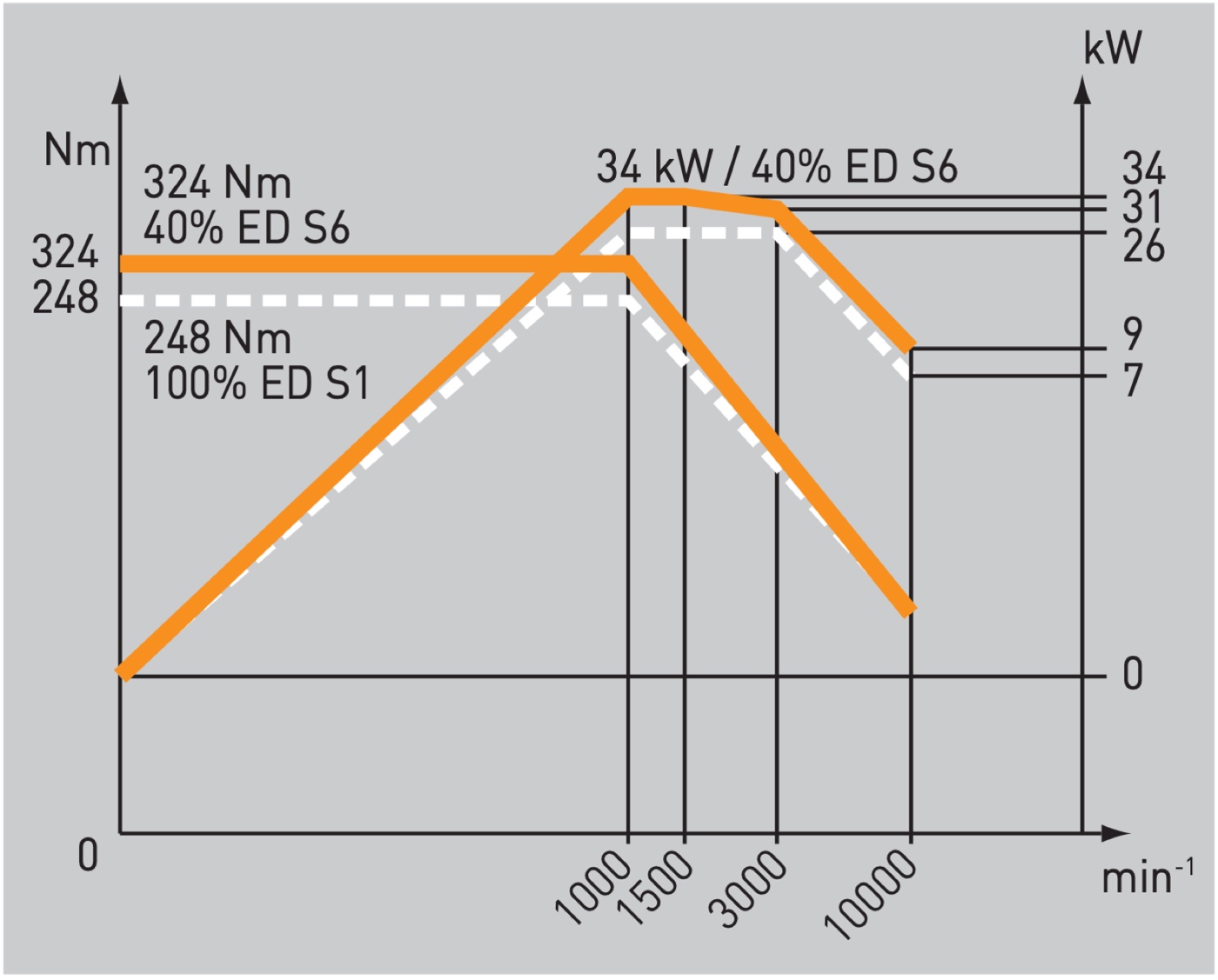
  • Spindle torque and power

ED = Einschaltdauer (operating time)

Milling machines

  • Huge variety of architectures
  • Common denominator: rotary tool
  • From desktop size to 200 m\(^3\) footprint
  • Some have rotary table and can do turning (hybrid mill-turn)
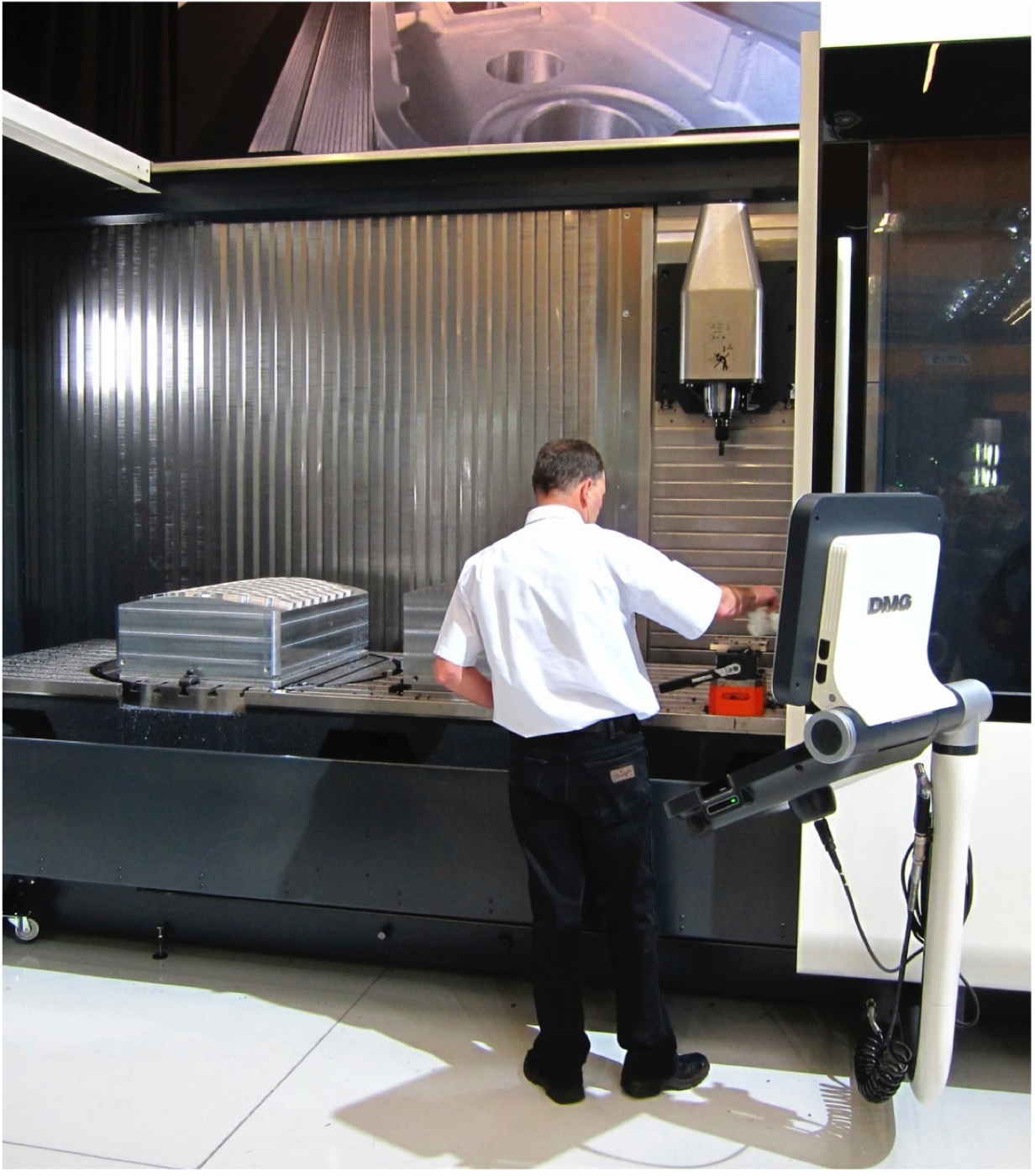
Types of Milling Machines

  • CNC Milling Machines
    • Horizontal spindle
    • Vertical spindle
  • Milling centers
    • Universal
    • Pallet changer
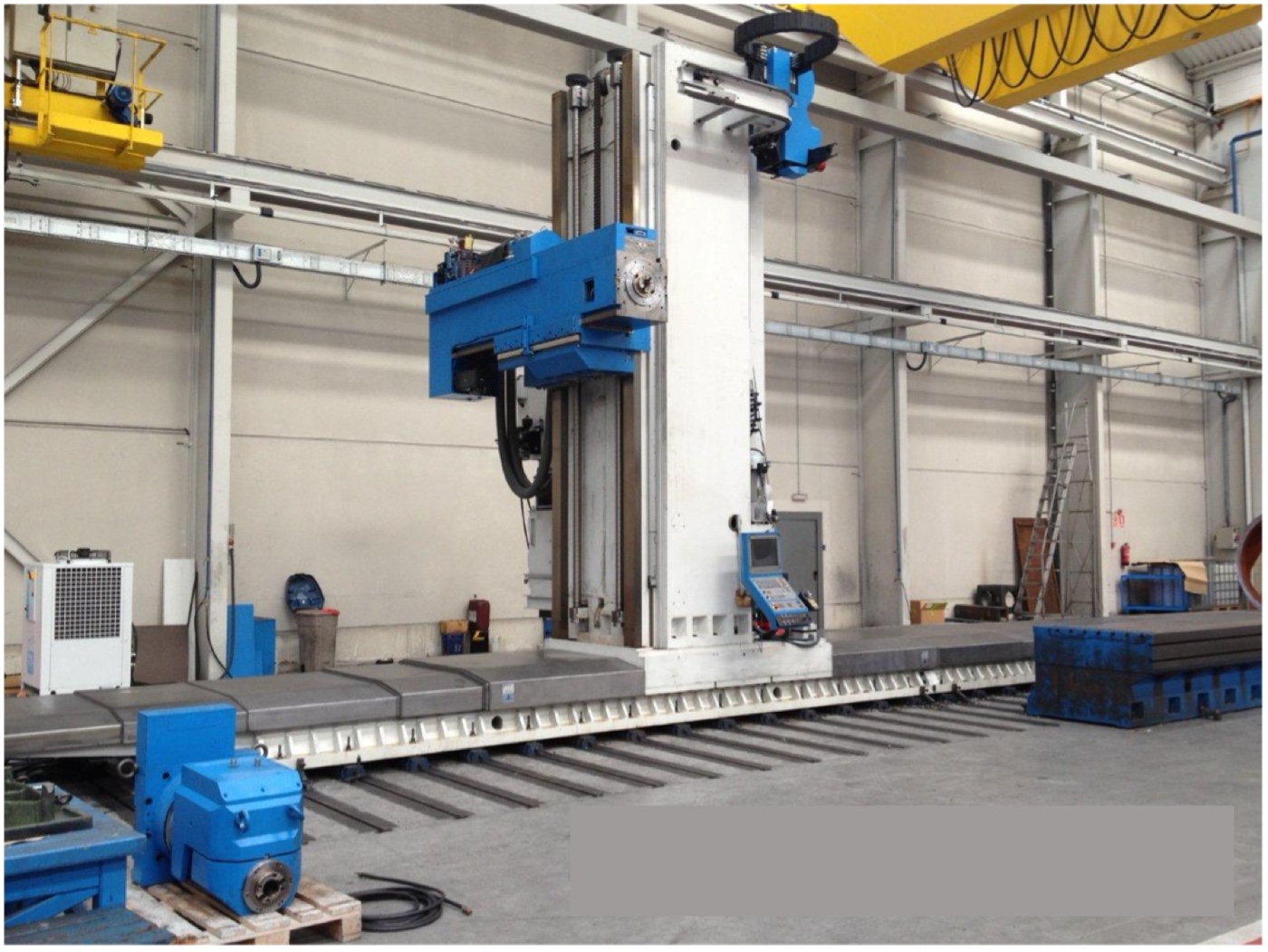
    • Traveling column
  • Architectures
    • Cantilever
    • Traveling column
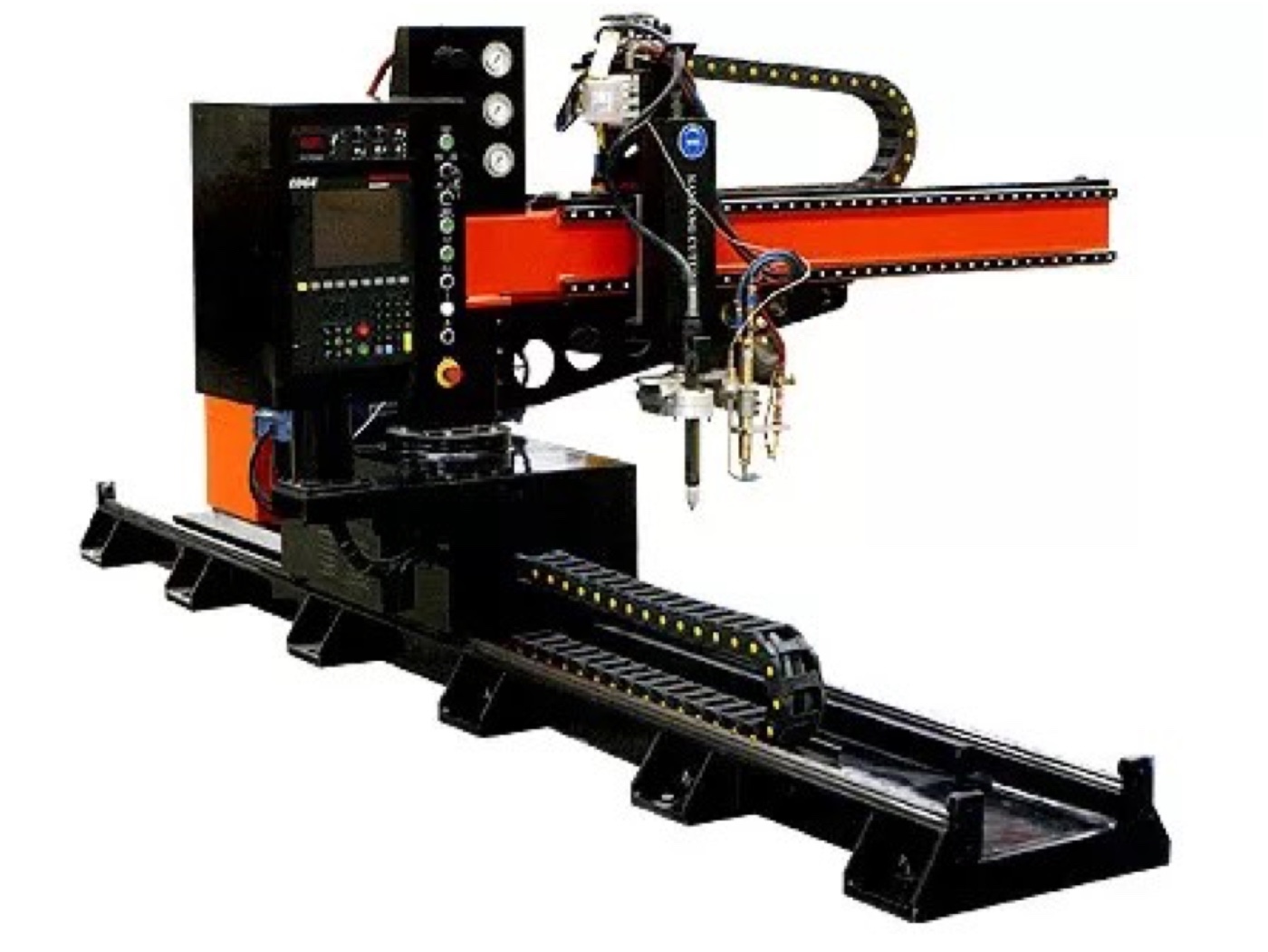
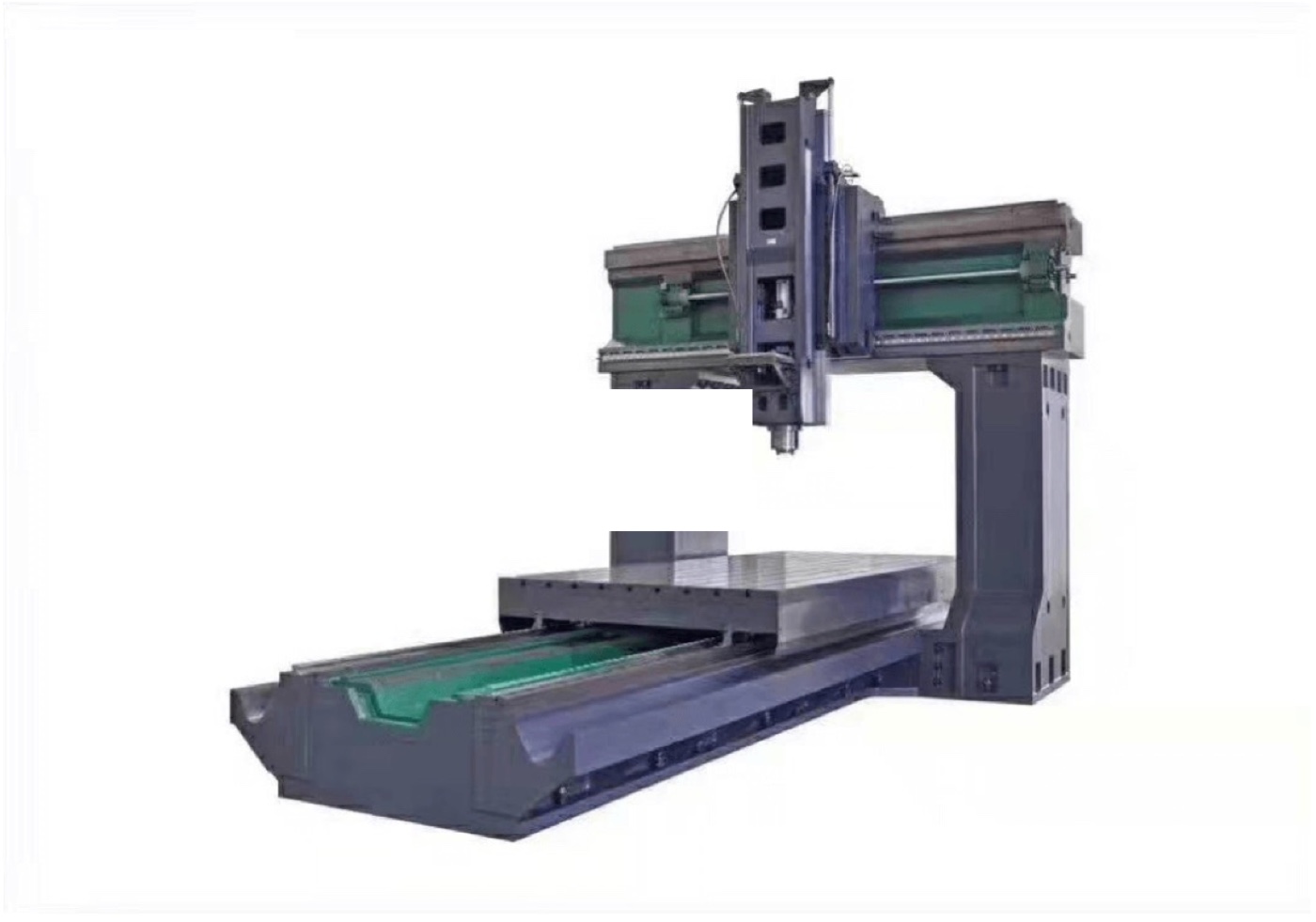
    • Gantry
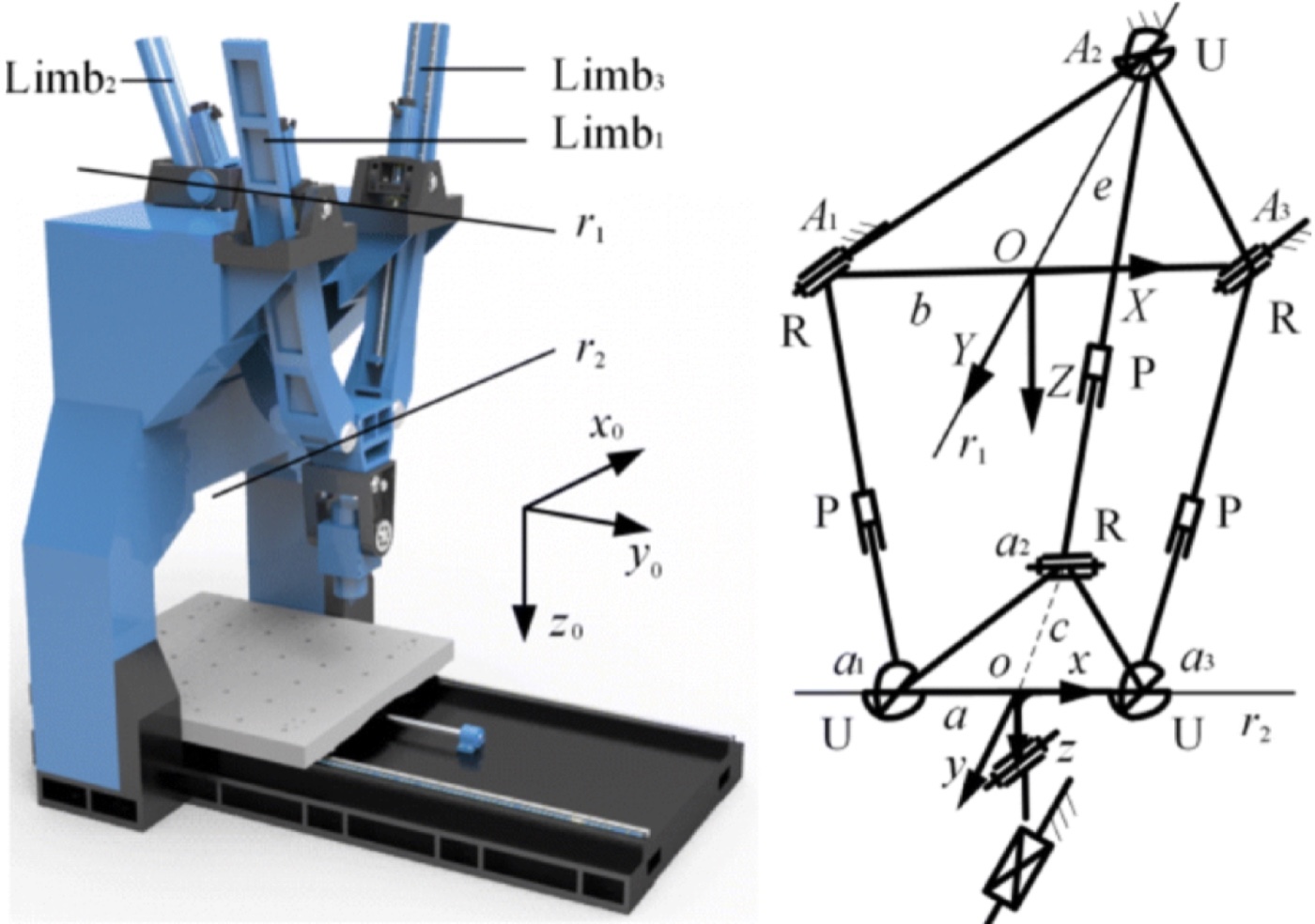
    • Parallel kinematics

Cantilever

Travelling column

Gantry

Parallel kinematics

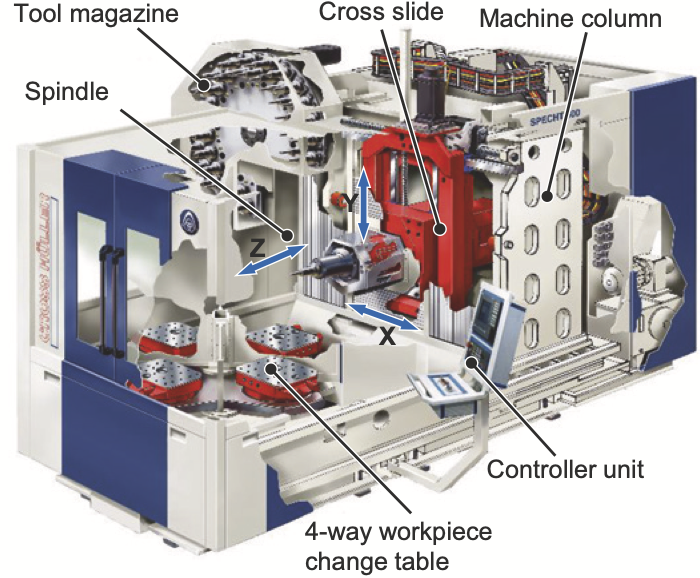
Universal milling center

  • Universal milling centers have a rotary table and a universal milling head that can be tilted and swiveled to machine any surface of the workpiece
  • By rotating the axis at 45° from Z, the spindle axis can be changed from vertical to horizontal (universal)
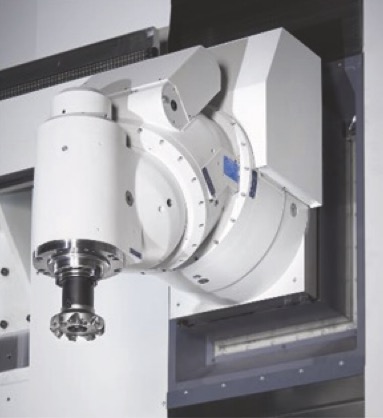
Universal milling head

Architectures

  • Cantilever: simplest and cheapest
  • Traveling column: suitable when one axis is much longer
  • Gantry: much more stiff and stable, but more complex (twin axes)
  • Parallel-K: much stiffer and faster, but complex to control and limited in travels
Vertical spindle

Pros:

  • Easy fixturing
  • Reduced moveable mass

Cons:

  • Chip disposal is more difficult
  • Not suitable for machining dies/cavities
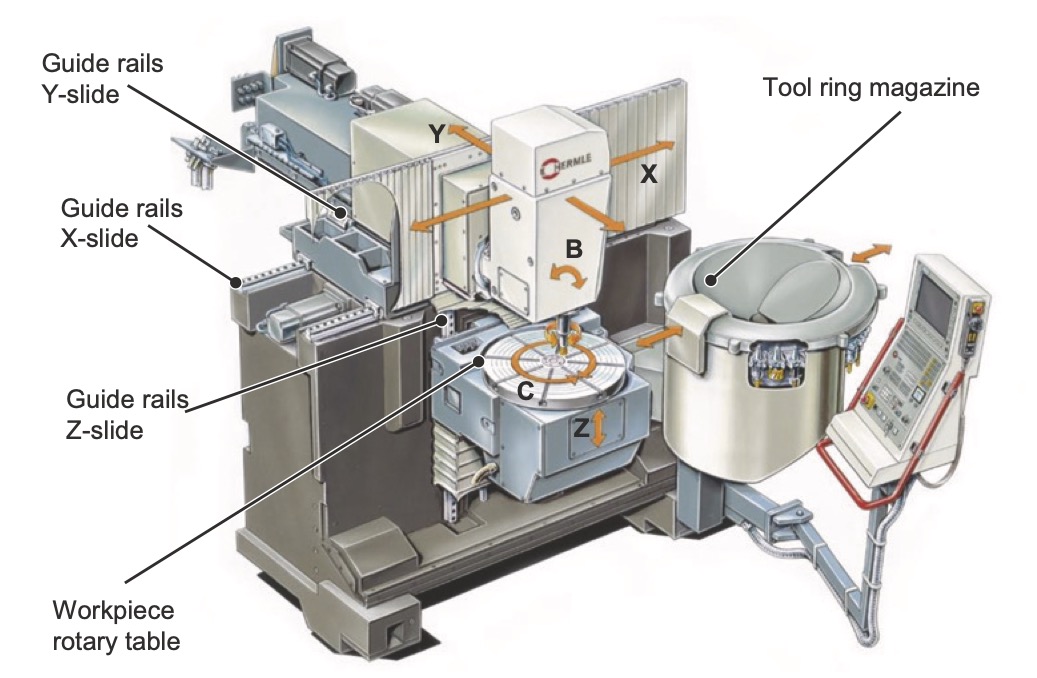
Vertical spindle machine

Horizontal spindle

Pros:

  • Better chip/liquids disposal
  • Large travels

Cons:

  • More difficult fixturing
  • More moveable mass (slower)
  • more difficult to fixture

Horizontal spindle machine

Pallet changer

  • Stocky WPs
  • High productivity
  • can be integrated in automated lines

Pallet changer

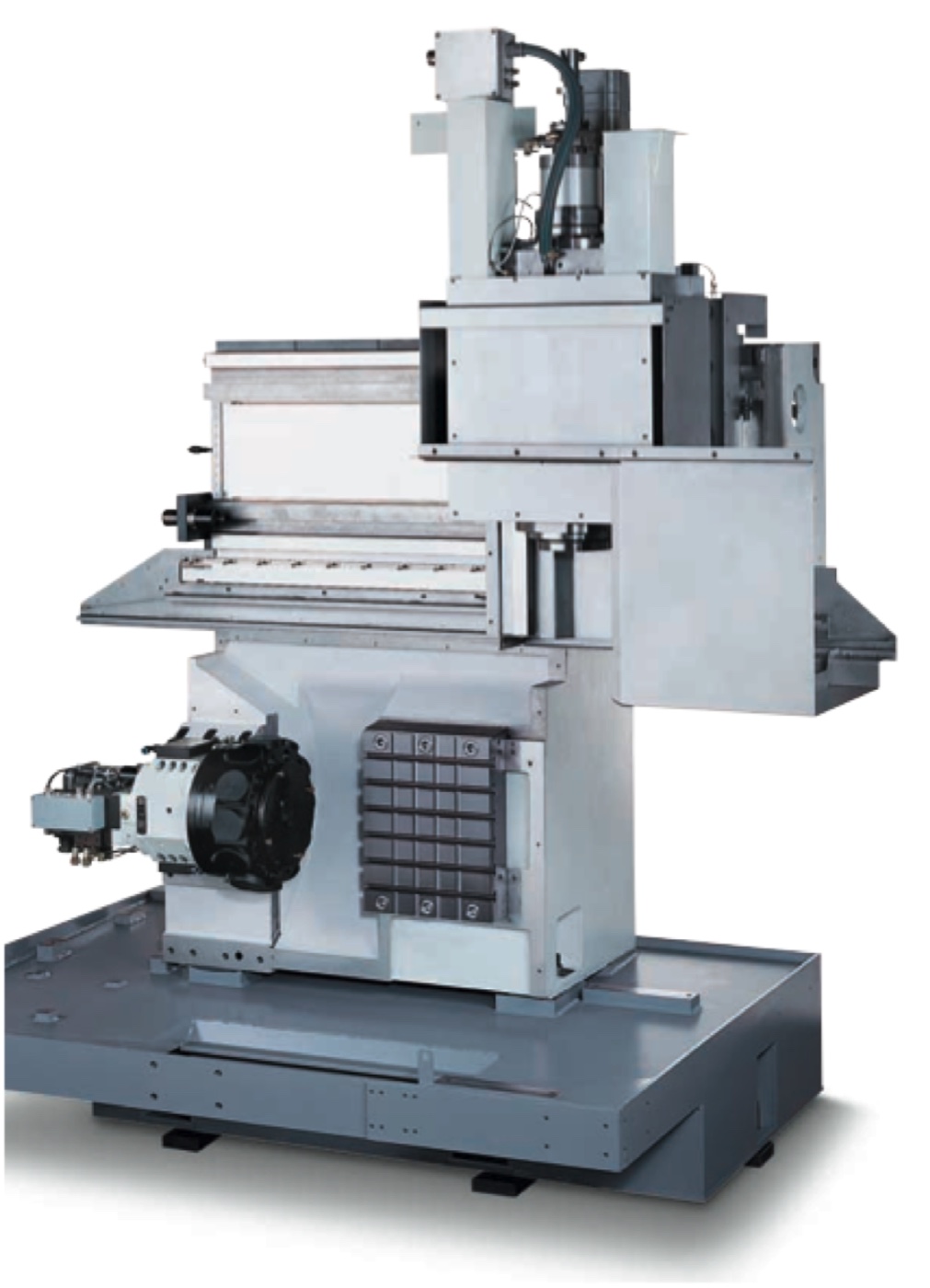
Traveling column

Suitable for:

  • slender WP
  • stocky WP but with two alternating fixturing zones (higher productivity)

Masked time

Any operation that can be performed in parallel to machining is said to happen in masked time. Its cost is absorbed in the machining cost

Other operations happen in exposed time, which is added to the machining cost
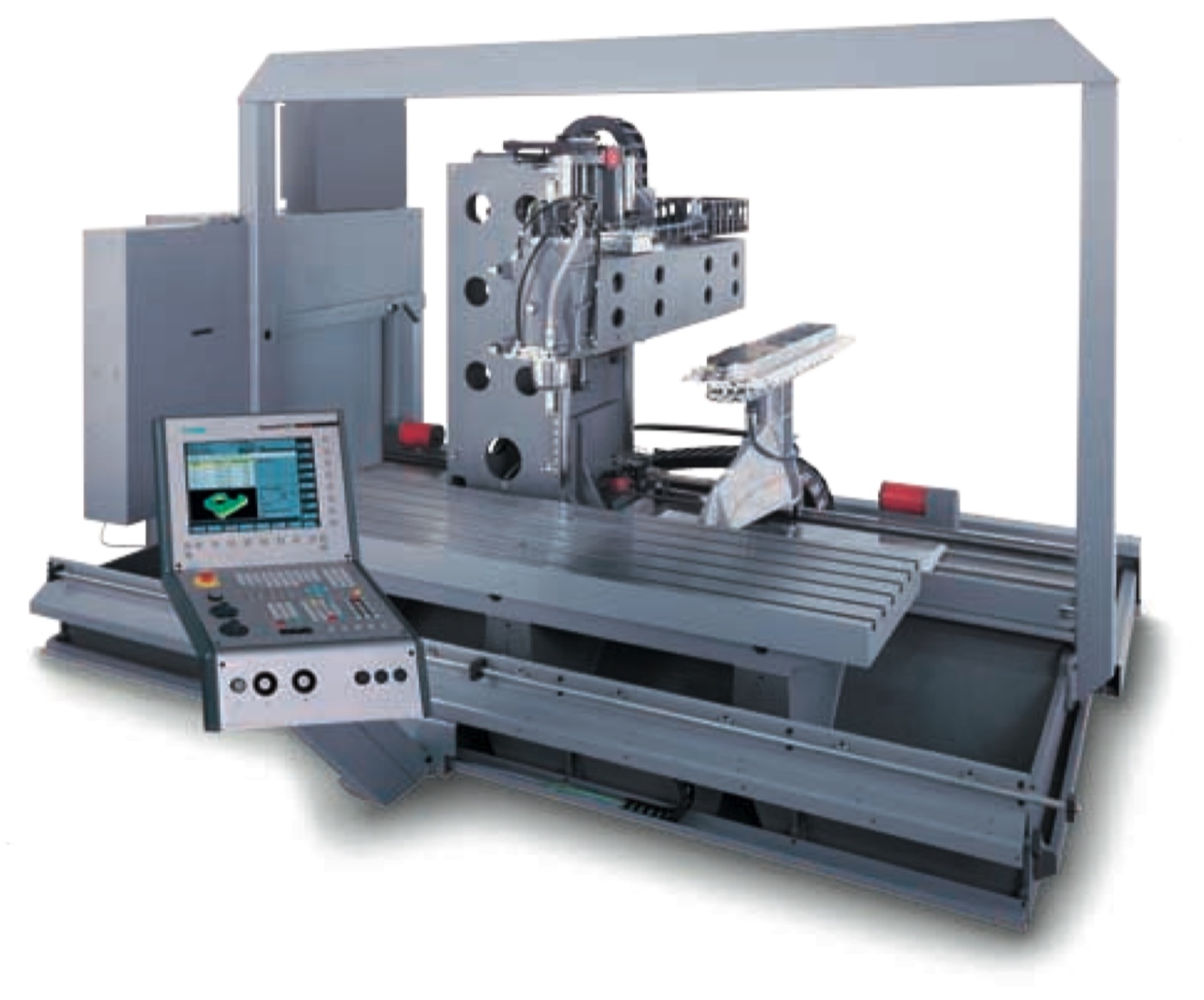
Travelling column machine

Milling centers

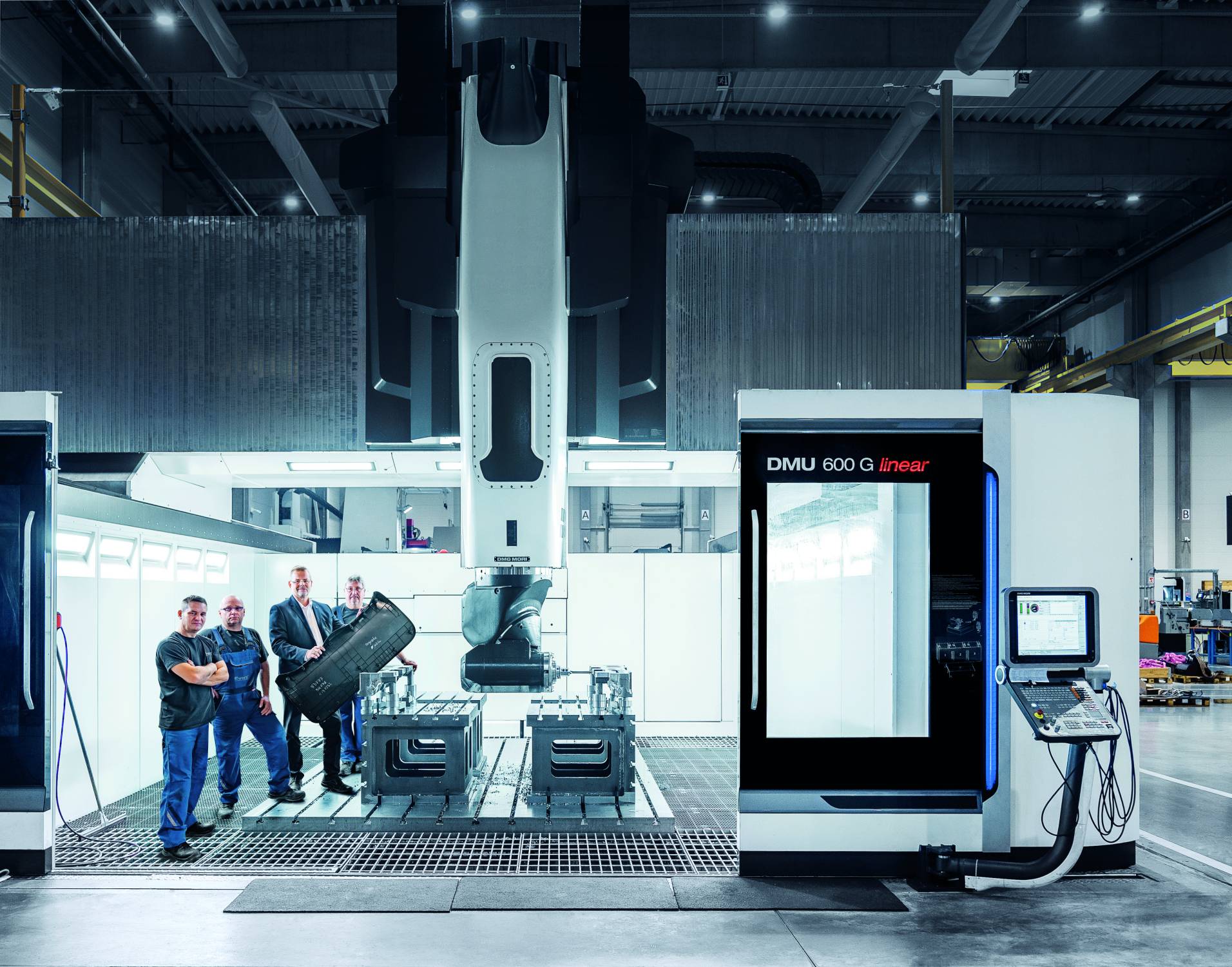
DMG Mori DMU600p linear

Parameters

  • Axes configuration
  • Axes travels
  • Spindle speed
  • Rapid speed
  • Spindle torque and power

ED = Einschaltdauer (operating time)

Automation

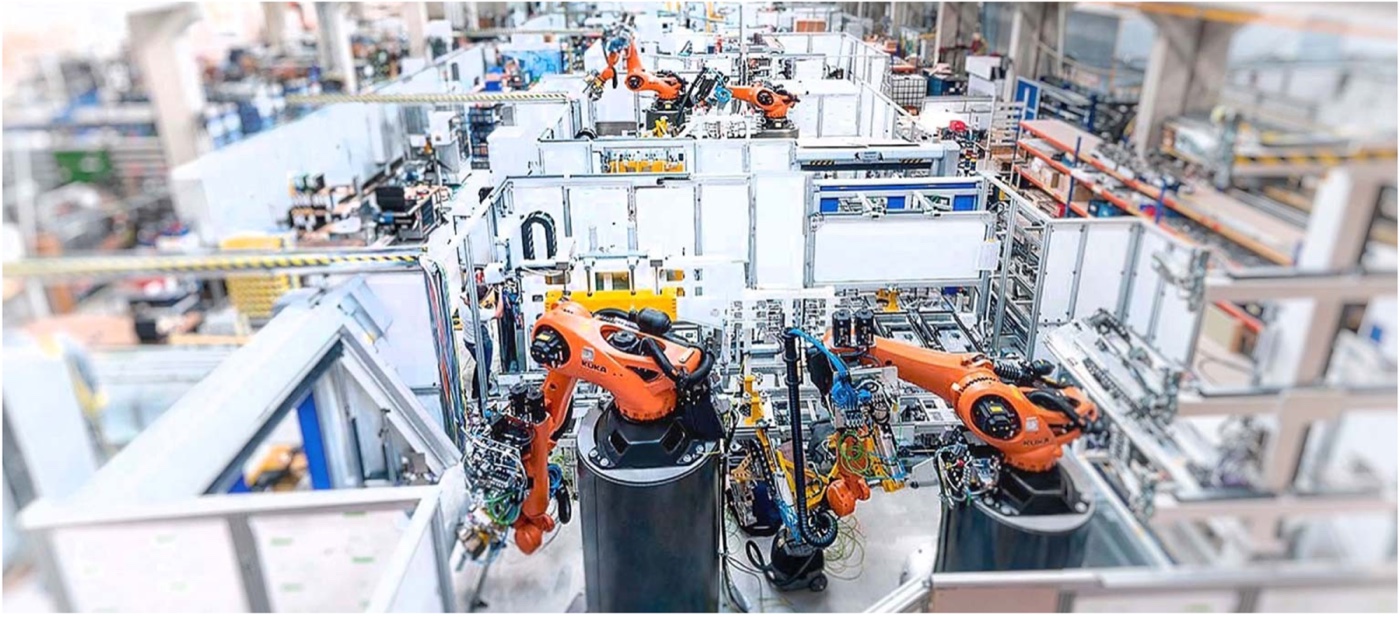
It is mainly a matter of synchronizing motion
Amber & Amber

The Yardstick of Automation (1962)

Order Human attribute Example
0 None Utensili manuali
1 Energy Powered machines and tools
2 Dexterity Single-cycle automatics (dexterity = self-feeding)
3 Diligence Repeats cycle; open-loop control
4 Judgment Closed loop; numerical control; self-measuring
5 Evaluation Computer control; model of process required for automation
6 Learning Limited self-programming; some artificial intelligence
7 Reasoning Inductive reasoning (cause-effects)
8 Creativity Performs (original) design unaided
9 Dominance Machine is master (HAL 9000)

Current level: A(4)

  • CNC machine tools
    • Convert a machining description in machining movements
    • Run machining commands with judgement (A4)
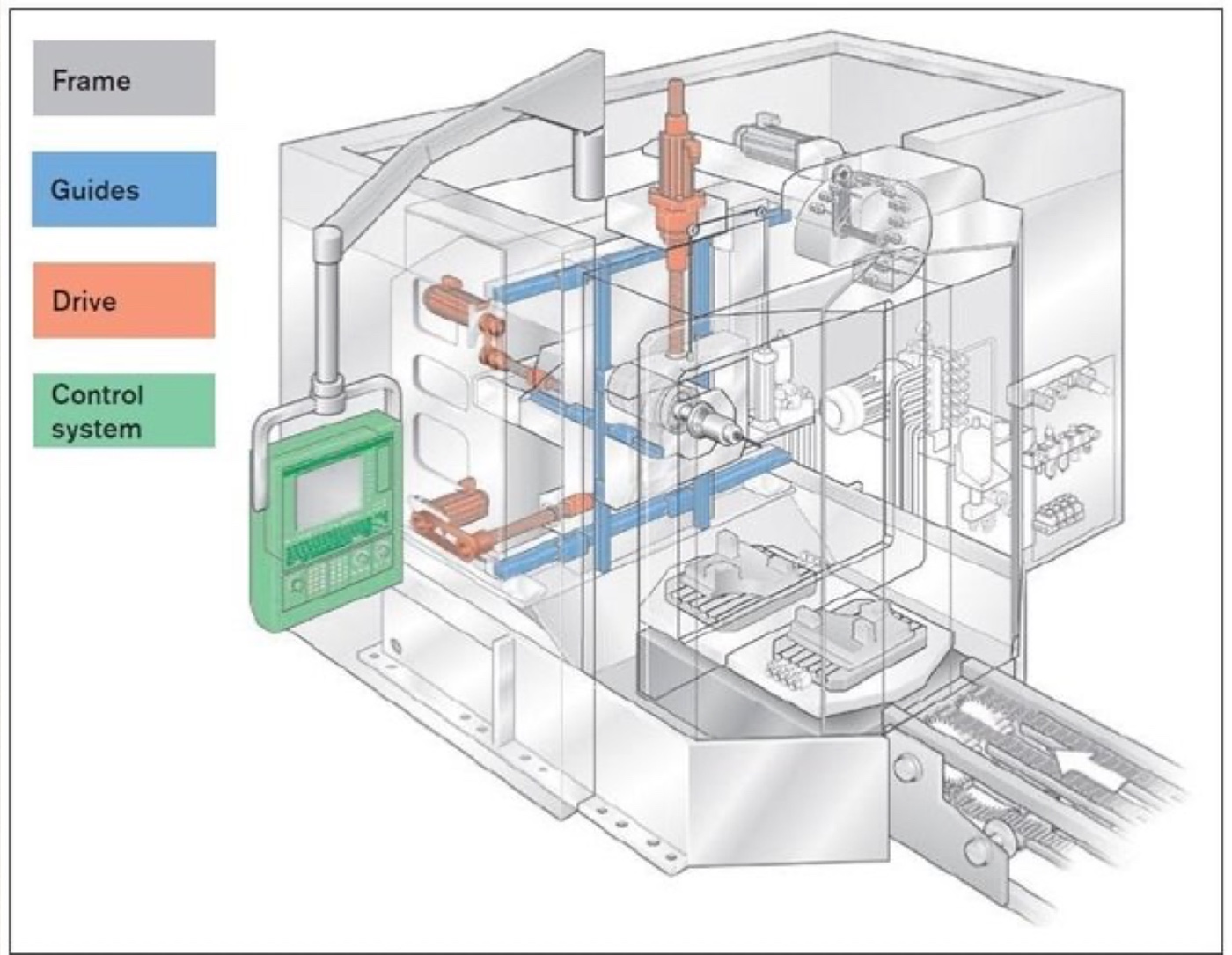
Machine tool elements
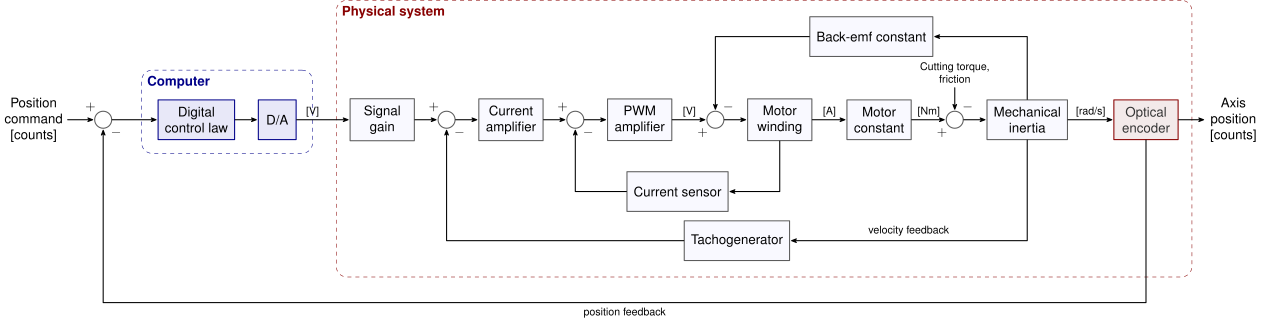
Drivers
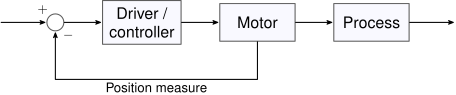
Requirements:

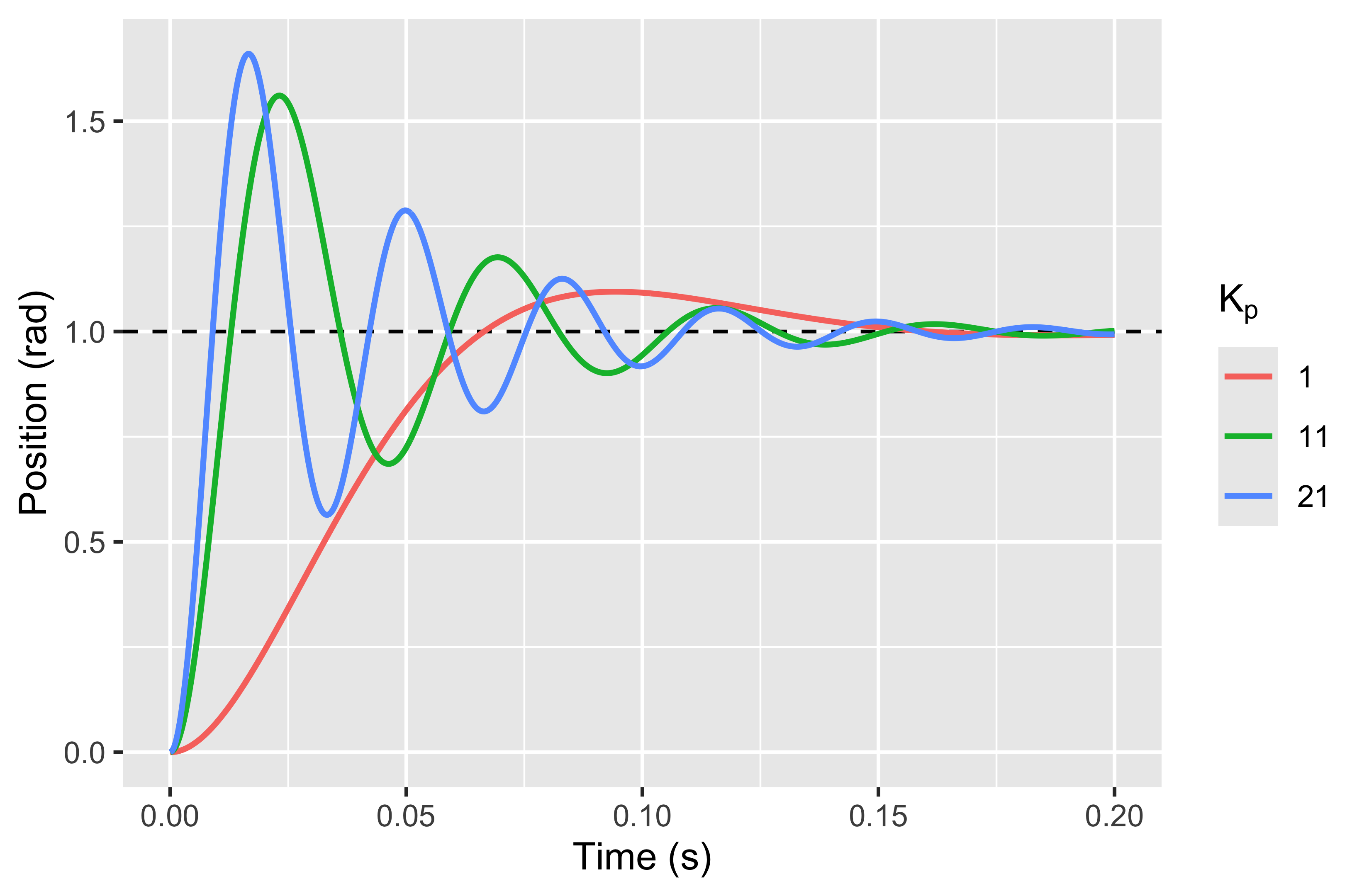
  • Fast response (acceleration)
  • Quick stabilization (minimum number of oscillations)
  • No overshoot (or risk of damages)

Feedback
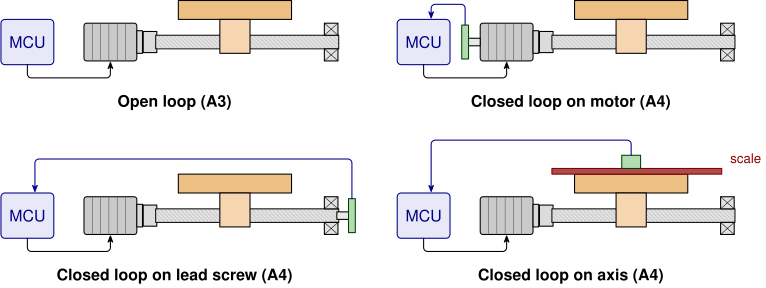
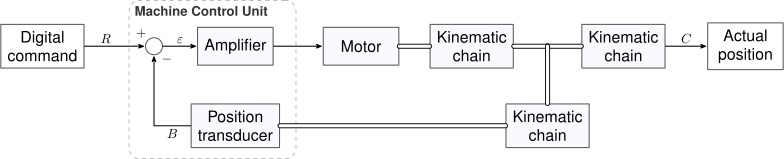
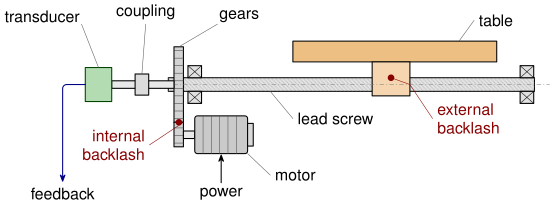
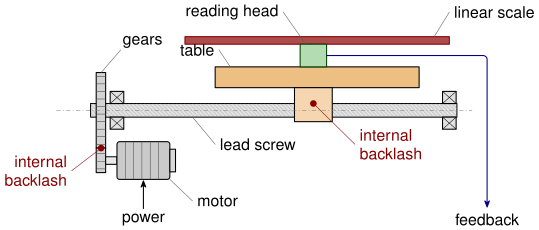
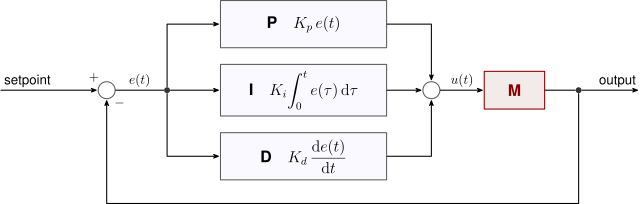
Open loop (A3); closed loop on motor, on lead screw, on axis (A4)

Errors

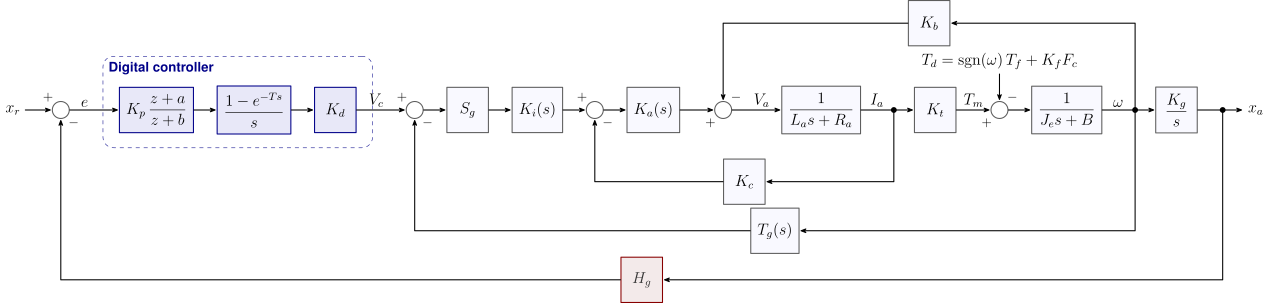
Linear axis control

Encoder gain: pulses/rev — Axis gain: screw pitch × encoder gain (mm/pulse)

Linear guide-rail
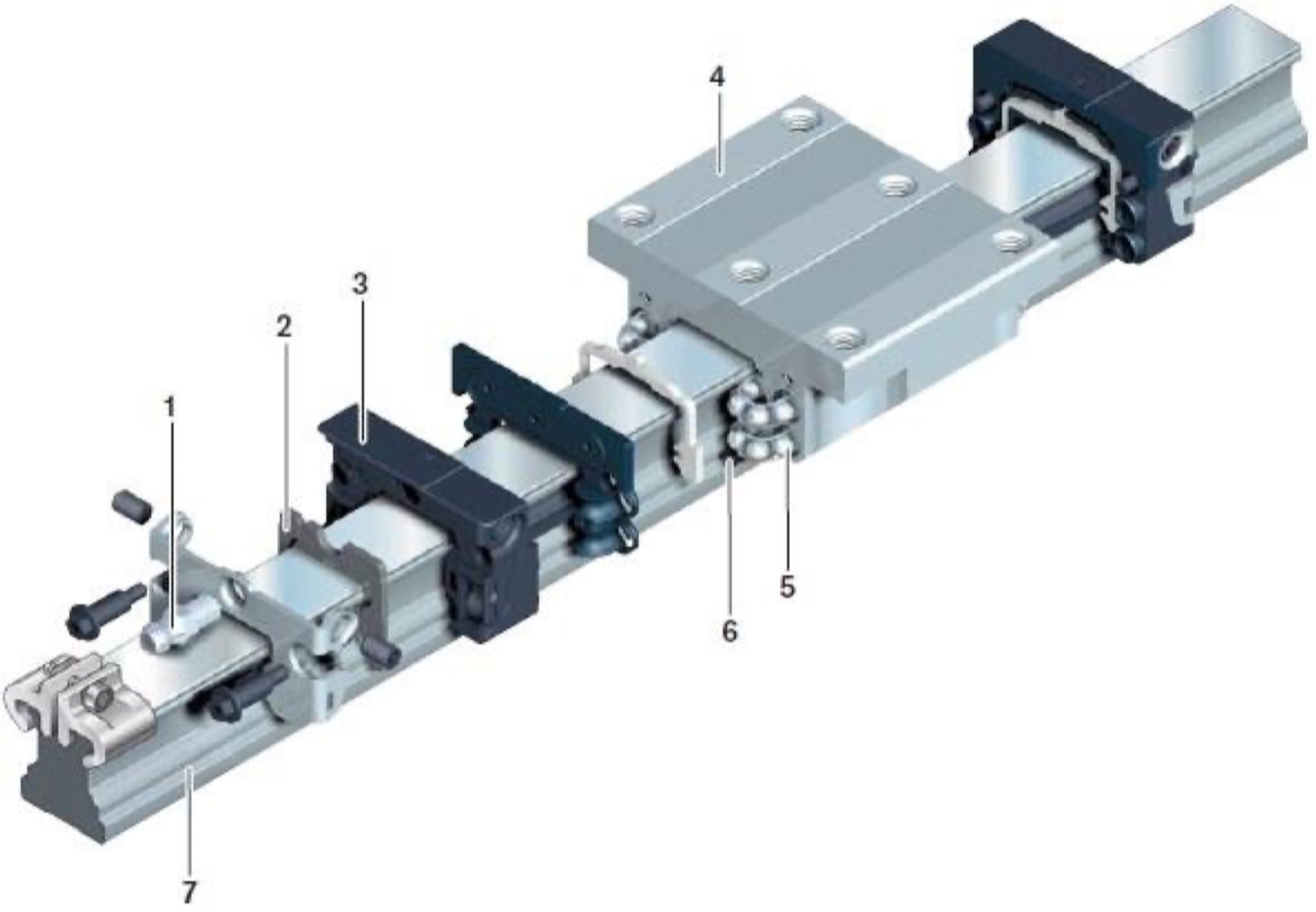
  1. Lube port
  2. end wiper seal
  3. end cap
  4. runner block body
  5. rolling element
  6. side seal
  7. guide rail

Encoder

  • Types
    • Rotary encoders
    • Linear encoders
  • Quality
    • Incremental
    • Absolute (Gray code)

PID controllers

Parameter Rise time Overshoot Settling time Steady-state error Stability
Kp Decrease Increase Small change Decrease Degrade
Ki Decrease Increase Increase Decrease significantly Degrade
Kd Minor decrease Minor decrease Minor decrease No effect Improve if Kd small

Actual control schemes

PLC: Programmable Logic Controller

PLC is a controller that implements logic relationships between inputs and outputs. It provides a range of interfaces and registers:

  • Analog and digital I/O (> 2048)
  • Relay (1000)
  • Memories (200)
  • Timers (200)
  • Counters (200)

Note

Can be either a separate hardware, or a software process running on the same computer that runs the CNC

PLC

  • Beside GPIO, PLC can also have advanced I/O and communication capabilities:
    • General purpose communication: RS232, RS422, Ethernet
    • Deterministic communication: Profibus, DeviceNet, Modbus, Industrial EtherNET, CAN-BUS
    • Special I/O: counters, virtual cams, PIDs and controllers
  • PLC programming languages have been designed to facilitate the transition from wired logics to software logics: the languages had to be intuitive and immediately productive for technicians with different backgrounds: electrical engineering, control engineering, firmware programming

PLC

The programming standard IEC 61131-3 provided this transition:

Language Type Description
Ladder Logic Graphical Resembles relay logic diagrams, intuitive for electricians
Function Block Diagram Graphical Resembles block diagrams, intuitive for control engineers
Sequential Function Chart Graphical Resembles flow charts and finite state machines, intuitive for process engineers
Structured Text Textual Resembles Pascal, intuitive for software engineers
Instruction List Textual Resembles assembly, intuitive for firmware engineers

Note

The standard states that languages must be interchangeable, i.e., the same program can be written in any language and must have the same behavior, different parts of a program can be written in different languages, and the program can be converted from one language to another

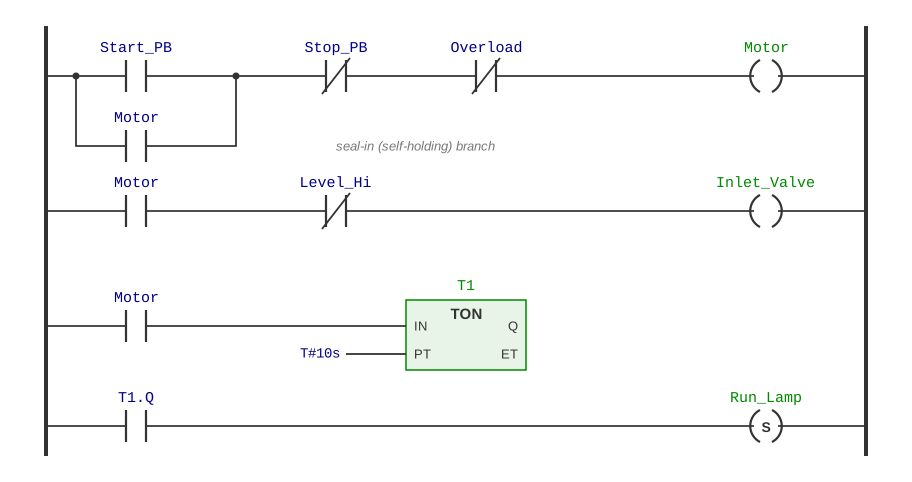
PLC: Ladder diagram

Note

  • On the left side there are contactors (inputs), on the right side there are coils (outputs).
  • parallel branches represent OR logic, series branches represent AND logic; contactors can be normally open or normally closed (NOT).
  • The program is read from left to right, top to bottom. The program is executed in a cyclic scan: all inputs are read, the logic is evaluated, and the outputs are updated.
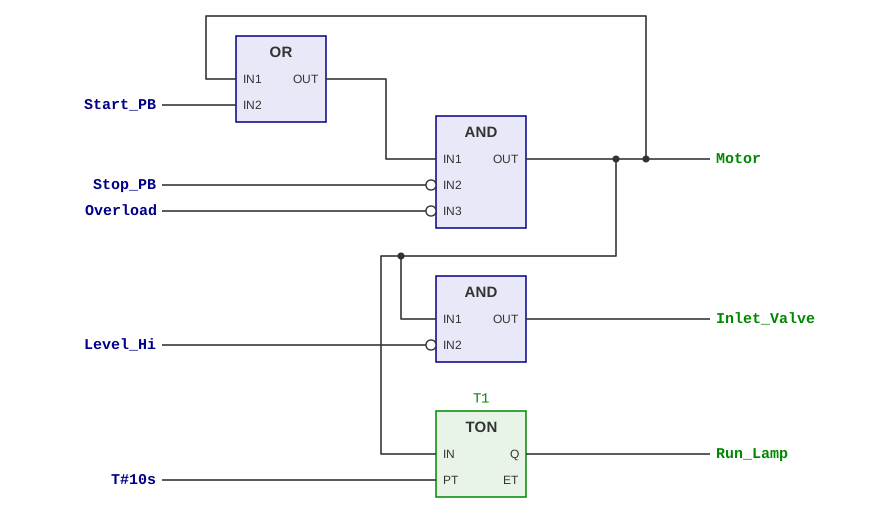
PLC: Function Block Diagram

Note

  • Each block implements a function, which can be a logic function, a timer, a counter, or even a more complicated one as a PID controller
  • Appeals to control engineers, being quite similar to Simulink and other block-diagram-based control design software
  • Complex programs tend to become quite messy, so FBD is often used in combination with other languages and limited to implement specific functions related to control and signal processing
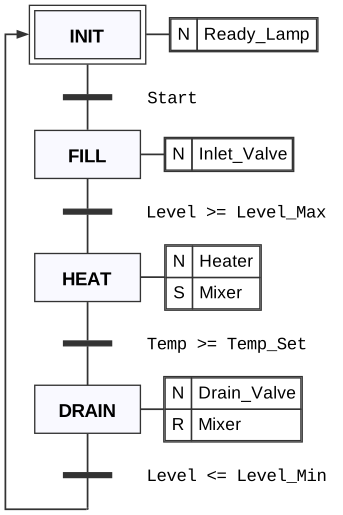
PLC: Sequential Function Chart

Note

  • SFC is a graphical language that implements a finite state machine
  • Each block is a state, each line a transition with its activation condition
  • It is very intuitive for process engineers, and it is often used in combination with other languages to implement the overall logic of a process, while the other languages are used to implement the details of each state
PLC: Textual languages

Structured Text (ST)
(* motor start/stop with seal-in *)
Motor := (Start_PB OR Motor)
         AND NOT Stop_PB
         AND NOT Overload;
Inlet_Valve := Motor AND NOT Level_Hi;
T1(IN := Motor, PT := T#10s);
IF T1.Q THEN
  Run_Lamp := TRUE;
END_IF;
Instruction List (IL)
LD   Start_PB
OR   Motor
ANDN Stop_PB
ANDN Overload
ST   Motor
LD   Motor
ANDN Level_Hi
ST   Inlet_Valve
CAL  T1(IN := Motor, PT := T#10s)
LD   T1.Q
S    Run_Lamp

Note

Textual languages are the most easy to implement and always available even on low-cost PLC and PLC IDEs

(Computer) Numerical Control

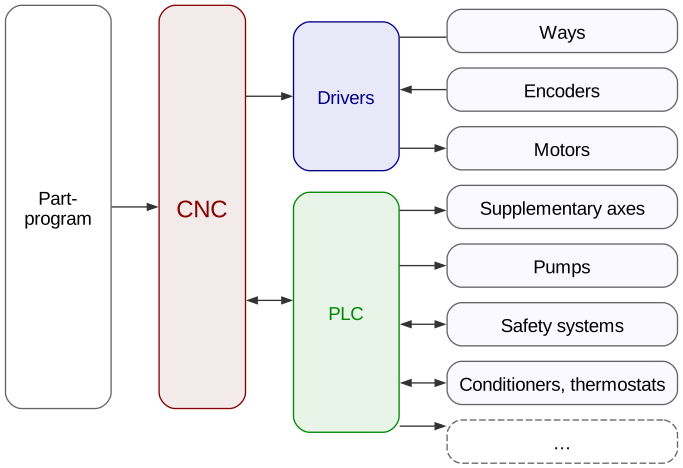
The CNC controller is the brain of the machine tool. It implements the judgement (A4) of Amber’s scale, and it is responsible for:

  • parsing the part-program
  • converting it into motion commands for the machine tool actuators
  • providing action inputs to the PLC controller for auxiliary functions (coolant, tool change routines, etc.)

CNC controllers are characterized by:

  • Types of motion interpolation
  • Number of controlled axes

Types of motion interpolation

CNC can control axes with increasing levels of sophistication:

  • Point to point: only the start and end points are controlled, the path is not controlled (drilling, pick-and-place)
  • Paraxial: one axis at a time can be controlled in feed (semi-automatic machines, machines that don’t need axes interpolation as sawing machines, presses)
  • Continuous: all axes can be controlled simultaneously, and the path is controlled in position and velocity

Number of controlled axes

  • 2 Axes: third axis is manually adjusted (manual lathes, manual mills)
  • 2 Axes and 1/2: only two axes at a time can be controlled, the third is for positioning
  • 3 Axes: full 3-D trajectory control of TCP
  • 5 Axes: full trajectory control of TCP and tool orientation

Coordinate systems

  • Axes references combine to give machine origin
  • Axes references are used to reset encoders (homing)
  • Machine controller works in machine coordinates
  • Workpiece origin is set up by the operator
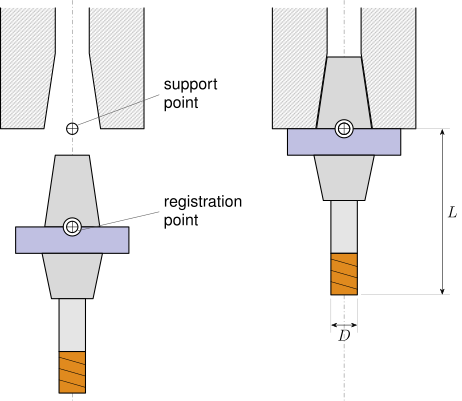
  • Registration point is the reference to measure tool length and diameter
  • Support point is the reference to mount the tool on the spindle (when mounted, reference = support)
Reference Symbol
Axis reference
Machine origin
Workpiece origin
Registration point
Support point

Tool reference

  • Support point:
    • Abutment plane (lathes)
    • Spindle nose (mills)
  • Registration point:
    • on the tool, the point that matches the SP when mounted
  • To be measured:
    • Length and offset (lathes)
    • Length, diameter, and toric radius (mills)
WP coordinates

  • Selected by operator/programmer
  • Part program can use WP coordinates and/or machine coordinates
  • After fixturing, WP origin has to be set up wrt machine origin
    • by touching with tool and compensating for tool radius
    • By 3-D touch probe

Coordinate transformations

  • The part program defines the toolpath as the trajectory of the tool center position (TCP) in the workpiece reference frame
  • The CNC controller converts the TCP coordinates into machine coordinates by applying a roto-translation transformation that accounts for:
    • the workpiece origin
    • the tool length
  • Tool diameter is accounted for by the tool radius compensation function, which offsets the toolpath by the tool radius in a direction perpendicular to the toolpath

Note

In turning, there is no tool radius compensation; rather, tool is measured by length and abutment, the latter being the offset w.r.t. the registration point

Coordinate transformations

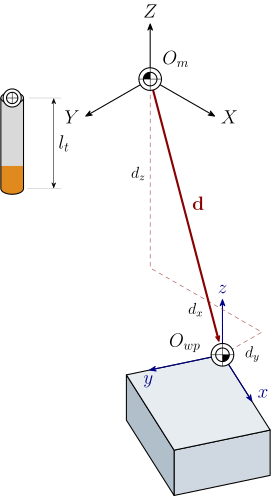
Any coordinate \(P_{wp}\) given in the workpiece reference frame \(O_{wp}\) is converted in machine coordinates \(P_m\), including tool length offset

\[ P_m = T_{wp \to m} P_{wp}; \qquad T_{wp \to m} = \begin{bmatrix} r_{11} & r_{12} & r_{13} & d_x \\ r_{21} & r_{22} & r_{23} & d_y \\ r_{31} & r_{32} & r_{33} & d_z + l_t \\ 0 & 0 & 0 & 1 \end{bmatrix} \]

\(d_{x-z}\) are coordinates of \(O_{wp}\) in \(O_m\)
Coordinate transformations

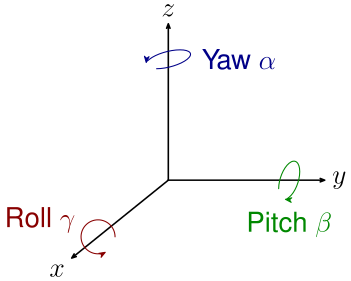
Remember that the roto-translation matrix is:

\[ T = \begin{bmatrix} \cos\alpha\cos\beta & \cos\alpha\sin\beta\sin\gamma - \sin\alpha\cos\beta & \cos\alpha\sin\beta\cos\gamma + \sin\alpha\sin\gamma & d_x \\ \sin\alpha\cos\beta & \sin\alpha\sin\beta\sin\gamma + \cos\alpha\cos\beta & \sin\alpha\sin\beta\cos\gamma - \cos\alpha\sin\gamma & d_y \\ -\sin\beta & \cos\beta\sin\gamma & \cos\beta\cos\gamma & d_z \\ 0 & 0 & 0 & 1 \end{bmatrix} \]

The order of transformations is:

  1. Roll by \(\gamma\)
  2. Pitch by \(\beta\)
  3. Yaw by \(\alpha\)
  4. Translate by \((d_x, d_y, d_z)\)

Coordinate transformations (3-axes machines)

Machines with 3 controlled axes (no tool alignment) typically implement a simplified transformation that only accounts for the workpiece origin translation and rotation \(\theta\) about \(z\) and tool length:

\[ \begin{bmatrix} x_m \\ y_m \\ z_m \\1 \end{bmatrix} = \begin{bmatrix} \cos\theta & -\sin\theta & 0 & d_x \\ \sin\theta & \cos\theta & 0 & d_y \\ 0 & 0 & 1 & d_z + l_t \\ 0 & 0 & 0 & 1 \end{bmatrix} \begin{bmatrix} x \\ y \\ z \\ 1 \end{bmatrix} \]

Workplane tilt compensation

Even for 3 axes machines, it is customary to also include small rotations about \(x\) and \(y\) in the transformation matrix, to account for misalignments of the working plane and tool holder: this comes especially handy for 3-D printers

Measuring positions: touch probe

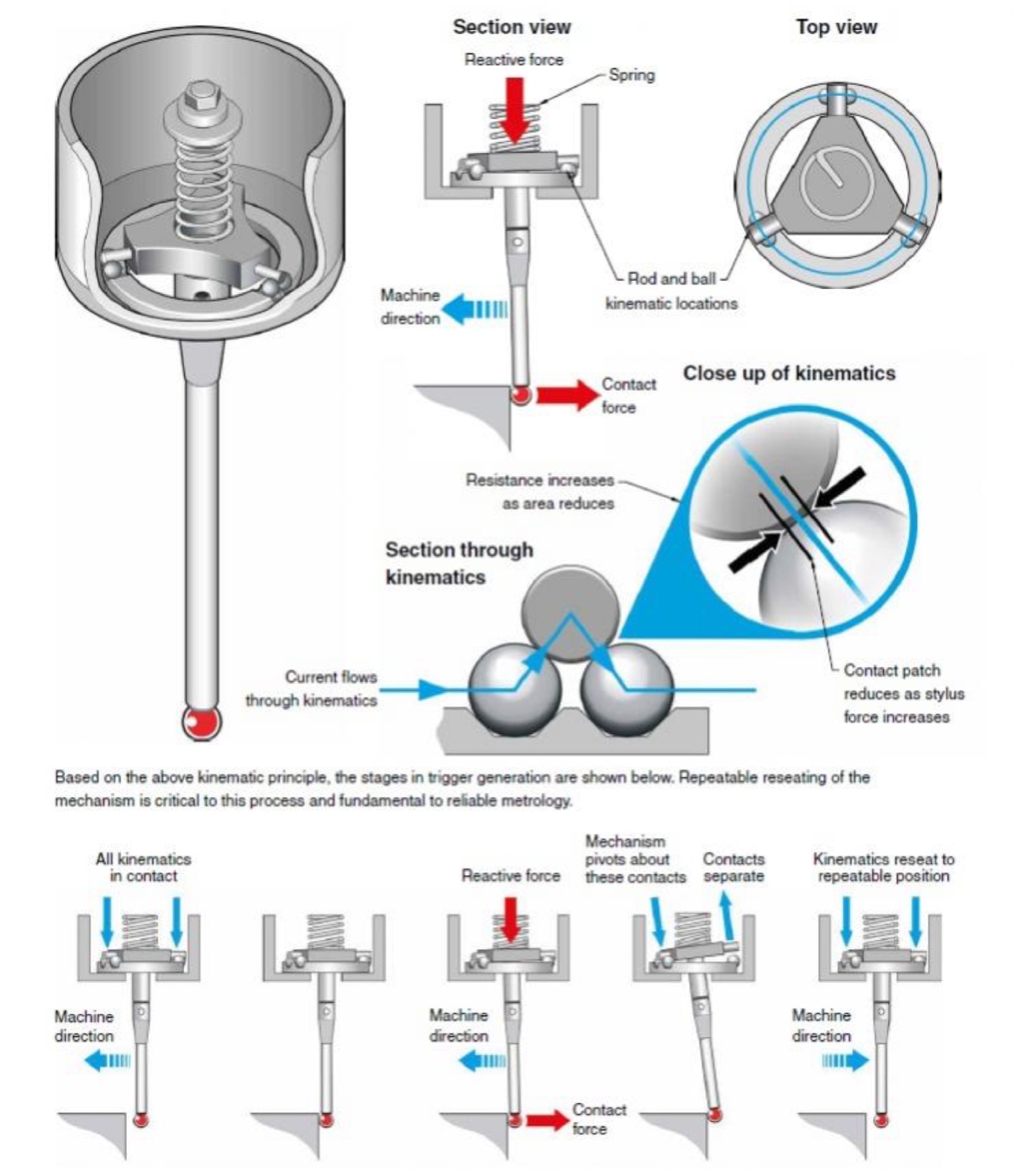
Reference positions (as \(O_{wp}\)can be measure in machine thanks to a touch probe:

  • a special non-rotating tool with a deflecting stylus and spherical tip that can be used to touch the workpiece and measure its position in machine coordinates
  • The 3 contact points provide a kinematic mount are also electric switches
  • When a switch opens, the current coordinate plus the sphere radius in the direction of motion gives the touch point coordinate
Tool reference (presetting)

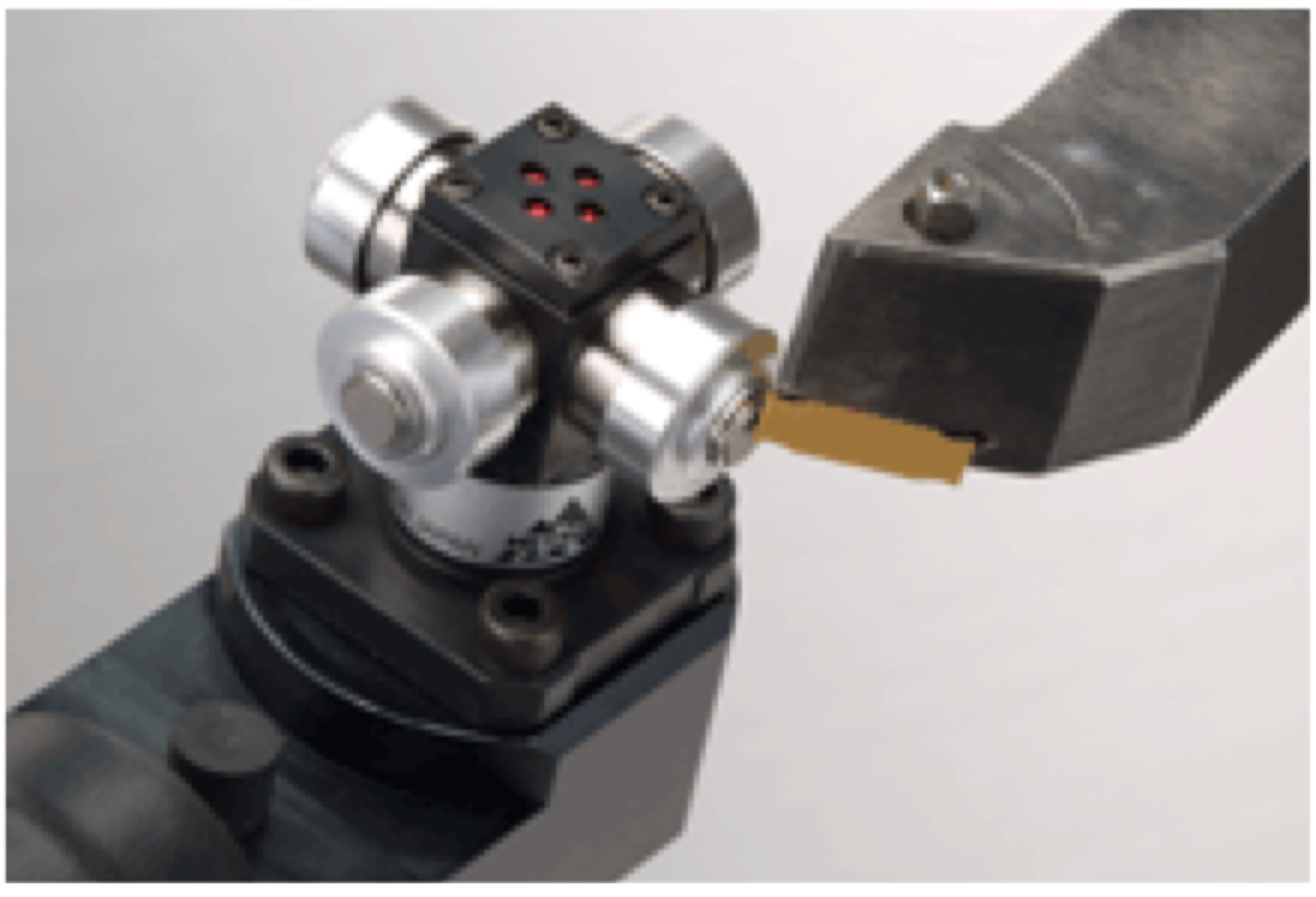
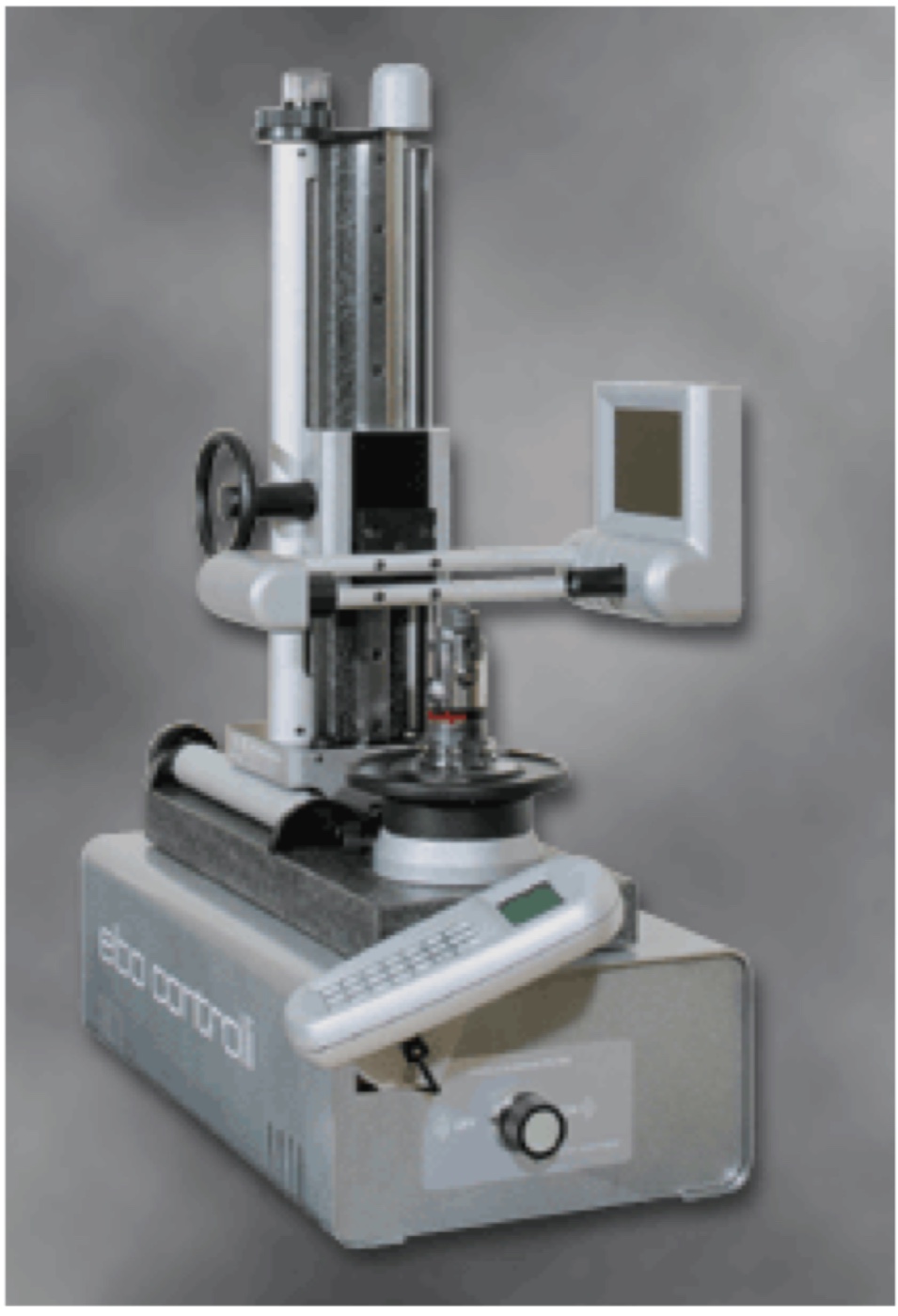
Tool geometry can be measured in machine (exposed time) or by a tool presetter (masked time). The latter is preferred because it is faster and more accurate, and it allows to measure the tool geometry without having to mount it on the machine.

  • On-board presetting uses a fixed stylus/switched contact point in known position reachable by the tool
  • Tool presetting systems have a dummy spindle mount, a camera and a shadow projector
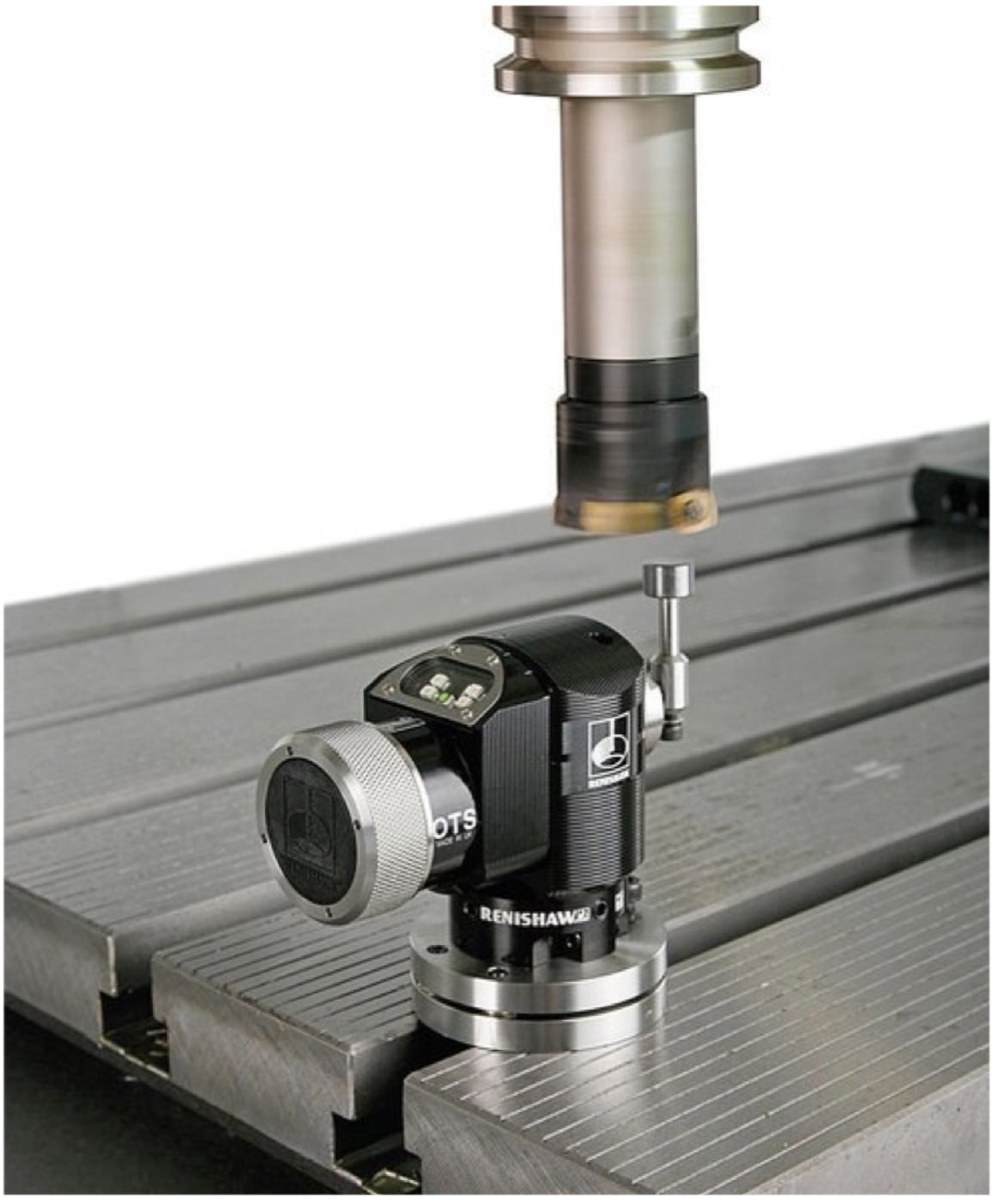
On-board presetting

Tool presetter

Automation

According to the Yardstick of Automation:

  • most CNC machines are at Level A4
  • Level A5 requires post-machining automated inspection and feedback to the CNC controller and to the part-program
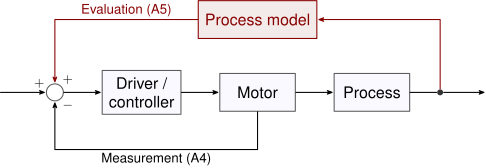
  • a validated process model can be required to implement A5, which is not necessarily available for most machining processes
  • empirical models (machine learning) can be used to implement A5, but they require a lot of data and are not always reliable

Machining cycle

The general sequence for machining a part is:
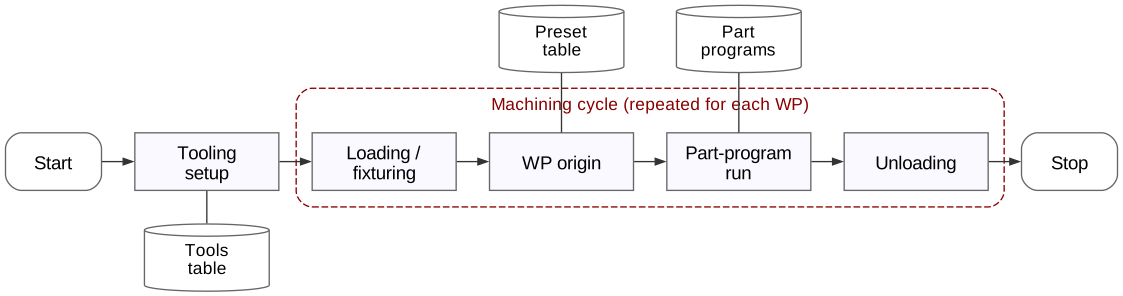
The section within the red box is the machining cycle, i.e. the sequence of operations that can be cyclically repeated for each part

Part-program structure

The structure of a part program generally follows a common structure:

  • setups
  • roughing section: removes the bulk of the material, usually with a large tool and high feedrate, leaving a small allowance for finishing
  • finishing section: removes the remaining material with a small tool and low feedrate (final geometry)
  • reset of the machine to a safe position and end of program
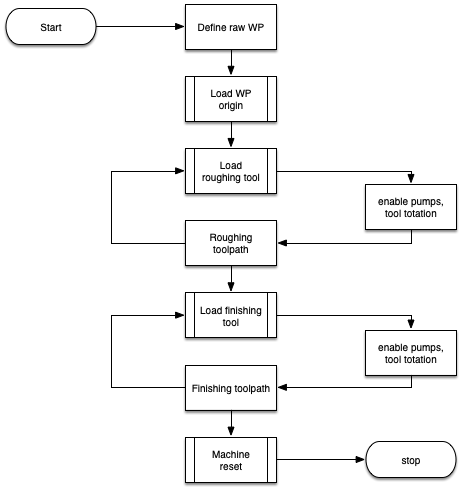
Toolpaths
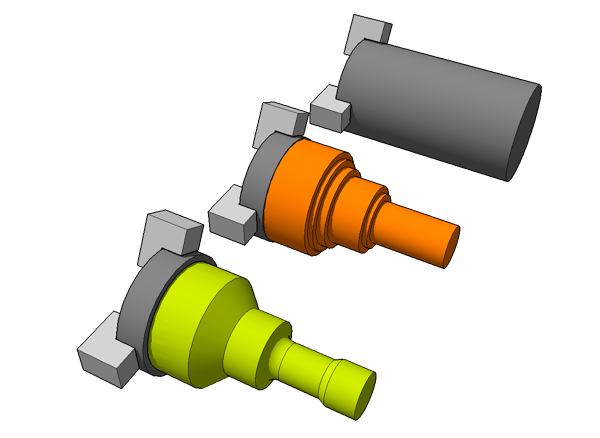
  • Roughing and finishing may require different tools for different geometries
  • Roughing typically follows simple, stepped trajectories
  • Roughing allowance (excess material) is usually in the range of
    • 0.5–1 mm for turning
    • 0.2–0.5 mm for milling

Workpiece Origin

In turning, X coordinates are in diameters. Two typical choices for origin:

  • rightmost axial point on finished workpiece
  • on the machine origin (fixtures must be taken into consideration)

Common choice for WP origin among machinists is the rightmost axial point on finished workpiece (turning) and topmost point on the finished workpiece (milling). This choice allows to quickly spot in a program safe fast motions (positive \(z\)), from dangerous fast motions (negative \(z\)) that can crash the tool into the workpiece or fixture.

G-Code

ISO language (ISO/DIN 6983): sequence of [C][arg] where C is a letter and arg is a number. Valid commands are:

Cod. Command
A Rotation about X
B Rotation about Y
C Rotation about Z
D Tool diameter compensation
E Secondary feedrate
F Feedrate
G Preparatory function
H —
I Circle center, X
Cod. Command
J Circle center, Y
K Circle center, Z
L —
M Machine function
N Block number
O —
P Third motion along X
Q Third motion along Y
Cod. Command
R Third motion along Z
S Spindle speed
T Tool number
U Second motion along X
V Second motion along Y
W Second motion along Z
X Motion along X
Y Motion along Y
Z Motion along Z

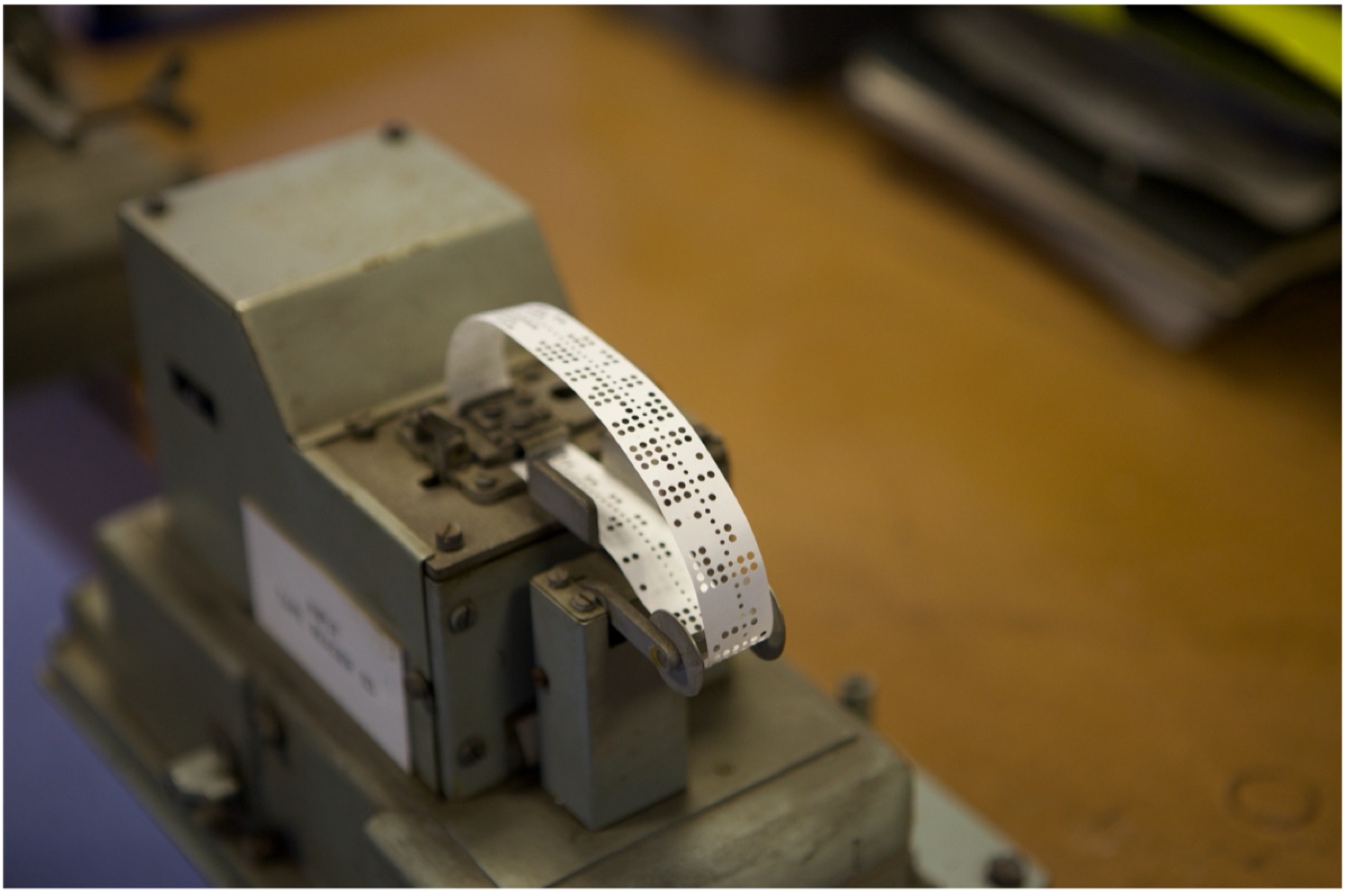
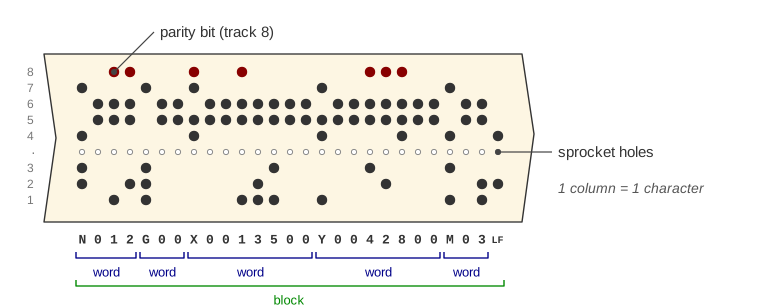
Punch tape

  • G-Code was developed during 1950s
  • Computers only had punch tapes as input devices
  • Language had to be concise

G-code functions

Types of functions:

  • Preparatory functions (G, T)
  • Positioning functions (X, Y, Z, A, B, C)
  • Machine functions (M)

G functions:

  • G00: rapid positioning
  • G01: linear interpolation
  • G02/G03: circular interpolation (CW/CCW)
N1 T1 S500.0 M3                             ; tool n°1, CW rotation, 500 rpm
N2 M8;                                      ; fluid jets ON
N3 G00 X60.0 Z0.0;                          ; rapid positioning
N4 G01 X-0.5 Z0.0 F1000.0                   ; facing
N5 G01 X20.0 F1000.0
N6 G03 X40.0 Z-5.0 I30.0 K-10.0 F1000.0     ; arc R=10.0
...
N128 M30                                    ; fine programma

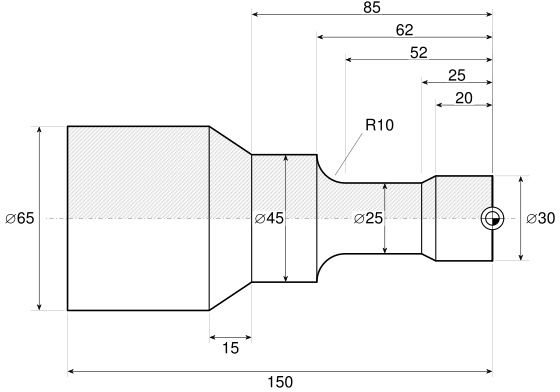
Example: turning

Example: turning — roughing
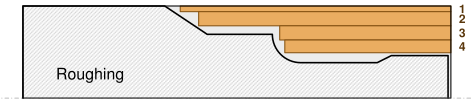
N10 G00 X61.0 Z7.0
N11 G01 Z-94.5 F1000.0
N12 G01 G91 X5.0 F2000.0
N13 G00 Z7.0
N14 G00 X51.0
N15 G01 Z-88 F1000.0
N16 G01 G91 X5.0 F2000.0
N17 G00 Z7.0
N18 G00 X41.0 Z7.0
N19 G01 Z-59.4 F1000.0
N20 G01 G91 X5.0 F2000.0
N21 G00 Z7.0
N22 G00 X32.0
N23 G01 Z-57.6 F1000.0
N24 G01 G91 X5.0 F2000.0
N25 G00 Z7.0

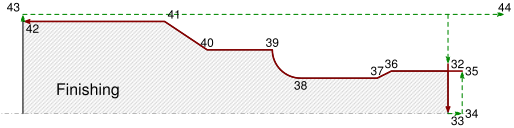
Example: turning — finishing

N31 G00 X70.0 Z0.0
N32 G00 X35.0
N33 G01 X0.0 F1000.0 S2000.0
N34 G00 Z5.0
N35 G00 X30.0
N36 G01 Z-20.0
N37 G01 X25.0 Z-25
N38 G01 Z-52.0
N39 G02 X45.0 Z-62.0 I10.0 K0.0
N40 G01 Z-85.0
N41 G01 G91 X20.0 Z-15.0
N42 G01 G90 Z-150.0
N43 G00 X70.0
N44 G00 Z20.0
...
N98 M30

Example: milling

  • WP origin is usually placed in \(y,y\) plane on a geometry feature where most of the dimensions are referenced to, e.g. the bottom-left corner of a rectangular pocket
  • The \(z\) coordinate is set to the topmost surface on the finished part:
    • the very first roughing operation will remove the excess material and reach the finished surface, which will be used as reference for all subsequent operations
    • any subsequent operation is carried out at a negative \(z\) coordinate, which is the depth of cut below the finished surface
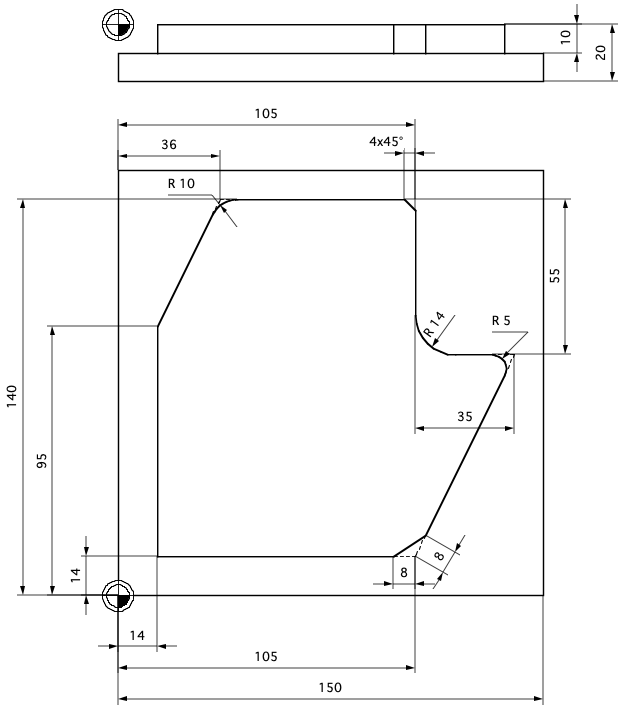
Example: milling

G-code language
%es1 G71 *
N10 G30 G17 X+0 Y+0 Z-20*
N20 G31 X+150 Y+150 Z+0*
N30 G247 Q339=+1*
N40 T1 G17 S5000 F4000*
N50 G00 G90 X+14 Y-15 Z+10 G40 M8*
N60 G00 Z-10 G40*
N70 G01 Y+95 G41 F4000*
N80 G01 X+36 Y+140*
N90 G25 R10*
N100 G01 X+105*
N110 G24 R4*
N120 G01 G91 Y-55*
N130 G25 R14*
N140 G01 G91 X+35*
N150 G25 R5*
N160 G01 G90 X+105 Y+14*
N170 G24 R8*
N180 G01 X-15*
N190 G00 Z+10 G40*
N200 G38 M30*
N99999999 %es1 G71 *
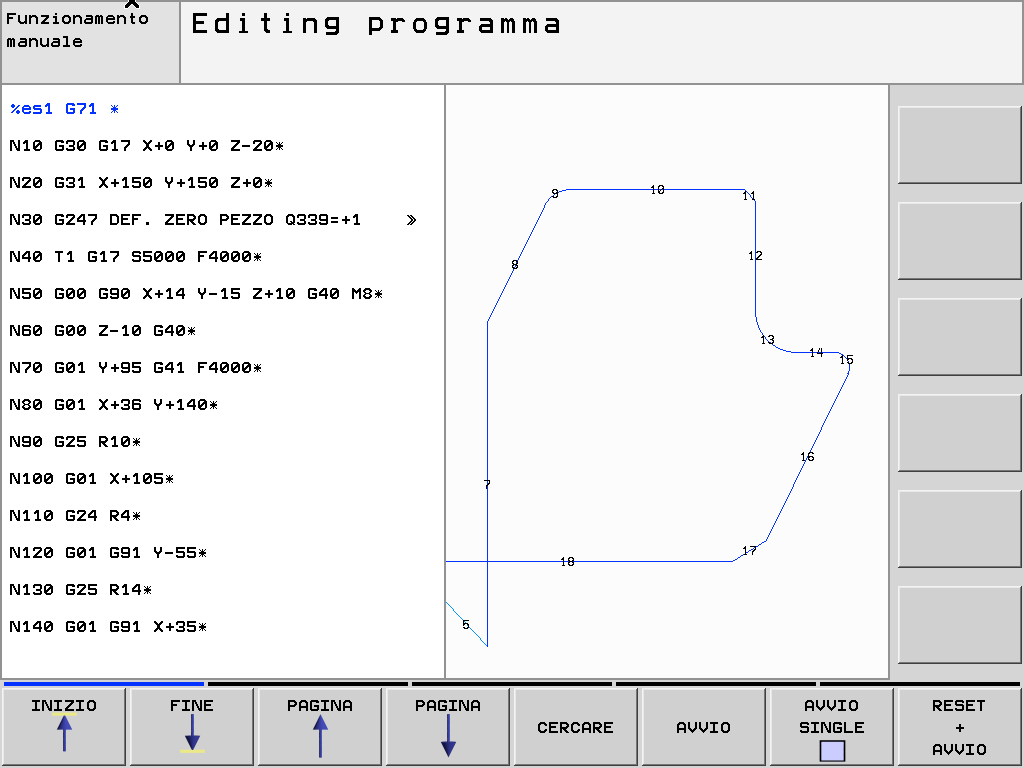
Heidenhain CNC - interactive programming

Program check

G-code language
%es1 G71 *
N10 G30 G17 X+0 Y+0 Z-20*
N20 G31 X+150 Y+150 Z+0*
N30 G247 Q339=+1*
N40 T1 G17 S5000 F4000*
N50 G00 G90 X+14 Y-15 Z+10 G40 M8*
N60 G00 Z-10 G40*
N70 G01 Y+95 G41 F4000*
N80 G01 X+36 Y+140*
N90 G25 R10*
N100 G01 X+105*
N110 G24 R4*
N120 G01 G91 Y-55*
N130 G25 R14*
N140 G01 G91 X+35*
N150 G25 R5*
N160 G01 G90 X+105 Y+14*
N170 G24 R8*
N180 G01 X-15*
N190 G00 Z+10 G40*
N200 G38 M30*
N99999999 %es1 G71 *
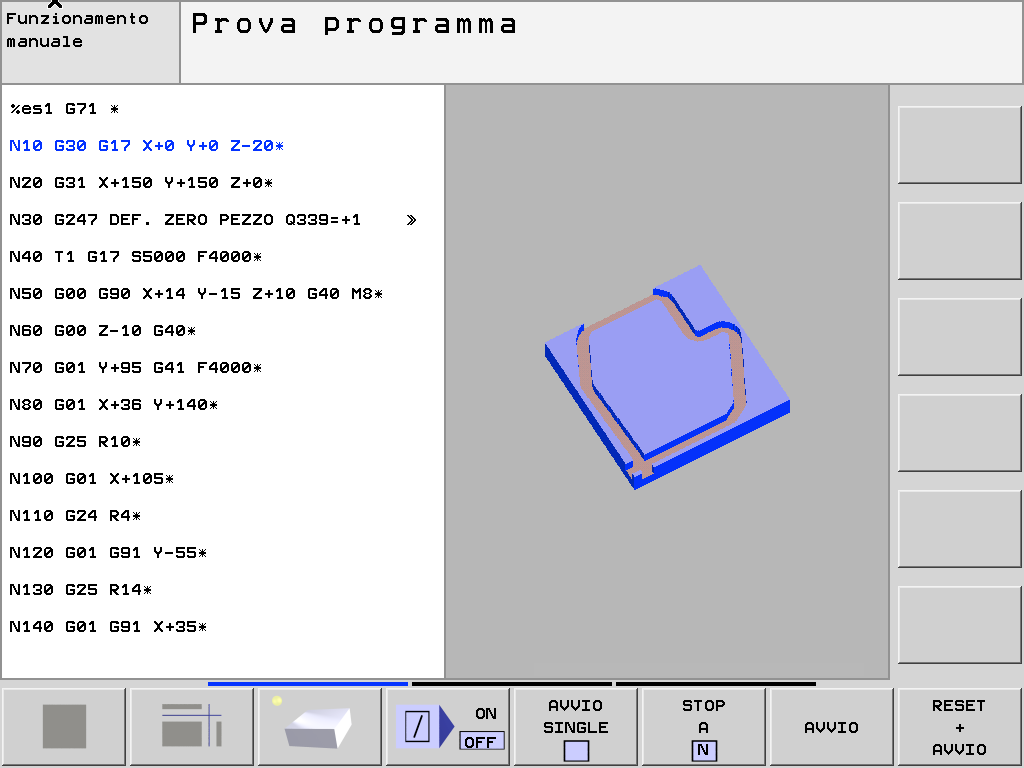
Heidenhain CNC - program preview

Advanced languages

Different CNC manufacturers implement proprietary languages that extend the basic G-code with advanced features:

  • Explicit, richer syntax
  • Conversational/interactive programming (zero-handbook)
  • Macros
  • Parametric programming
Heidenhain language
0  BEGIN PGM es1 MM
1  BLK FORM 0.1 Z  X+0  Y+0  Z-20
2  BLK FORM 0.2  X+150  Y+150  Z+0
3  CYCL DEF 247 DEF. ZERO PEZZO ~
    Q339=+1    ;NUMERO ORIGINE
4  TOOL CALL 1 Z S5000 F4000
5  M8
6  L  X+10  Y-10  Z+10 R0 FMAX
7  L  Z-10 R0 FMAX
8  L  Y+95 RL F AUTO
9  L  X+36  Y+140
10 RND R10 F AUTO
11 L  X+105
12 CHF 4
13 L IY-55
14 RND R14
15 L IX+35
16 RND R5
17 L  X+105  Y+14
18 CHF 8
19 L  X-15
20 L  Z+10 R0 FMAX
21 STOP M30
22 END PGM es1 MM

CNC

Algorithms for Computer Numerical Control — machining complex shapes
CNC kernel tasks

The CNC kernel is the part of the CNC controller that implements the real-time control loop. It is responsible for:

  • Understanding a part-program (parsing)
  • Generate velocity profiles (profiling)
  • Position interpolation (project trajectory on the machine axes)
  • Generate command signals (actuation) to the axes drives

Note

Beside these tasks, the rest of the CNC also takes care of the GUI, programs selection, editing and storing, networking, tables management (presets and tools), interaction with the PLC, and other non-real-time tasks. The CNC kernel is the part of the CNC that is real-time and must be implemented in a real-time operating system (RTOS)

Profiling

Profiling is where motion algorithms are implemented. For every block:

  • preserve block length: \(\displaystyle\int_{t_a}^{t_b} f(\tau)\,\mathrm{d}\tau = l\)
  • limit acceleration to the maximum allowed by the machine
  • limit jerks, to minimize vibrations and mechanical stress
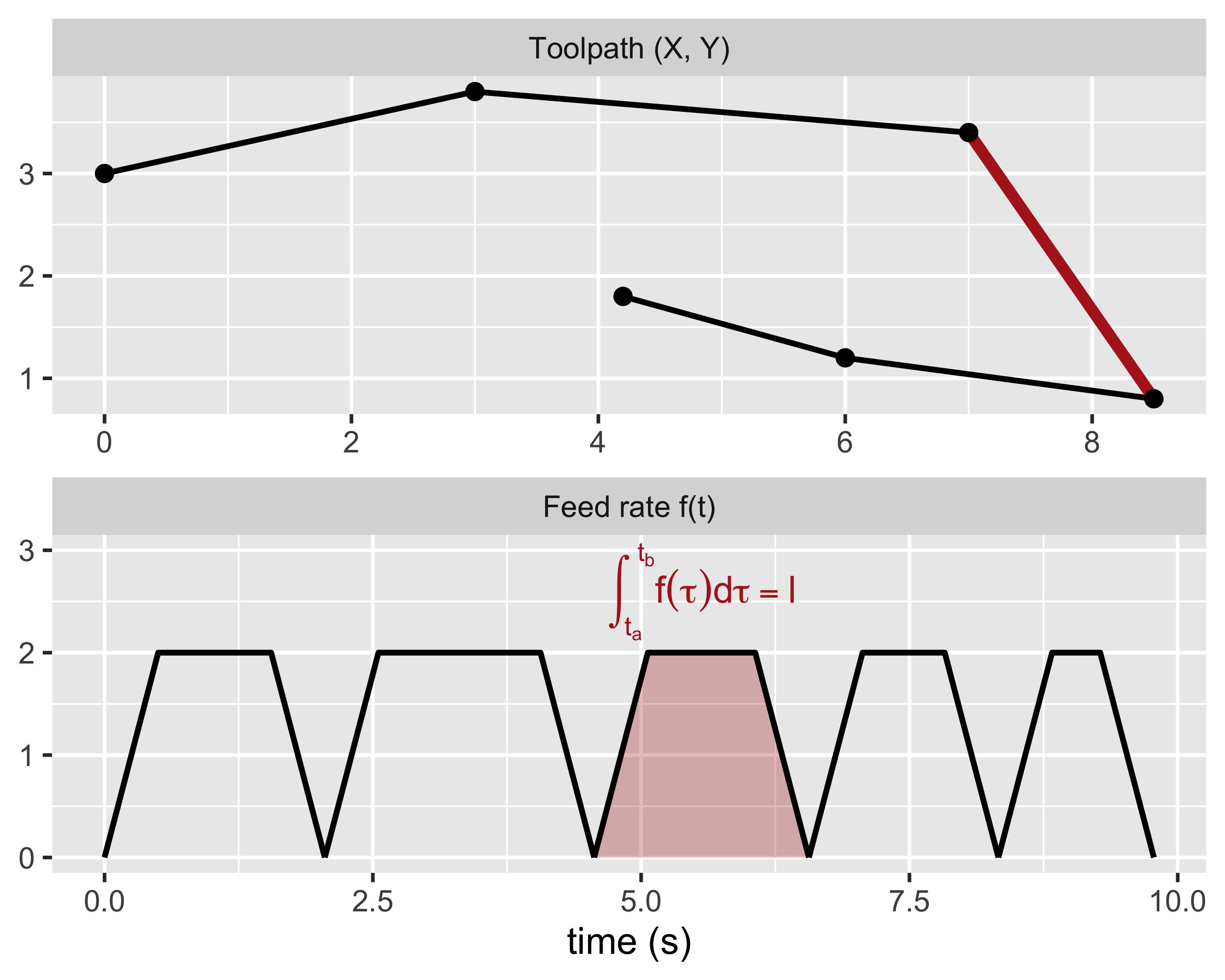
Profiling

Discrete time-base (clock steps of \(t_q\)) and feedrate quantization. Block durations must be scaled to a multiple of \(t_q\) yet maintaining the same block length. The actual feedrate is reduced accordingly.
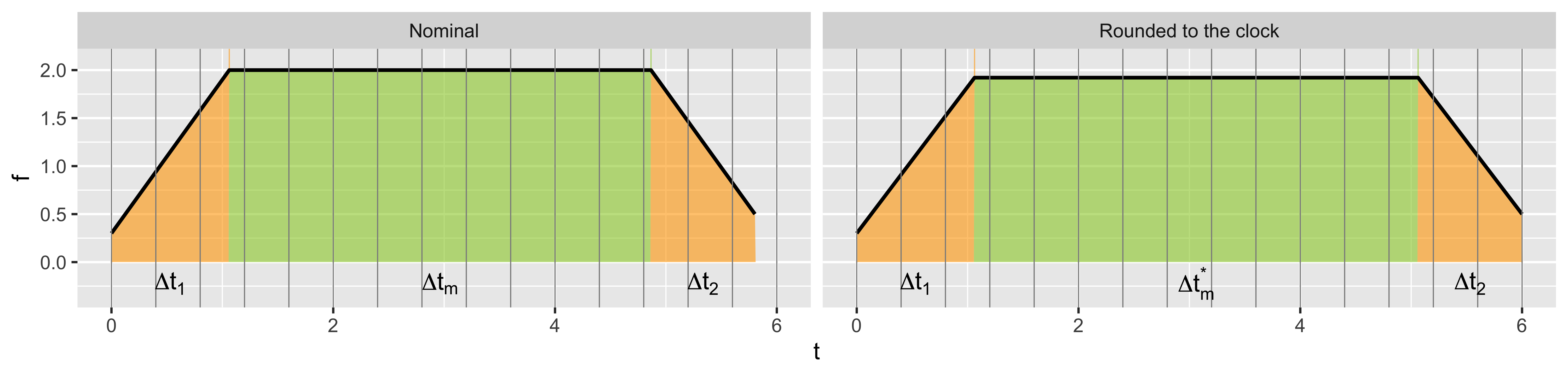
\[ \Delta t_1 = \frac{f_m - f_s}{a}, \quad \Delta t_2 = \frac{f_m - f_e}{d}, \quad \Delta t_m = \frac{l}{f_m} - \Delta t_1 \frac{f_m + f_s}{2 f_m} - \Delta t_2 \frac{f_e + f_m}{2 f_m} \]

\[ \Delta t^* = \mathrm{int}\left(\frac{\Delta t}{t_q} + 1\right) t_q = \Delta t_1 + \Delta t_m^* + \Delta t_2, \qquad \Delta t_m^* = \Delta t_m + \Delta t^* - \Delta t \]

Profiling

Discrete time-base (clock steps of \(t_q\)) and feedrate quantization. Block durations must be scaled to a multiple of \(t_q\) yet maintaining the same block length. The actual feedrate is reduced accordingly.
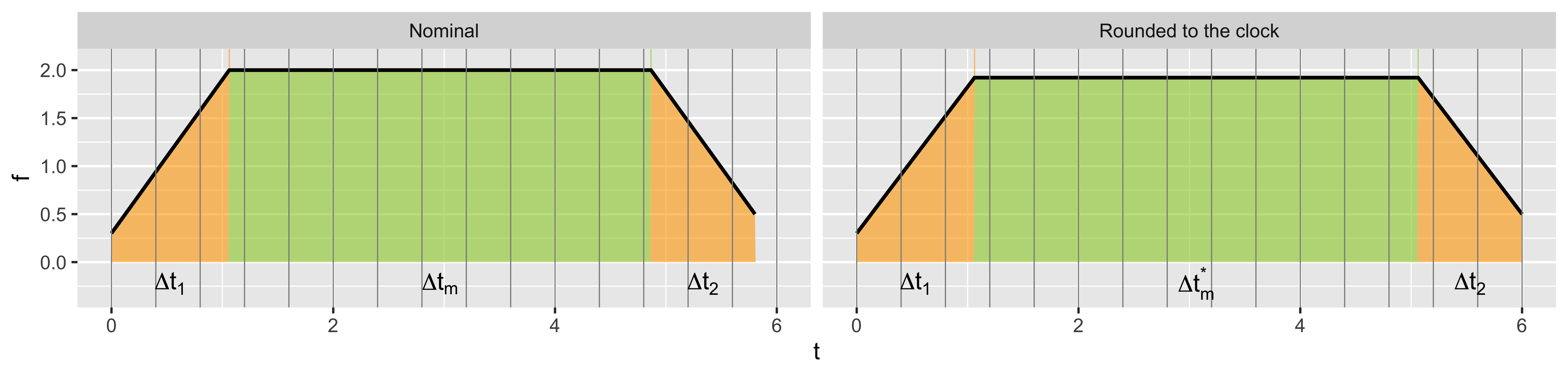
\[ \int_{t_s}^{t_e} f(\tau)\,\mathrm{d}\tau = \frac{\Delta t_1}{2}(f_m^* + f_s) + \Delta t_m^* f_m^* + \frac{\Delta t_2}{2}(f_m^* + f_e) = l \]

\[ f_m^* = \frac{2l - f_s \Delta t_1 - f_e \Delta t_2}{\Delta t_1 + \Delta t_2 + 2\Delta t_m^*}, \qquad a^* = \frac{f_m^* - f_s}{\Delta t_1}, \qquad d^* = \frac{f_e - f_m^*}{\Delta t_2} \]

Profiling

In short segments there’s no time enough to reach the nominal feedrate: \(\Delta t_m \le 0\)
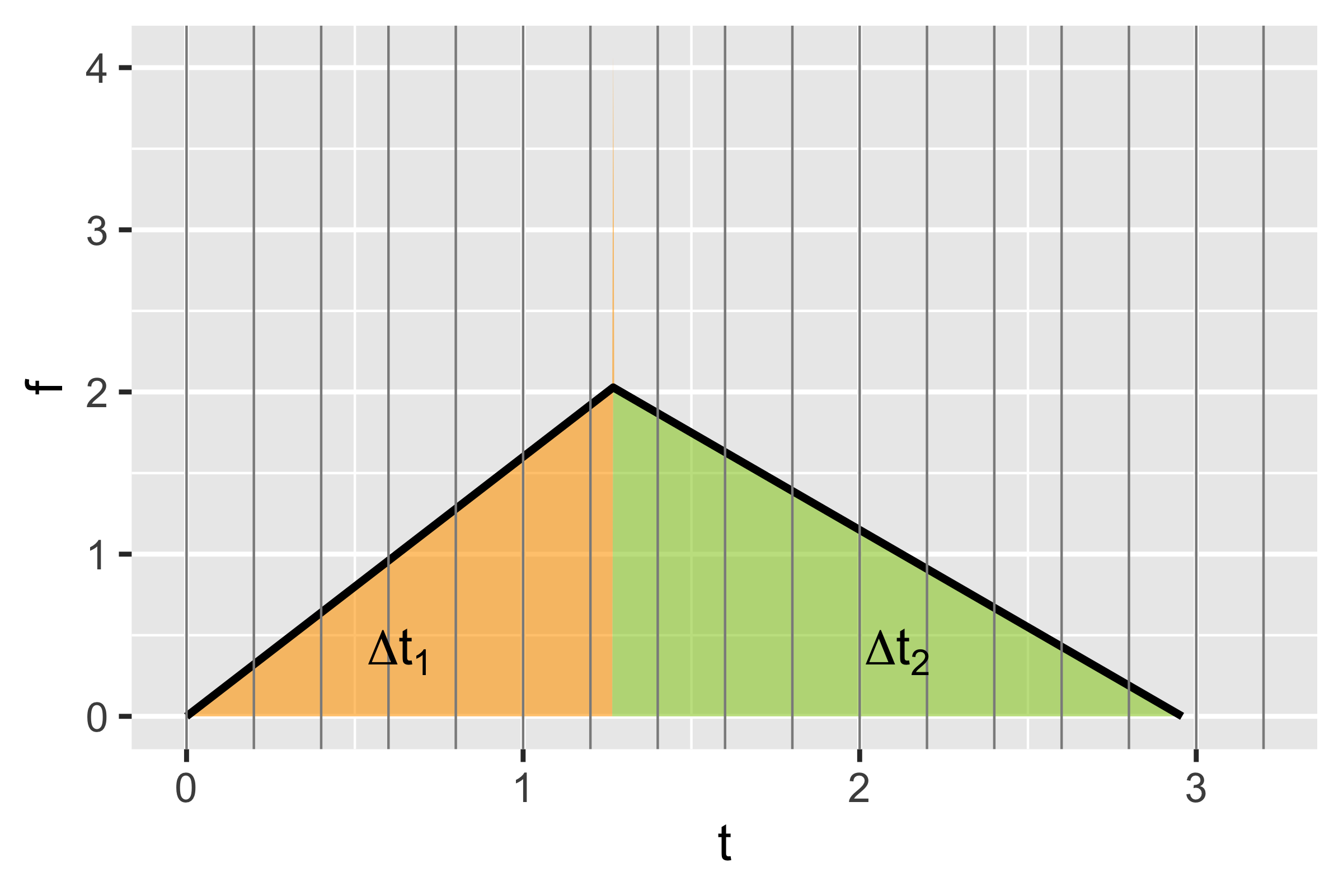
\[ \int_{t_s}^{t_e} f(\tau)\,\mathrm{d}\tau = \frac{a\Delta t_1^2 + d\Delta t_2^2}{2}; \quad a\Delta t_1 = d\Delta t_2 \]

\[ \frac{\Delta t_1^2 (a + a^2/d)}{2} = l \]

\[ \begin{aligned} \Delta t_1 &= \sqrt{\frac{2l}{a + a^2/d}} \\ \Delta t_2 &= \frac{a}{d}\Delta t_1 \\ \Delta t_2^* &= \Delta t^* - \Delta t_1 \end{aligned} \qquad f_m^*(\Delta t_1 + \Delta t_2^*) = 2l \qquad \begin{aligned} a^* &= \frac{f_m^* - f_s}{\Delta t_1} \\ d^* &= \frac{f_e - f_m^*}{\Delta t_2^*} \end{aligned} \]

Motion interpolation

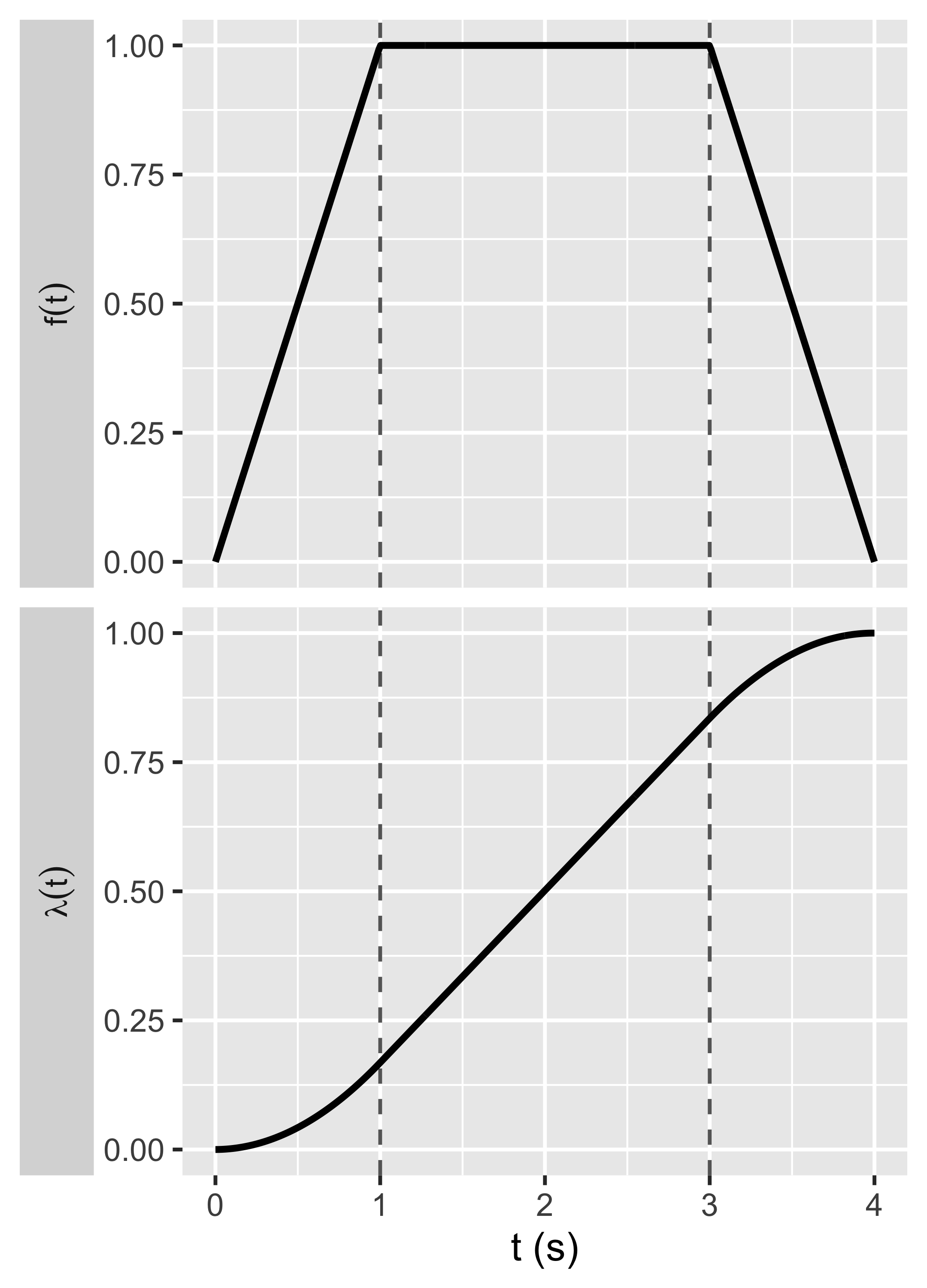
  • The speed profile is evaluated and integrated at each time tick: \(\lambda(t) = 1/L\int_0^t f(\tau)\,d\tau\)
  • The axes set-points are calculated with the parametric equation of the path
  • For a linear motion:

\[ \begin{aligned} X(t) &= X_0 + \Delta X \lambda(t) \\ Y(t) &= Y_0 + \Delta Y \lambda(t) \\ Z(t) &= Z_0 + \Delta Z \lambda(t) \end{aligned} \]
Motion interpolation

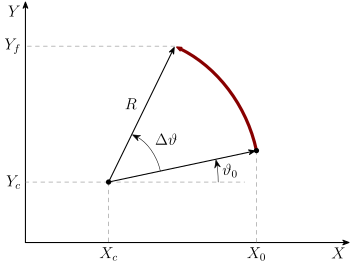
For arc interpolation:

\[ \begin{aligned} X(t) &= X_c + R\cos(\vartheta_0 + \Delta\vartheta \lambda(t)) \\ Y(t) &= Y_c + R\sin(\vartheta_0 + \Delta\vartheta \lambda(t)) \\ Z(t) &= Z_0 + \Delta Z \lambda(t) \end{aligned} \]

Warning: feedrate may be reduced

\[ f_{m,a} = \min\left(f_m, \sqrt{aR}\right) \]
Motion interpolation

Two alternative G-code syntax for arcs:

  • arch center: G[02|03] X[\(X_f\)] Y[\(Y_f\)] I[\(I\)] J[\(J\)]
  • radius: G[02|03] X[\(X_f\)] Y[\(Y_f\)] R[\(\pm R\)] (radius sign discriminates which arc to take)
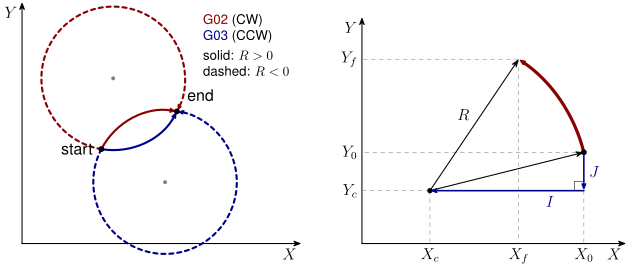
\[ \begin{aligned} \vartheta_0 &= \cos^{-1} I/R \\ \vartheta_f &= \cos^{-1} (X_f - X_c)/R \\ X_c &= X_0 + I \\ Y_c &= Y_0 + J \\ R &= \sqrt{I^2 + J^2} \\ R^2 &= (X_f - X_c)^2 + (Y_f - Y_c)^2 \end{aligned} \]

Motion interpolation

Center coordinates (two alternatives depending on the sign of \(R\))

\[ \Delta x = X_f - X_0, \qquad \Delta y = Y_f - Y_0 \]

\[ X_c = X_0 + \frac{1}{2}\left(\Delta x - \mathrm{sign}(R)\,\frac{\sqrt{-\Delta y^2 (\Delta x^2 + \Delta y^2)(-4R^2 + \Delta x^2 + \Delta y^2)}}{\Delta x^2 + \Delta y^2}\right) \]

\[ Y_c = Y_0 + \frac{\Delta y}{2} + \mathrm{sign}(R)\,\frac{\Delta x \sqrt{-\Delta y^2 (\Delta x^2 + \Delta y^2)(-4R^2 + \Delta x^2 + \Delta y^2)}}{2\Delta x^2 \Delta y + 2\Delta y^3} \]

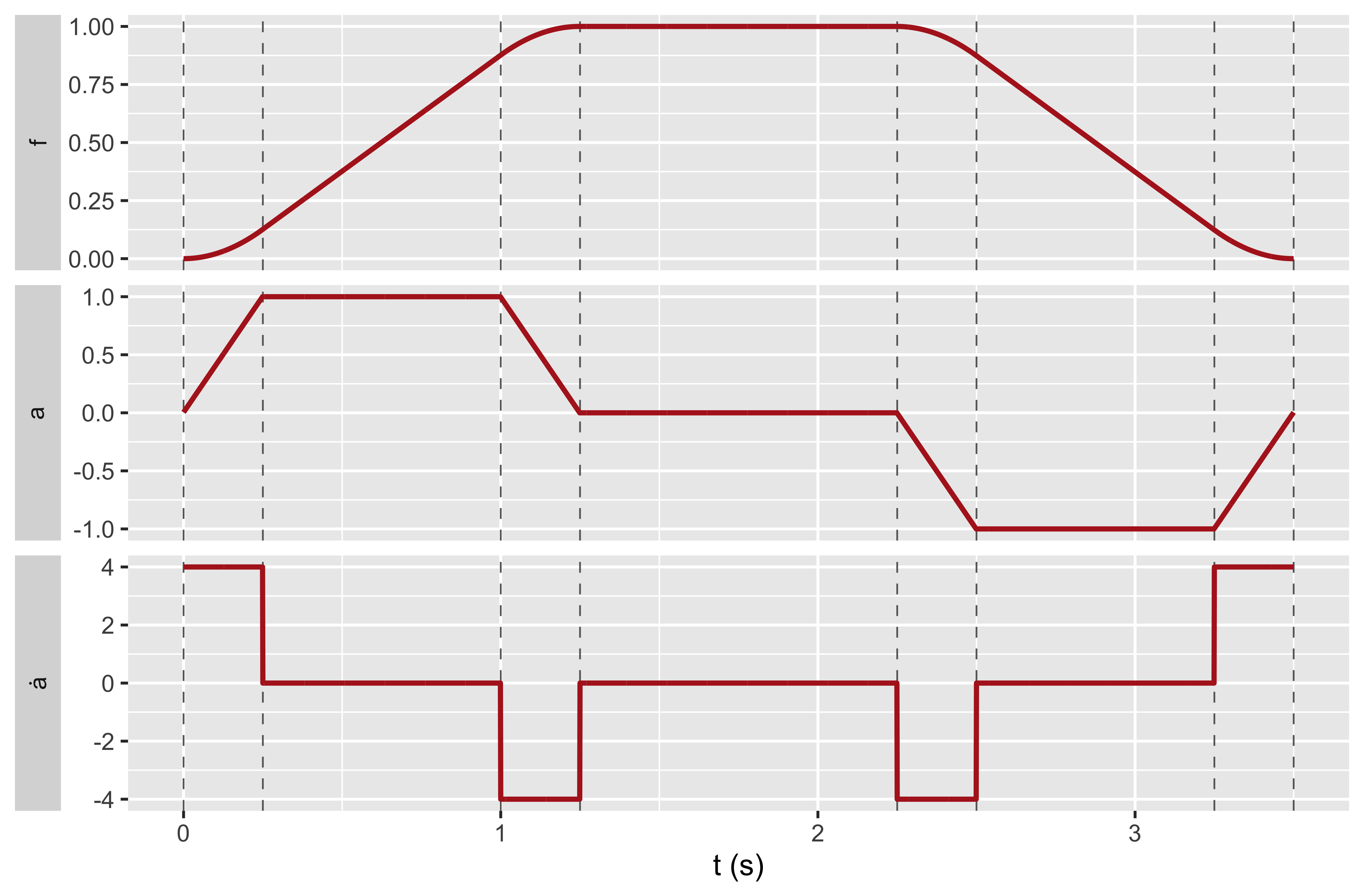
Jerk

Jerk-limited profiling:

  • corners in feedrate imply discontinuous acceleration
  • discontinuous acceleration mean infinite jerk
  • infinite jerk produces vibrations and mechanical stress
  • for limited jerk profiling each segment is split into 7 ranges (vs. 3)
Look-ahead feedrate profile

The above presented algorithm assumes that the instant speed goes to zero at each corner. This is not acceptable in real CNC machines, for two reasons:

  • Problem 1: tangent or semi-tangent blocks would result in excessive reduction of feedrate wrt nominal
  • Problem 2: it shall be possible to accelerate to nominal feedrate with continuous acceleration over \(n\) short segments, and it may take more than one segment to decelerate down to stop

To solve these issue we need to plan the velocity profile across multiple blocks of G-Code. This is called look-ahead

Look-ahead feedrate profile

Approach:

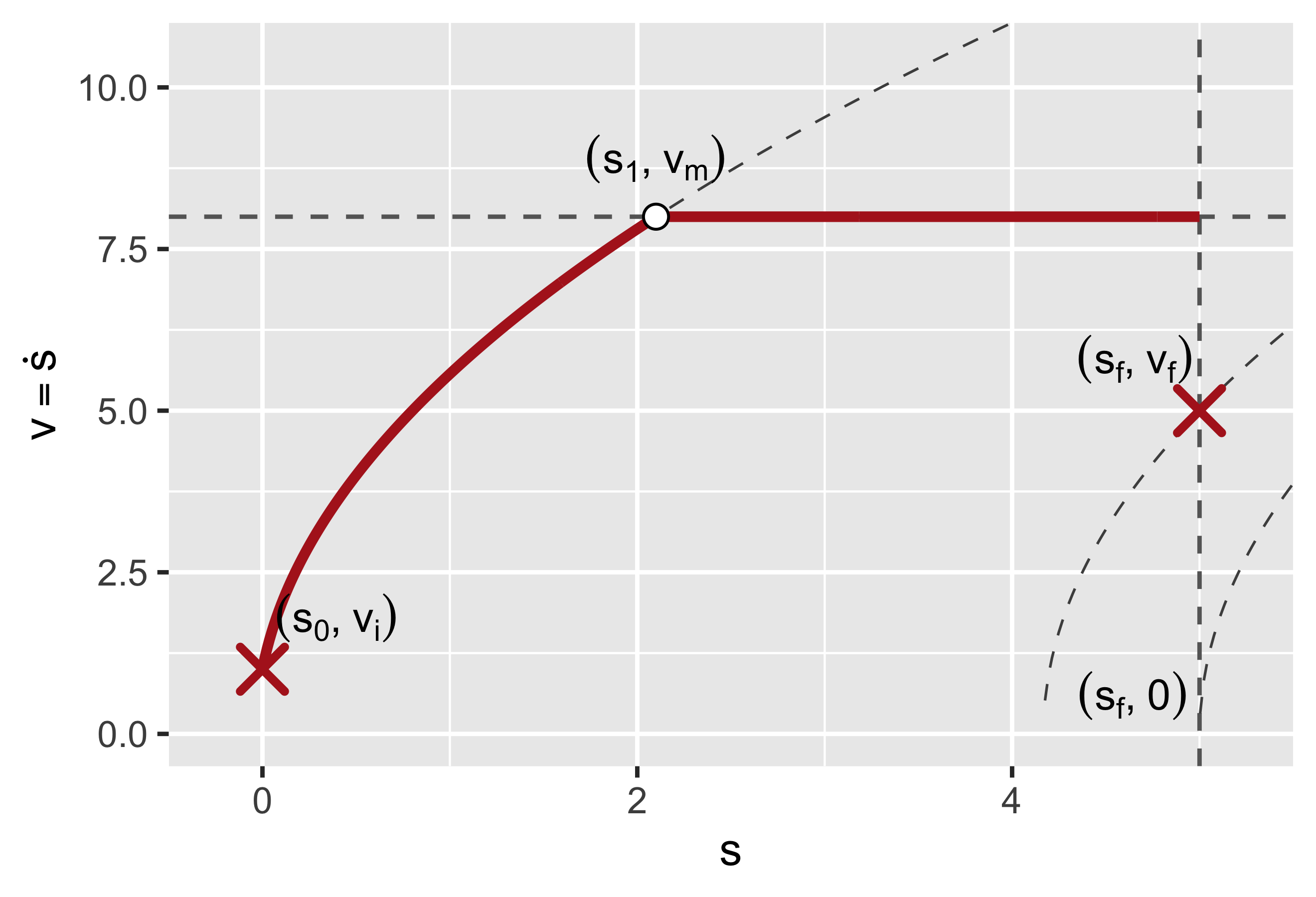
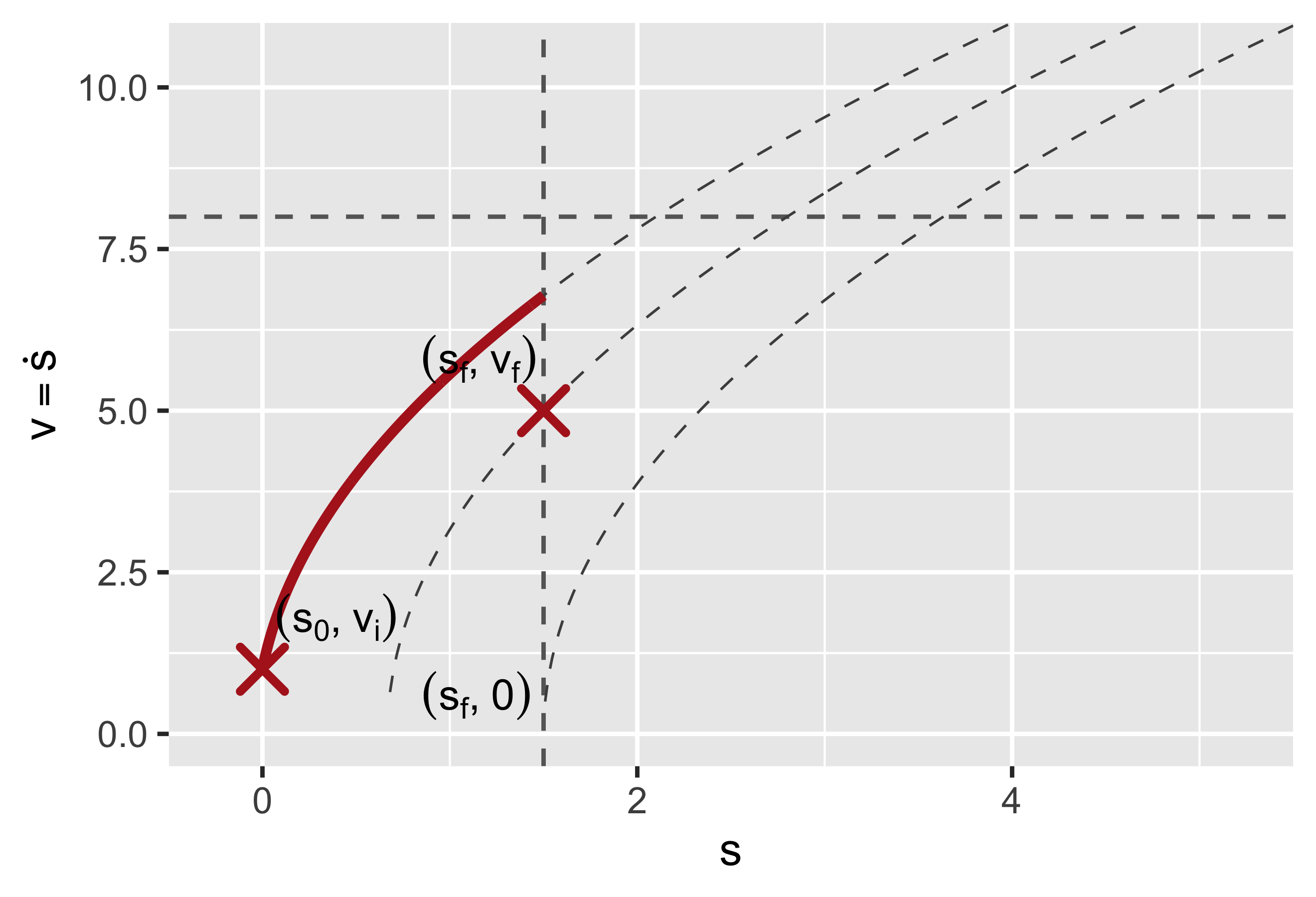
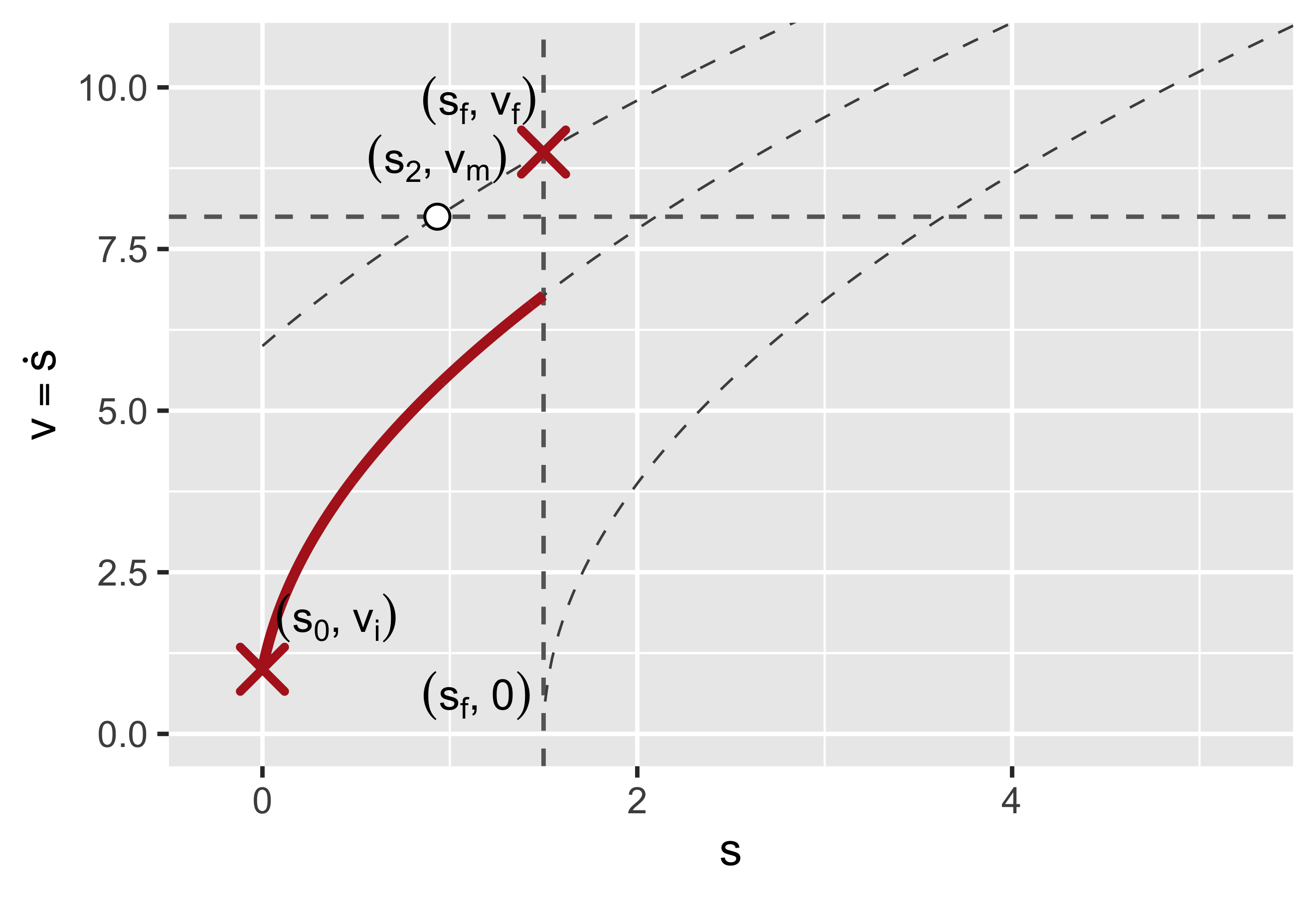
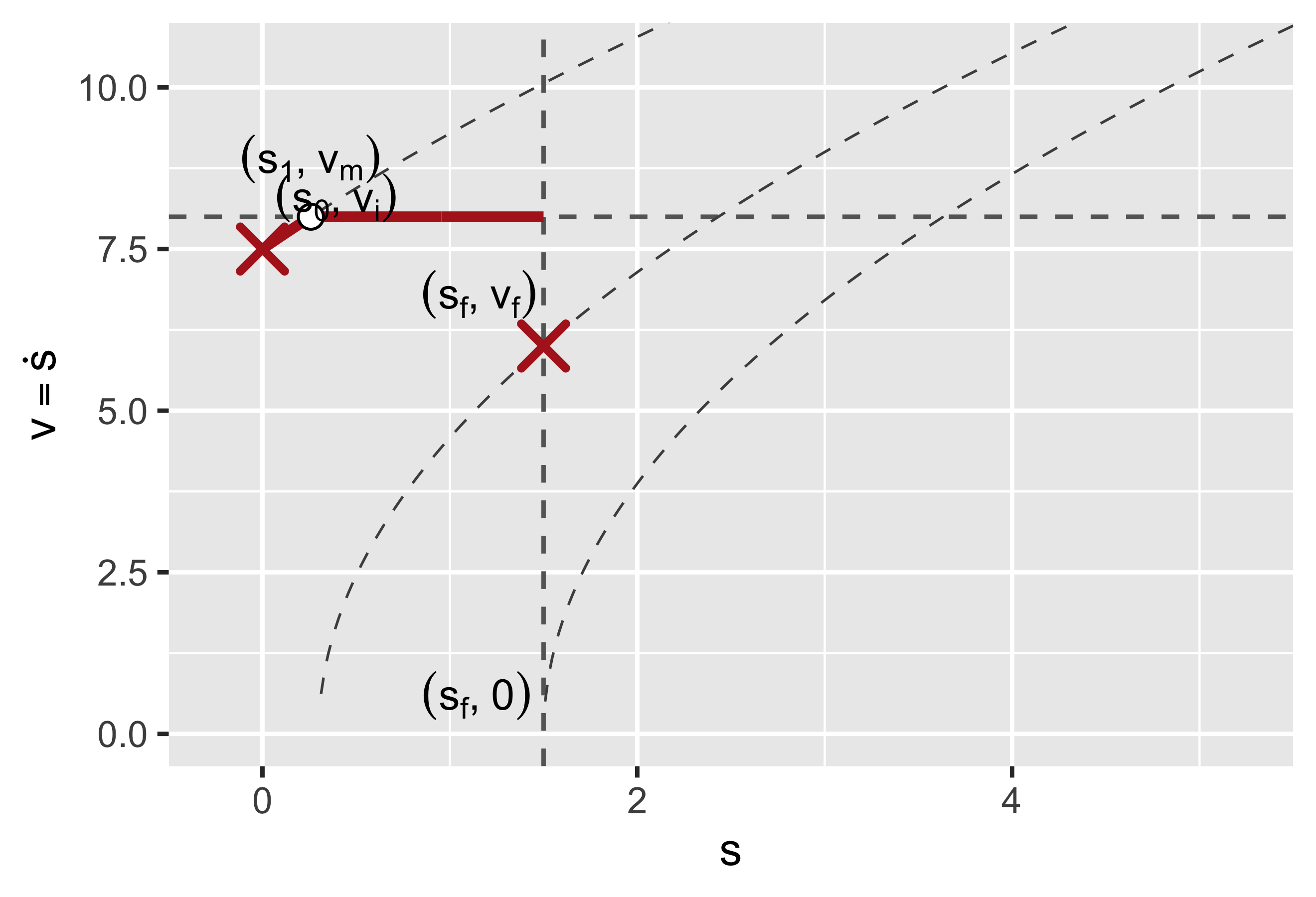
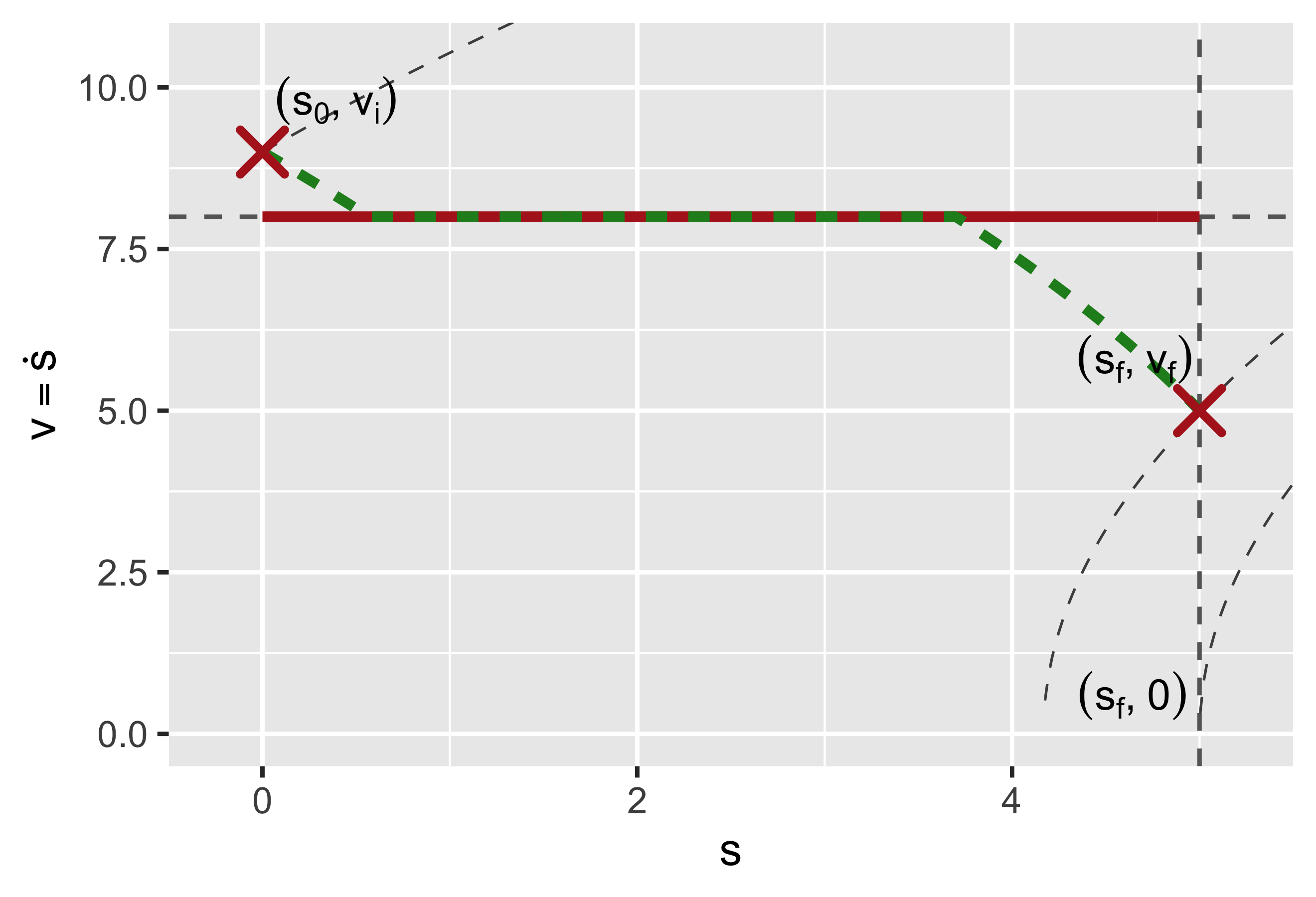
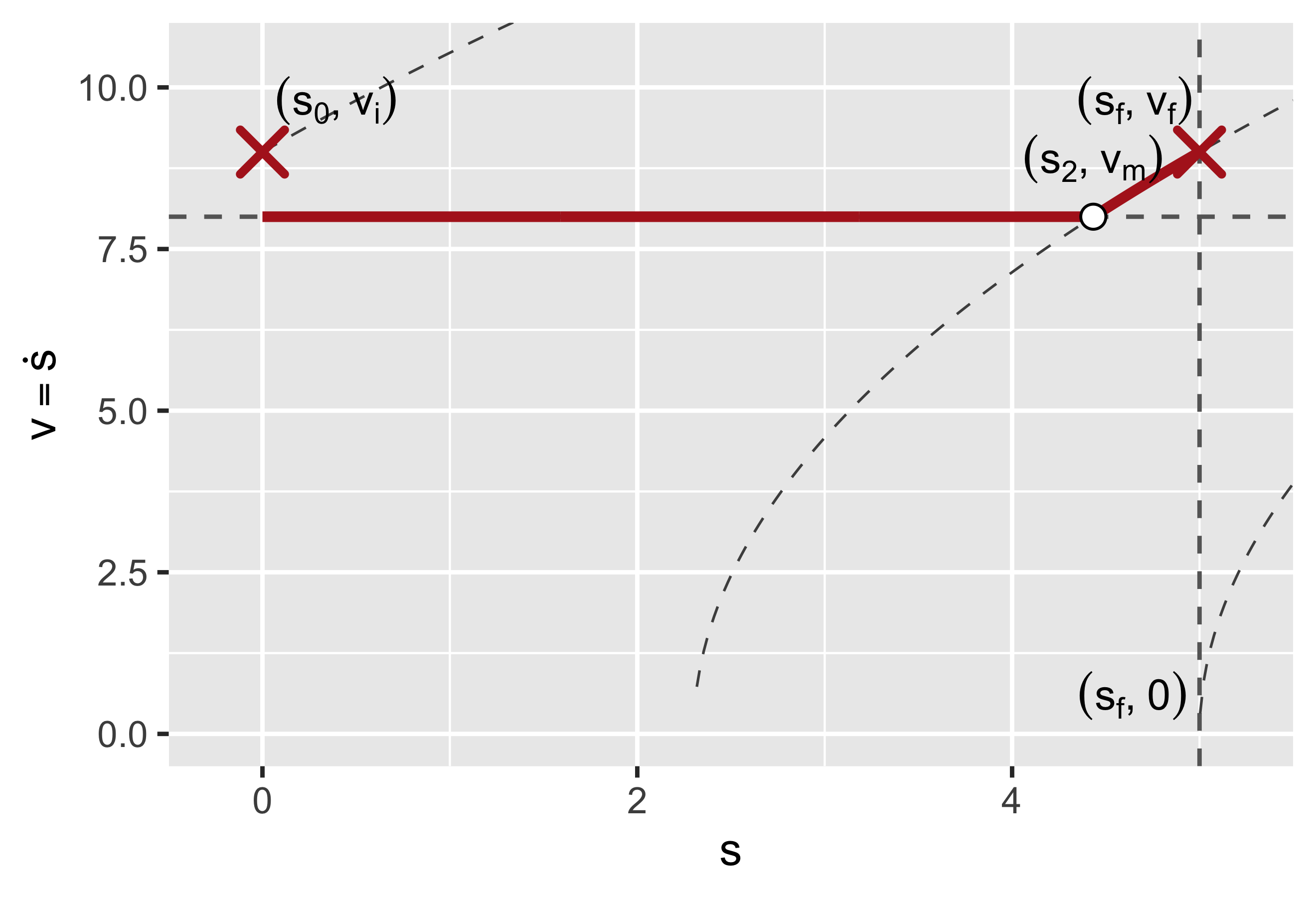
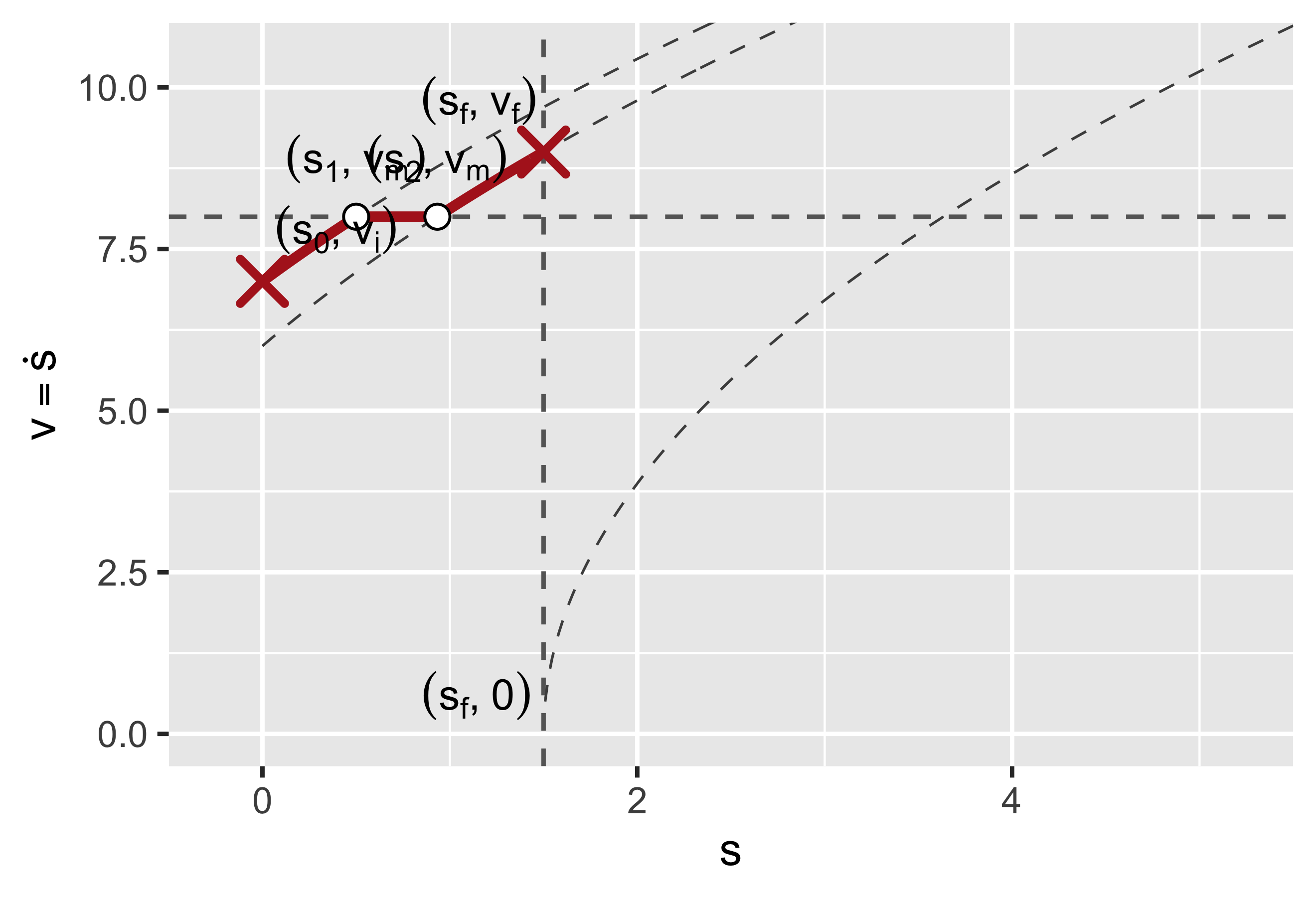
  1. Calculate \(v_i\), \(v_m\), \(v_f\) for each block, considering \(v = v(s)\)
  2. Forward step: from block 1 to block \(n\), calculate accelerations only
  3. Backward step: from block \(n\) to block 1, calculate decelerations only and compose with accelerations
  4. Change variable \(s \to t\) and get \(v = v(t)\)
  5. Reshape \(v^* = \dfrac{v(t)}{k}\), where \(k = t_f / t_f^*\) and \(t_f^*\) is the multiple of \(t_q\) immediately larger than the total time \(t_f\) (block by block)

Constant Acc/Dec

  • We cannot calculate feed profiles in time abscissa, for we don’t know the duration of each step
  • Thus we start planning in curvilinear abscissa \(s\):
    • \(s(t) = s_0 + v_0 t + a t^2/2\), and thus \(t(s) = \dfrac{1}{a}\left(-v_0 \pm \sqrt{2a(s - s_0) + v_0^2}\right)\)
    • Since \(v(t(s)) = v_0 + a\, t(s)\), it follows that \(v(s) = \sqrt{2a(s - s_0) + v_0^2}\)
    • So accelerations and decelerations follow a square root law of \(s\)
  • In jerk-limited approach, we’d have a cubic root branch at the beginning and at the end of each acc/dec branch

Look-ahead feedrate

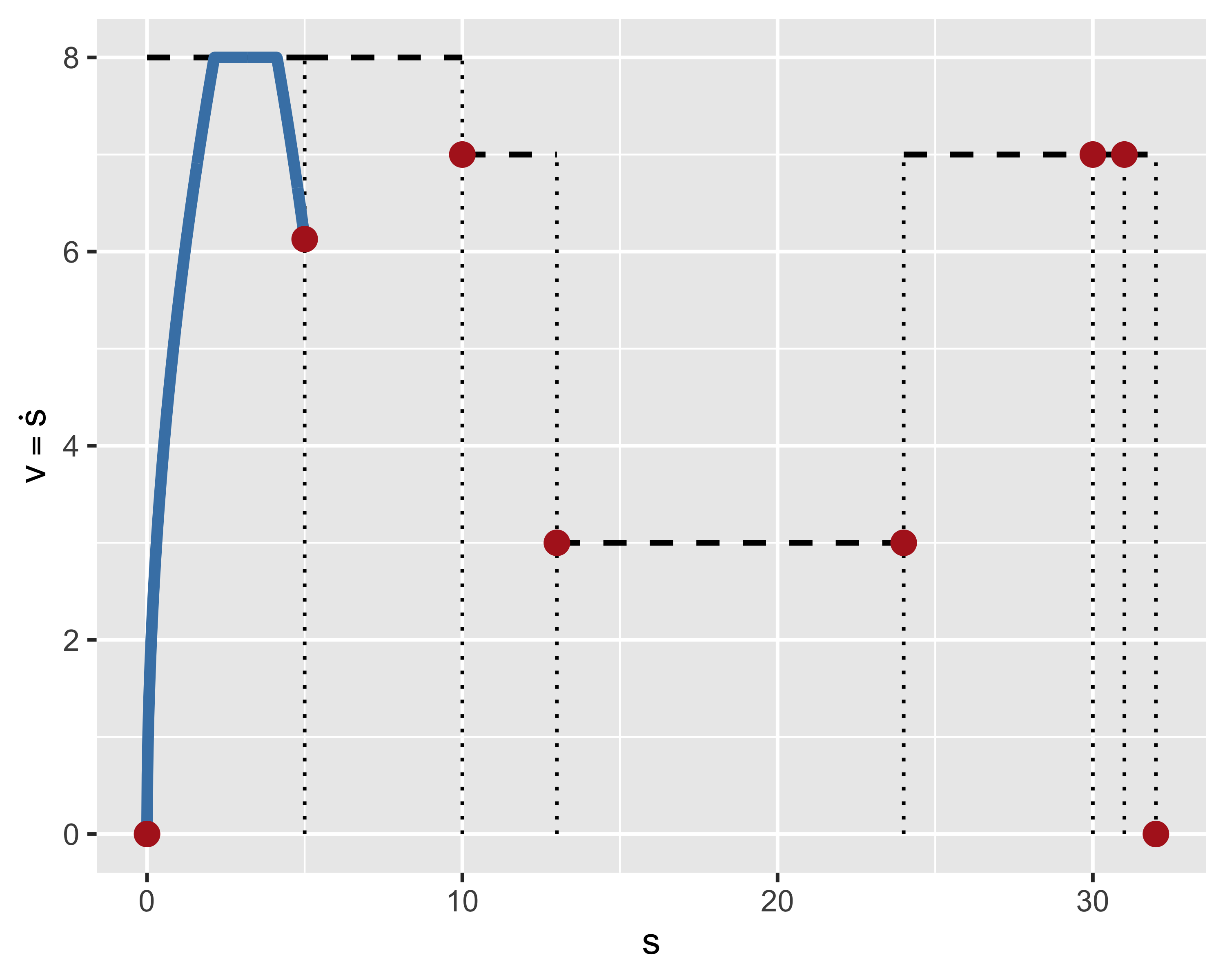
Step 1: calculate velocities:

  • \(v_{i,i} = v_{f,i-1}\), or 0 for first sg.
  • \(v_{m,i} = f_i\) for G01
  • \(v_m = \min(f_i, \sqrt{aR})\) for G02/G03
  • \(v_{f,i} = \dfrac{v_{m,i} + v_{m,i+1}}{2}\cos\alpha_i\)
  • \(v_{f,i} = 0\) for last segment or if \(v_{m,i} = 0\)
Forward step: accelerations

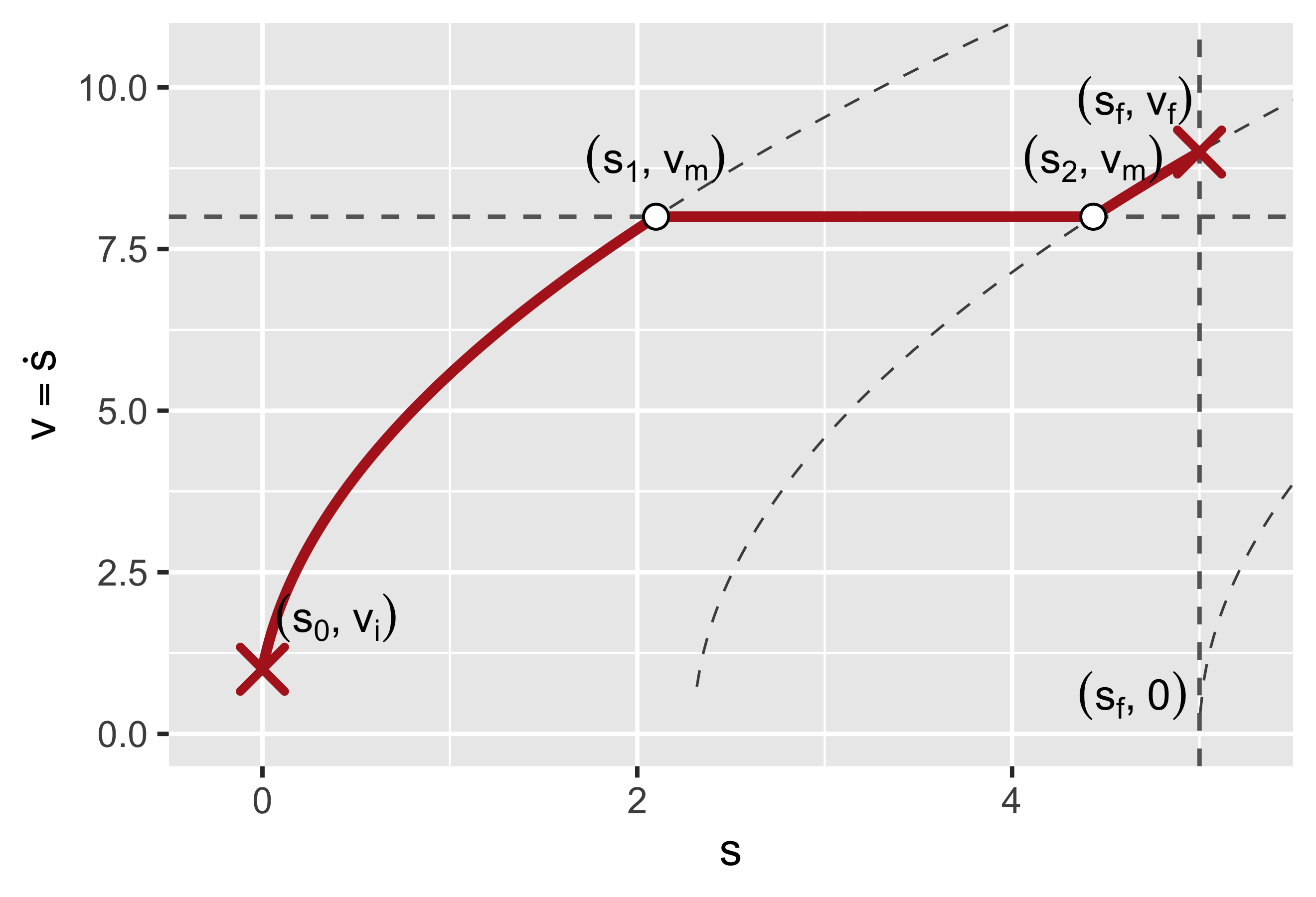
Long segments, \(v_i < v_m\):

A. \(v_f > v_m\), \(s_0 < s_1 < s_2 < s_f\)

B. \(v_f < v_m\), \(s_0 < s_1 < s_f < s_2\)
Forward step: accelerations

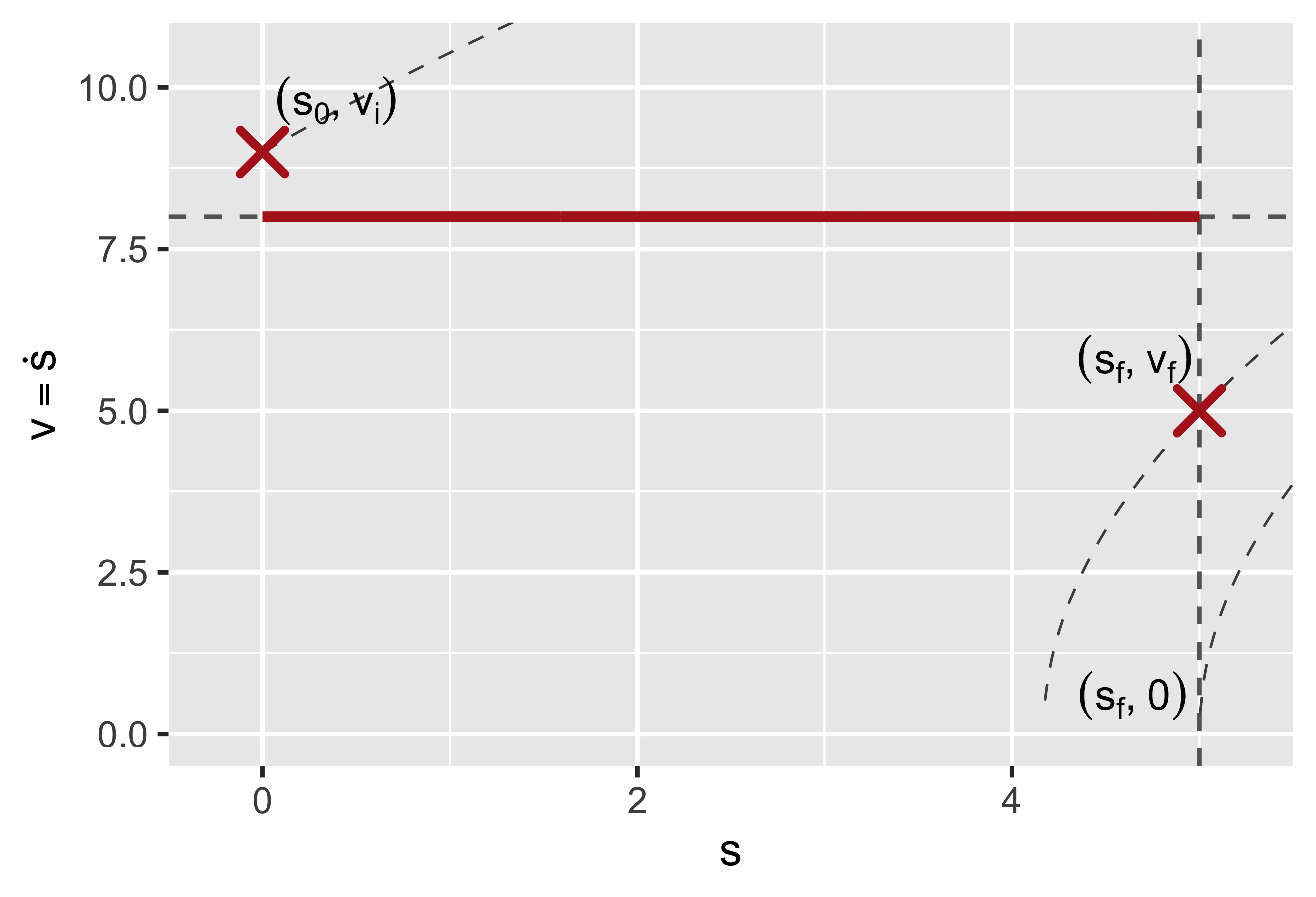
Long segments, \(v_i > v_m\):

A. \(v_f > v_m\), \(s_1 < s_0 < s_2 < s_f\)

B. \(v_f < v_m\), \(s_1 < s_0 < s_f < s_2\)
Forward step: accelerations

Short segments:

  • \(s_0 < s_f < s_1\)
  • \(v_f\) and \(s_2\) are not relevant

Forward step: accelerations

Short segments:

  • If \(v_i\) is large enough, fallback to long segment cases
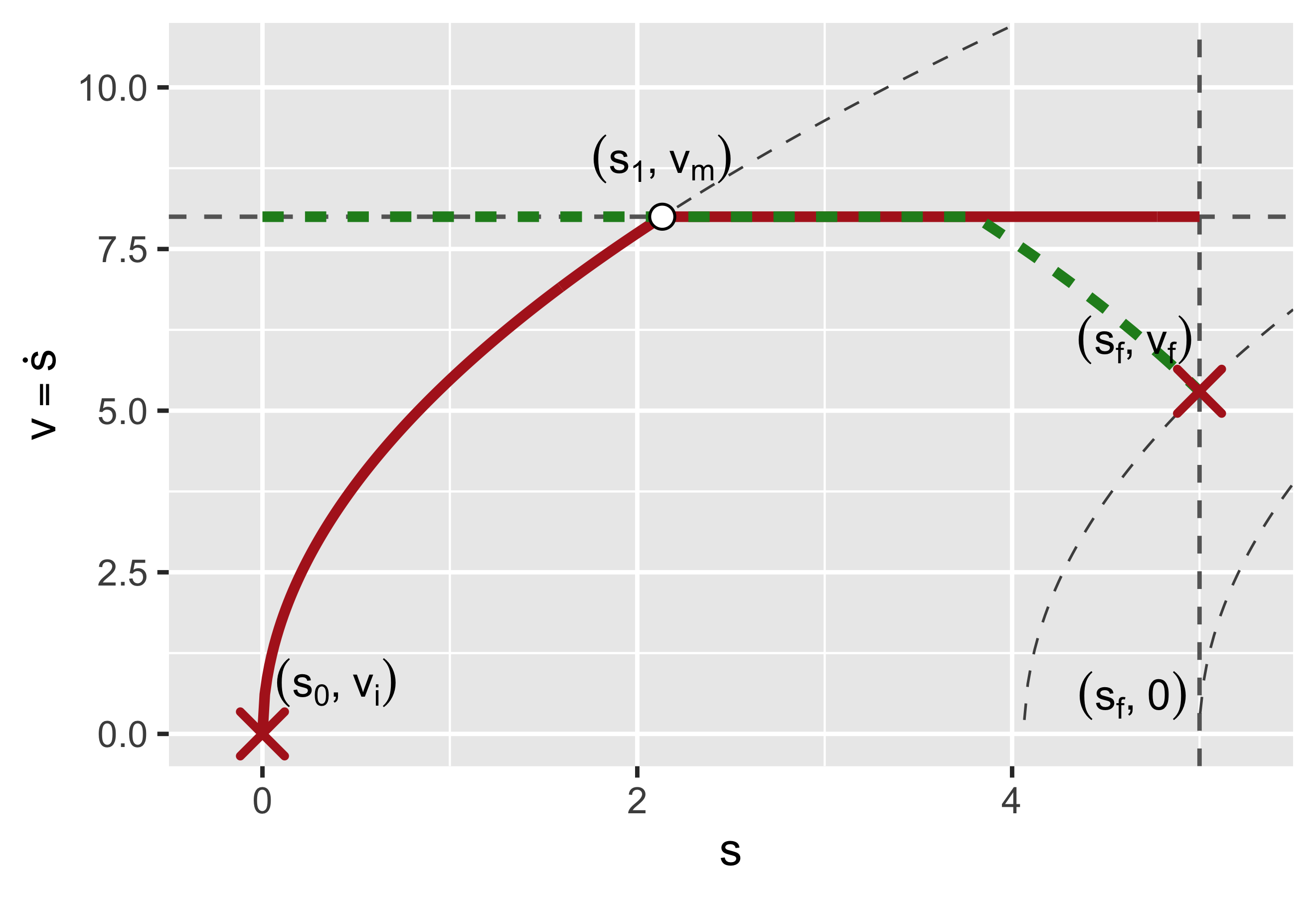
Backward step: decelerations

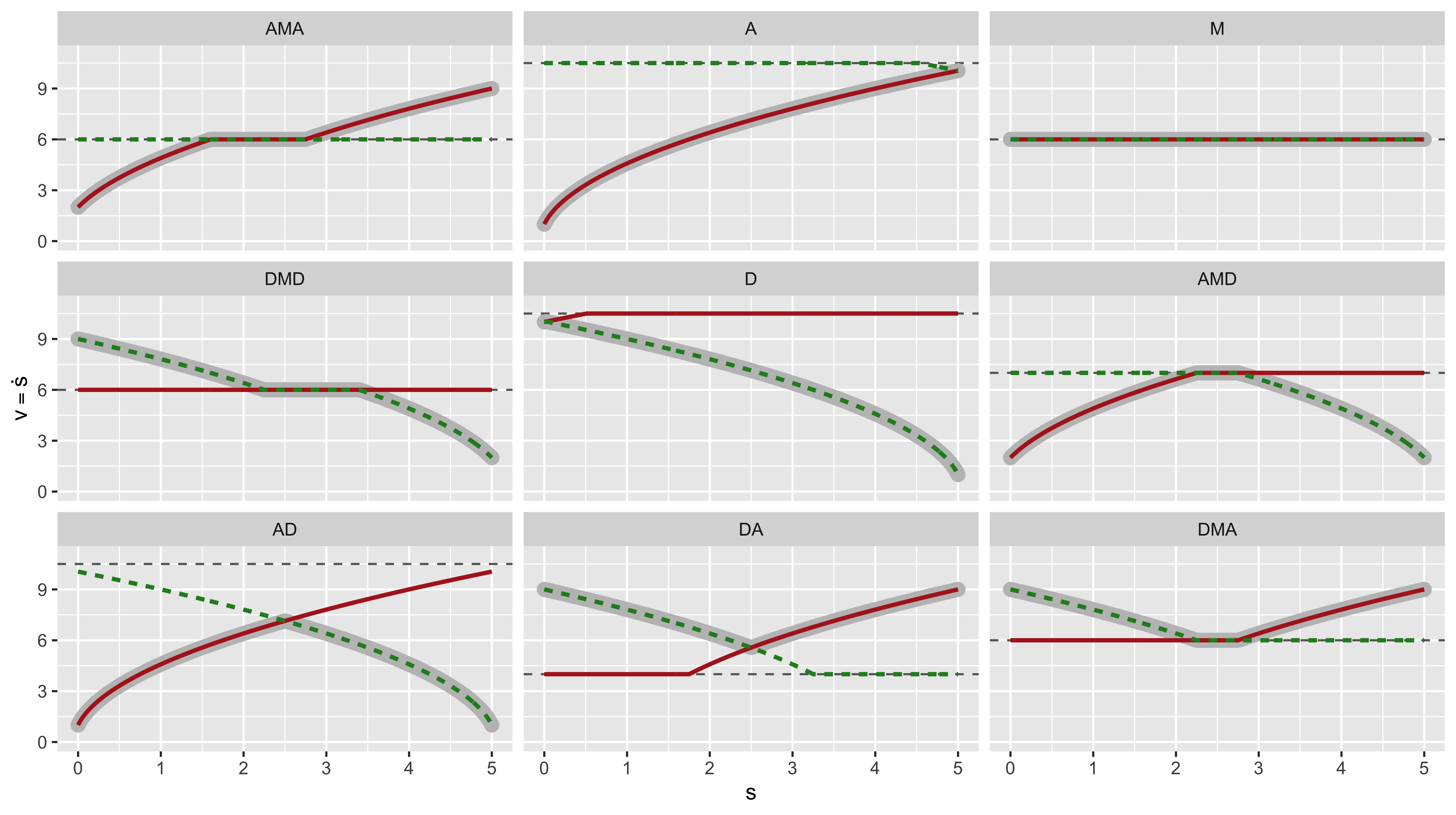
  • Same approach as forward step
  • For each block, select the path going from \((s_0, v_i)\) to \((s_f, v_f)\)
9 Possible cases
Change of variable

Back to time abscissa

Convert back from curvilinear abscissa to time, one block at a time:

  • Calculate \(v(t) = v_0 + at\), \(s(t) = s_0 + v_0 t + at^2/2\) in the ranges \([s_i, s_1]\), \([s_1, s_2]\), \([s_2, s_f]\)
  • Calculate timings \(t_1\), \(t_2\), \(t_f\)

Reshape for discrete time

  • Calculate \(t_f^* = \lceil t_f / t_q + 1 \rceil t_q\)
  • Calculate \(k = t_f^* / t_f\)
  • Rescale feedrate so that \(v^*(t) = \dfrac{v(t)}{k}\)

Receding horizon

  • This algorithm requires a sequence of blocks starting and ending at zero feedrate
  • You can assume that G00 blocks mark full stops at corners
  • Nonetheless, a program can consist in thousands of sequential G01/G02/G03 blocks: memory problem
  • Solution:
    • At run time, pre-elaborate a buffer made of a limited number of blocks (say 100) assuming the last one stops (look-ahead buffer)
    • Re-calculate the moving buffer as soon as a block is done by adding a new block at the end (FIFO): start backward (dec) until no change, then forward (acc)
    • The buffer size depends on available memory and on computation time (must be shorter than the time needed to execute the buffer); calculations are done in parallel in a separate thread

Errors in machine tools

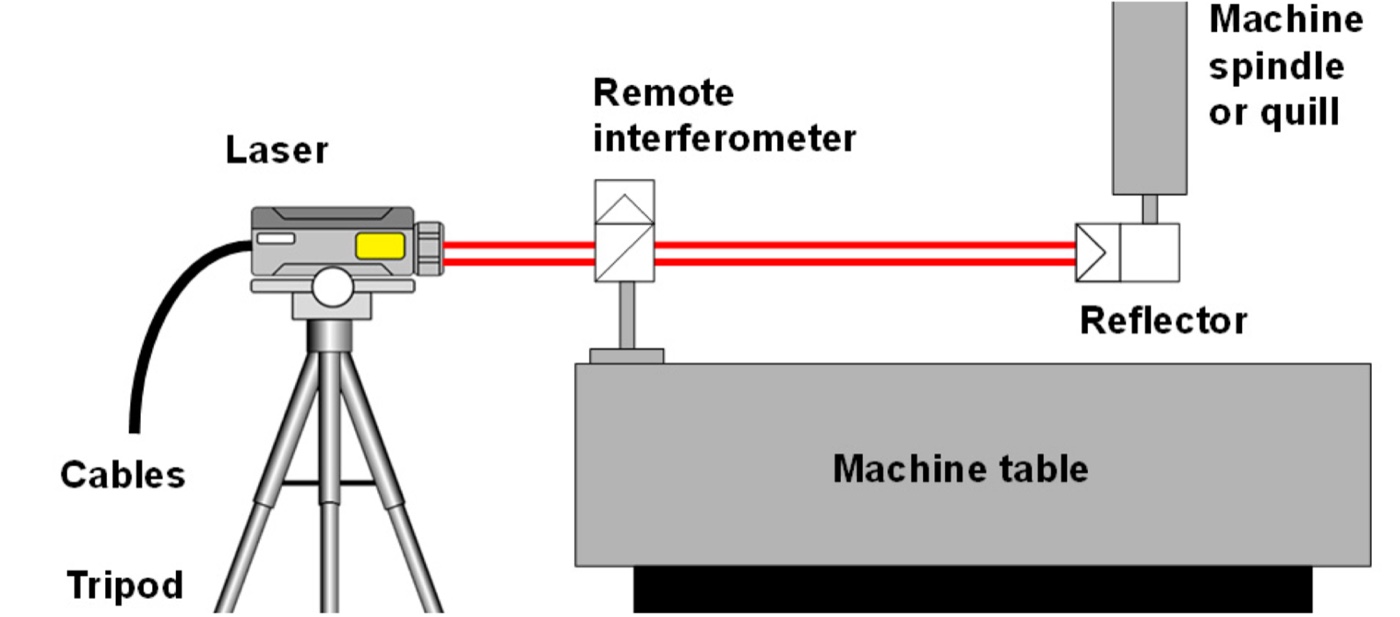
Machine tools are precision systems — laser interferometry
Machining error sources

  • Process error sources: tool/workpiece interaction (minimized by proper process conditions)
  • Structural error sources: time-dependent, eventually become stable and can be compensated
  • Machine error sources: more difficult to compensate, potentially ever changing

errsrc box lab ≈ 70% of total errors geo Geometrical errors th Thermal errors kin Kinematic errors tot Total volumetric error wear Tool wear cut Cutting forces fix Fixtures mat Material instability ctl Control interpolation creep Creep at joints tot--geo tot--th tot--kin tot--wear tot--cut tot--fix tot--mat tot--ctl tot--creep

Error Compensation (A5)

Compensating for error means to measure errors and to apply corrections to the machine tool commands. This is a closed-loop control approach

  • Adaptive control systems (A/C) = evaluation attribute (A5)
  • Factors under evaluation:
    • forces/deflections
    • machining errors
    • thermoelastic dilatations/deformations

Profiling errors

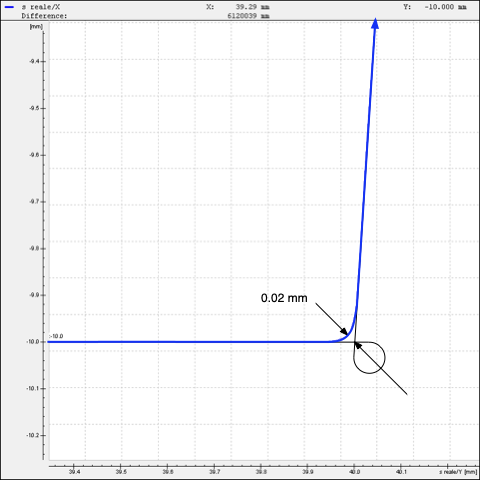
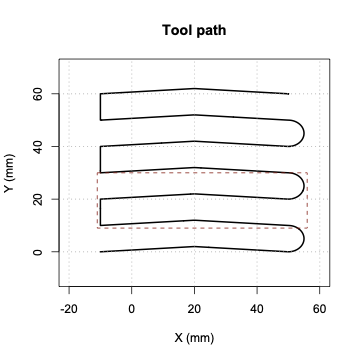
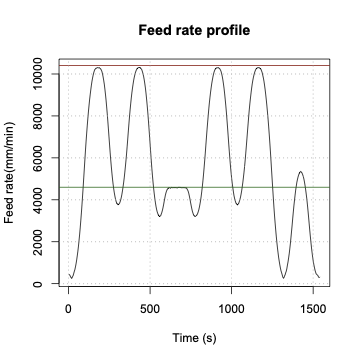
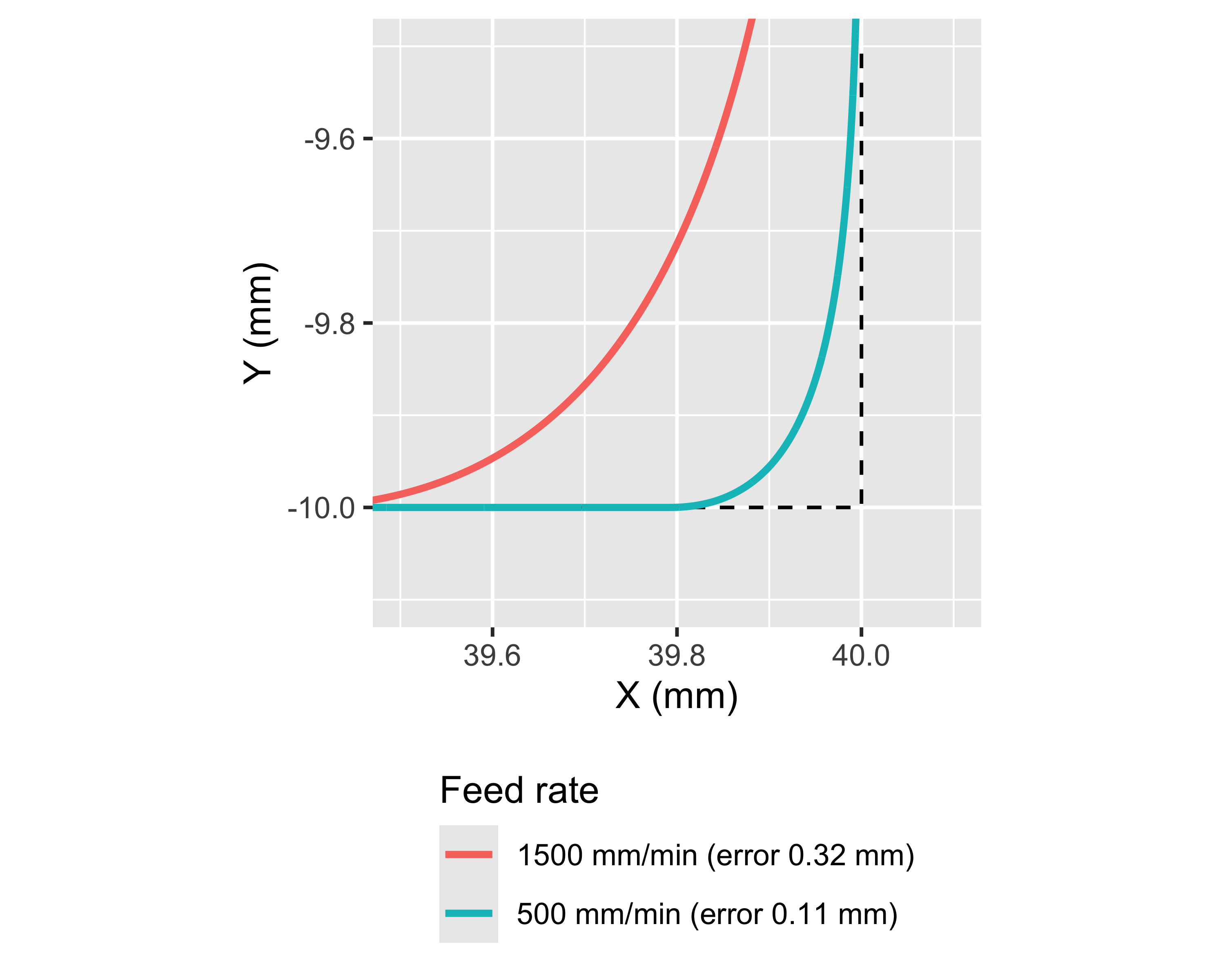
Look-ahead can alter trajectory, especially at corners:

  • More evident at high speed
  • When a sharp corner is needed, use curls or disable look-ahead
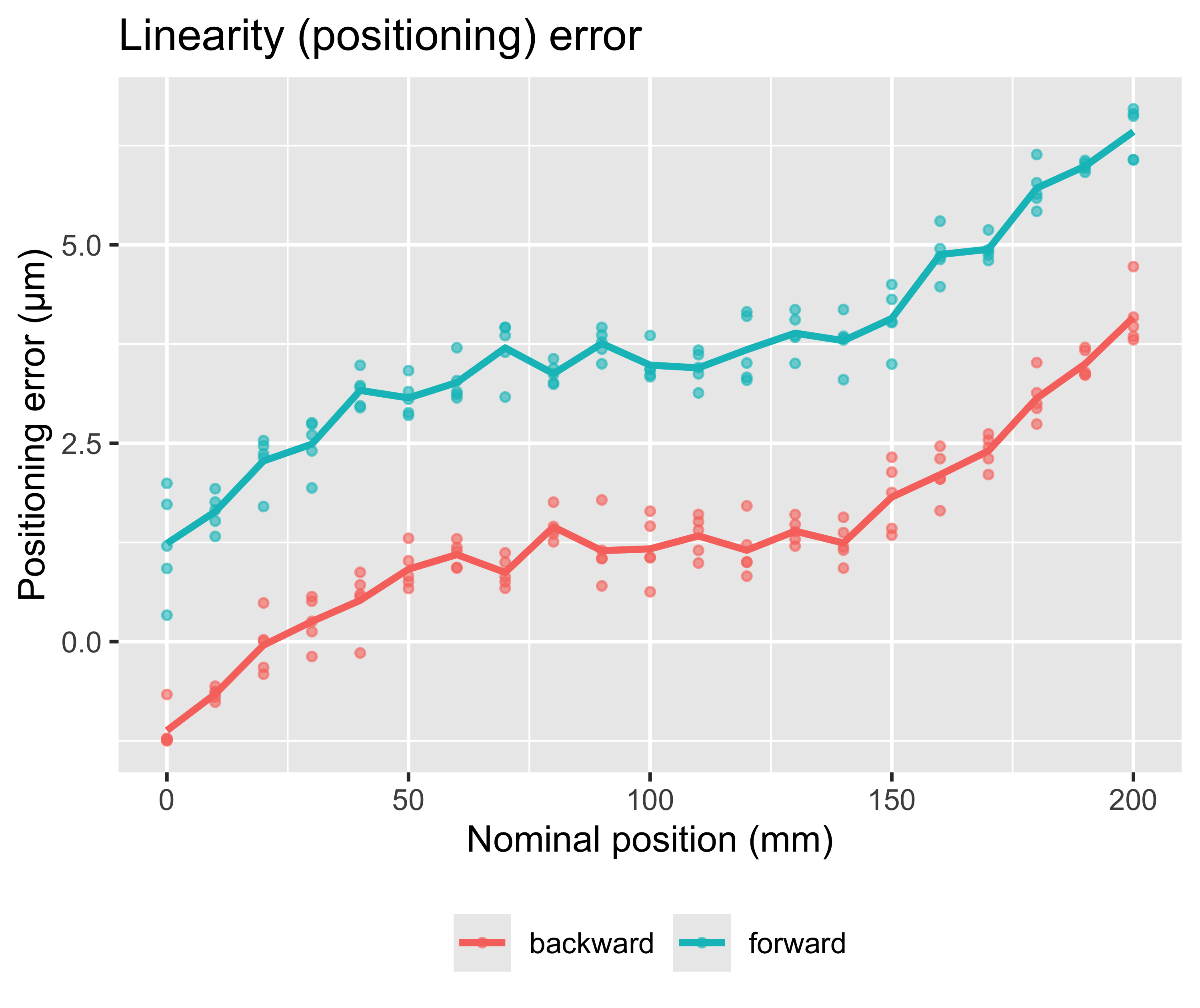
Positioning errors

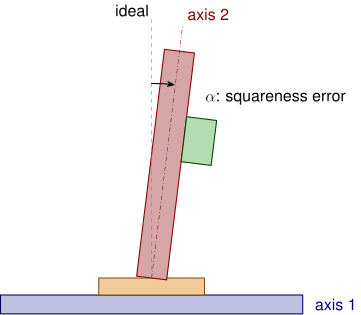
Squareness errors
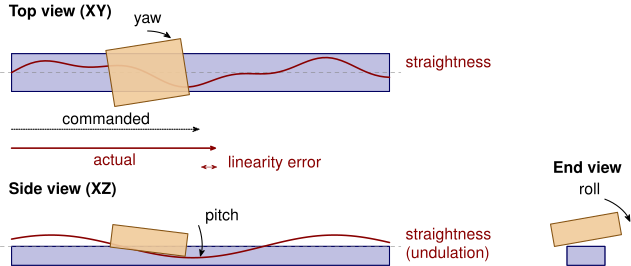
Elementary errors

  • Three linear errors per axis (linearity, straightness, undulation)
  • Three angular errors per axis (roll, pitch, yaw)
  • Two squareness errors between axes 1 and 2
  • Two squareness errors between axes 3 and 2
  • Total of 18 + 4 = 22 elementary errors, 18 of which are position-dependent

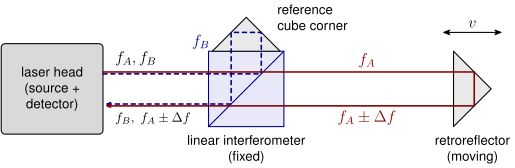
Laser interferometer

Laser interferometer
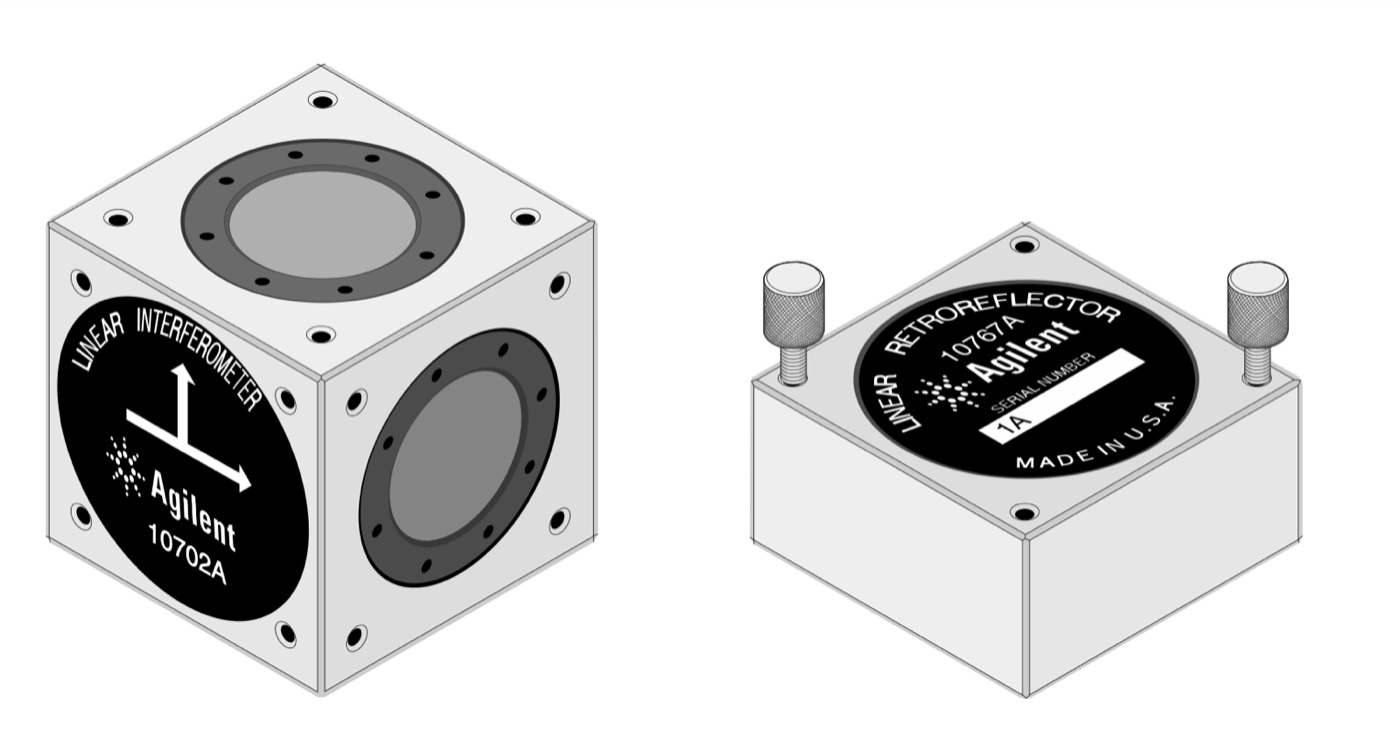
Agilent beam splitter and retro-reflector

Linearity measurement

  • This is the simplest measurement
  • The laser beam is reflected by a mirror mounted on the axis and the interferometer measures the distance travelled by the axis
  • It is a way to calibrate and to verify the positioning accuracy of the axis encoder
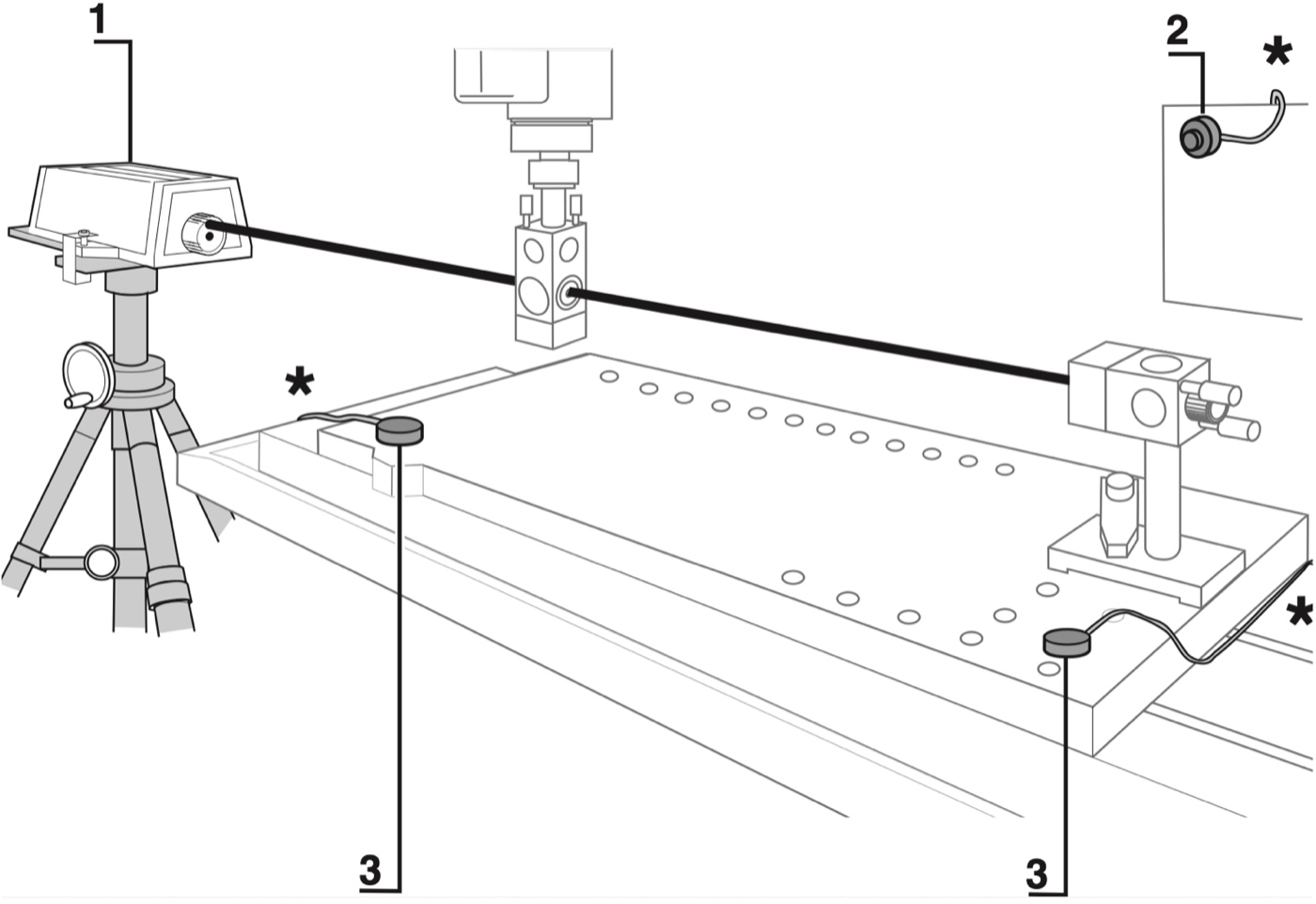
Linearity measurement

Angle measurement

  • An angle interferometer only changes the optical paths difference upon rotation
  • Rotation can happen either on the splitter or in the retro-reflector
  • The action plane can be selected to measure the pitch or the yaw angles
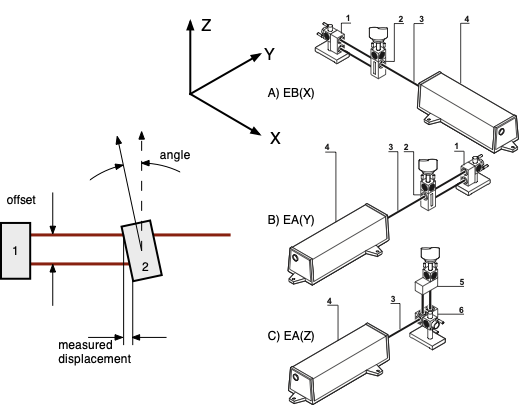
Angle measurement

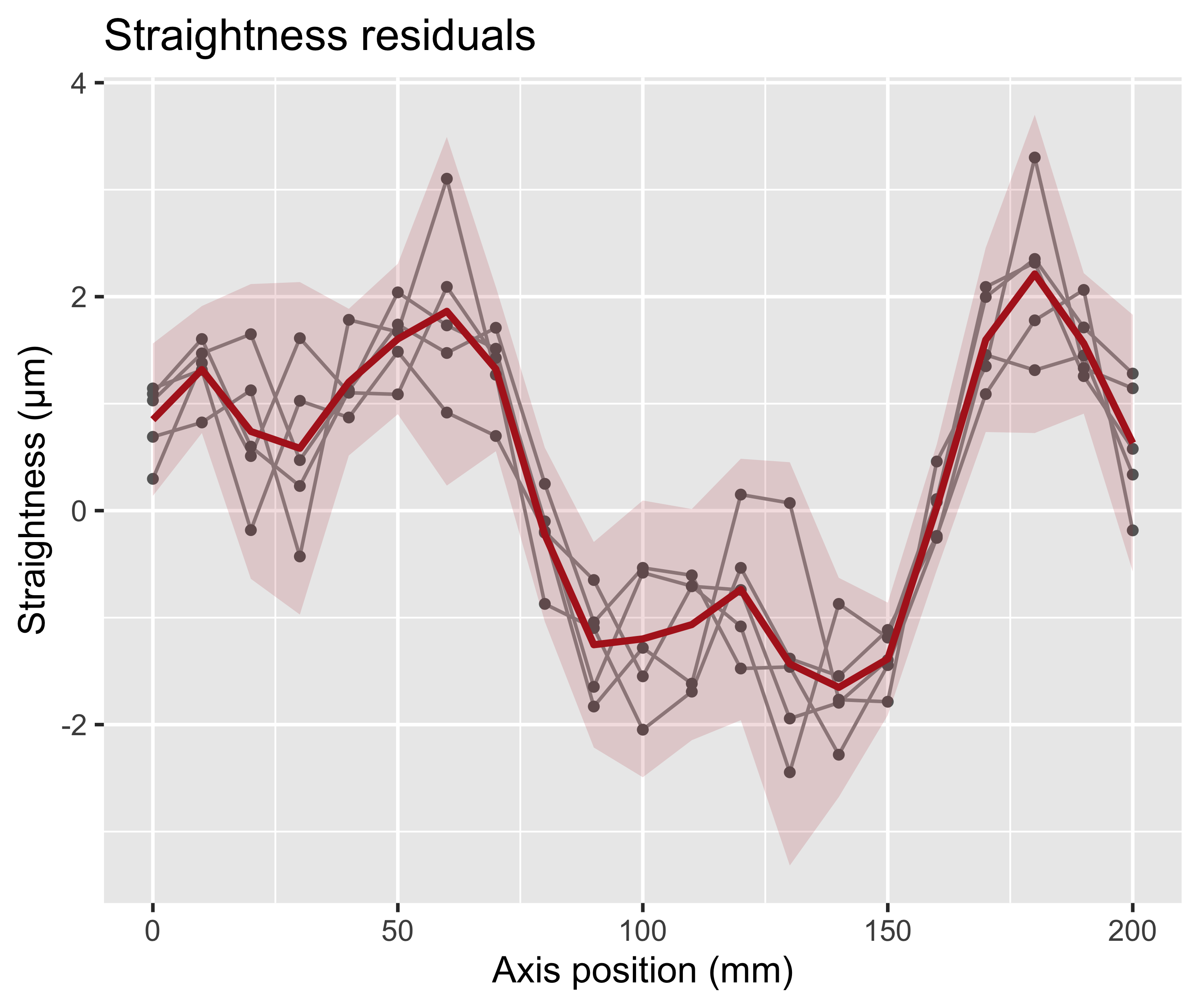
Straightness measurement

A Wollaston prism is a beam-splitting prism that splits a beam of light into two beams with orthogonal polarizations. The two beams are diverging at a small angle (typically 15–30 arcmin). The prism is used to measure the straightness of an axis by measuring the lateral displacement of the reflected beam.
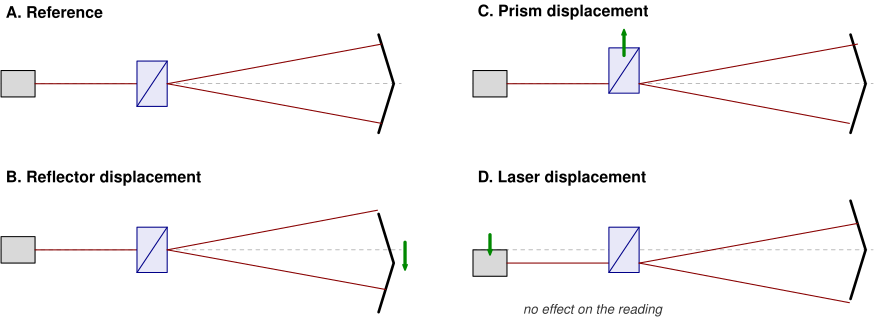
Straightness measurement

  • By aligning the Wollaston prism action plane with XY and with XZ planes it is possible to measure the straightness of the X axis in Y and Z directions
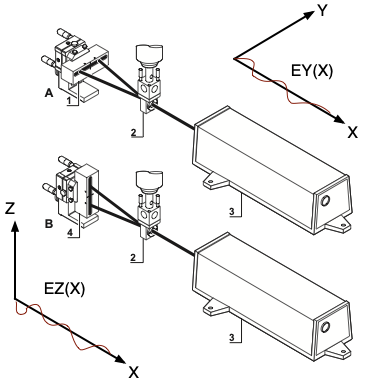
Wollaston prism

Squareness measurement

  • By combining lateral displacement measurement with an optical square it is possible to measure the squareness between two axes.
  • The optical square is a reflecting prism that reflects the laser beam at 90° its incoming direction
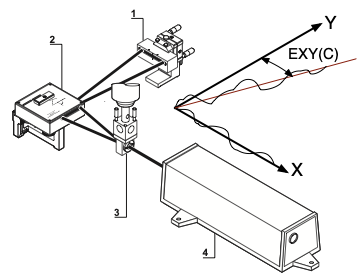
Wollaston prism and optical square

Calibration

Laser interferometer: three-axis machine tool installation

High precision machine tools are equipped with a laser interferometer to measure the actual position of the axes.

  • one laser head (emitter only)
  • one receiver per axis
  • beam splitters direct 1/3 of the total source power to each axis

Note

Laser beam can be affected by refraction index changes and by air turbulence, so the machine is usually equipped with a temperature and pressure sensor to correct the measured distance and the laser is usually enclosed in a protective tube to avoid air turbulence.
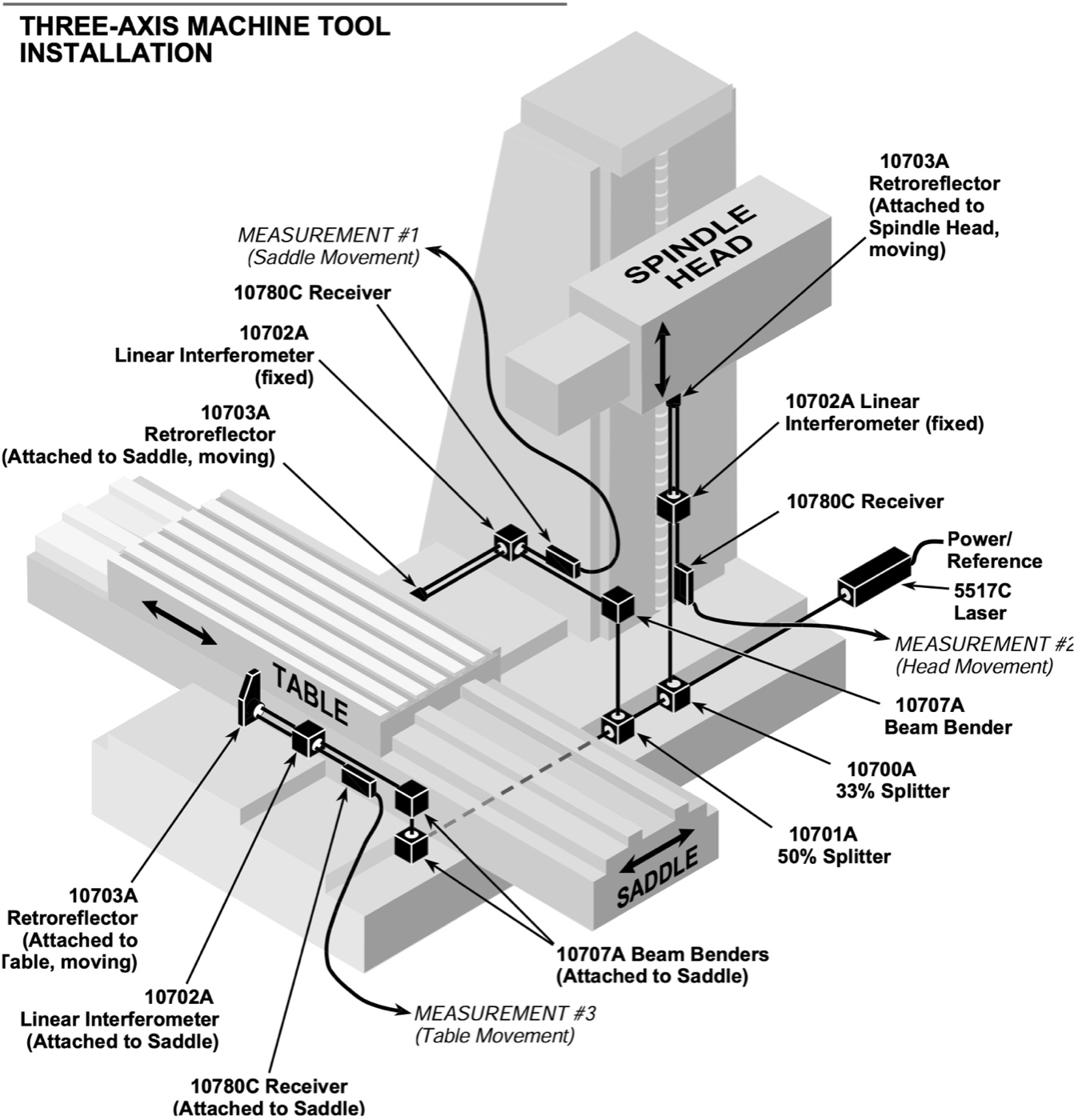
Using LIF as measurement tool